
The best address shipping labels for small online sellers in the Philippines depend on your daily order volume, the type of printer you own, and the packaging materials you use. For high-volume shops, direct thermal labels are the most efficient choice, while low-volume or home-based businesses often find printable laser or inkjet sheet labels more practical.
A shipping label is the critical link between your inventory and your customer’s doorstep. If a label peels off, smudges, or tears during transit, the package can easily become lost in a courier’s sorting facility, leading to delayed deliveries and lost revenue.
Choosing the right label involves balancing cost, durability, and compatibility. Small business owners must evaluate their current printing setup, the types of packaging they use (such as corrugated boxes or plastic poly mailers), and the specific requirements of local delivery services. By understanding these factors, you can streamline your packing process, reduce waste, and ensure that every package arrives safely.
Products mentioned in this guide
Prices are valid at publication and may change. Please refer to the product page for the latest price.
Key Factors When Choosing Address Shipping Labels
Selecting the right shipping label requires a clear understanding of your operational needs and the physical demands of the shipping process.
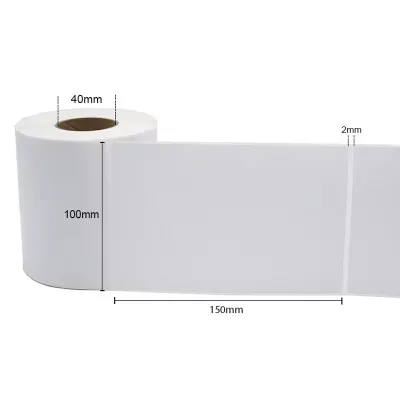
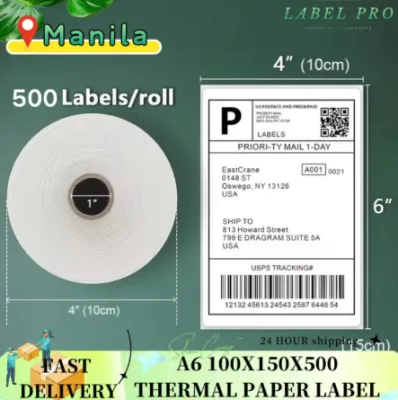
First, consider label dimensions and formats. The standard size for e-commerce waybills in the Philippines is 4×6 inches (approximately 100x150mm). This size provides ample space for barcodes, QR codes, sender and recipient addresses, and routing information. For smaller packages, such as jewelry boxes or cosmetic pouches, you may need smaller formats like 3×2 inches or custom-cut labels. It is essential to verify that your printer can handle the specific dimensions you choose.
Printer compatibility is another critical factor. Direct thermal printers require heat-sensitive paper rolls or fanfold stacks, which do not use ink or toner. Standard office printers, such as laser or inkjet models, require sheet labels (usually in A4 or Letter size) that feed through a standard paper tray. Attempting to use the wrong label type in your printer can lead to poor print quality, smudging, or even physical damage to the printer’s internal components.
Adhesive strength is vital for ensuring your labels stay attached. Corrugated cardboard boxes have a porous, textured surface that requires a strong, permanent adhesive to prevent lifting. Plastic poly mailers and bubble wraps have smooth, non-porous surfaces that can sometimes resist certain adhesives, especially if the plastic has a high-slip additive or textured finish. When sourcing labels, look for those specified with permanent acrylic adhesives, which are designed to bond securely to both paper and plastic substrates.
Finally, durability considerations are paramount. During transit, packages are subjected to friction, moisture, and temperature fluctuations. Rather than assuming all labels are equally durable, check the manufacturer’s specifications for smudge resistance, water resistance, and tear strength. Paper-based labels are highly susceptible to water damage, while synthetic materials like polypropylene or coated thermal papers offer significantly higher resistance to moisture and abrasion.
Types of Address Shipping Labels for Different Business Needs
To optimize your packaging workflow, you must select a label format that aligns with your daily order volume and operational scale. Small e-commerce businesses typically transition through different stages of growth, starting with basic home office equipment and eventually upgrading to dedicated shipping hardware.

By matching your label type to your current printing infrastructure, you can avoid unnecessary upfront investments while maintaining a professional presentation. It is always wise to request sample sheets or rolls from suppliers to verify their compatibility and performance before purchasing in bulk.
Direct Thermal Labels for High-Volume Sellers
Direct thermal labels are the industry standard for high-volume e-commerce sellers. These labels are coated with a chemical layer that turns black when exposed to the heat of a thermal print head. Because they do not require ink, toner, or ribbons, they offer a highly cost-effective solution for businesses processing dozens or hundreds of orders daily.
The absence of ink cartridges simplifies the printing process and eliminates the risk of ink running out mid-batch. Thermal printers are also designed for speed, allowing you to print waybills in a fraction of the time it takes a standard inkjet printer to process a single sheet.
However, direct thermal labels require careful selection. You must verify the manufacturer’s specifications regarding heat sensitivity and fade resistance. Because the paper is heat-sensitive, exposure to direct sunlight, high temperatures (such as the interior of a delivery vehicle), or certain adhesives and plastics can cause the print to fade or the entire label to turn black over time. Ensure the labels you purchase are compatible with your specific printer model, paying close attention to whether your printer accepts roll labels (which sit inside the printer) or fanfold labels (which feed from a stack behind the printer).
Laser and Inkjet Sheet Labels for Low-Volume Sellers
For home-based businesses, startups, and low-volume sellers, investing in a dedicated thermal printer may not be immediately justifiable. In these cases, utilizing an existing laser or inkjet office printer with sheet labels is a highly practical and accessible alternative. These labels are typically sold in A4 or Letter-sized sheets, with pre-cut shapes that allow you to print multiple address tags or waybills at once.
When using sheet labels, printer settings and paper handling are critical. Label sheets are significantly thicker than standard copy paper due to the adhesive layer and the backing paper. To prevent paper jams and ensure smooth feeding, always check your printer’s manual for the maximum supported paper weight and adjust your printer settings to “Labels” or “Heavy Paper” mode. This adjustment slows down the feeding process and, in laser printers, increases the fuser temperature to ensure the toner bonds permanently to the label surface.
Additionally, you must test for ink or toner smudge resistance on the specific label material. Inkjet printers use liquid ink, which can easily bleed or smudge if the printed label comes into contact with rain or sweat during delivery. If you use an inkjet printer, look for label sheets specifically rated for inkjet use, which often feature a special absorbent coating to lock in the ink. For laser printers, ensure the toner does not flake off when the label is bent or rubbed, which can happen if the printer’s fuser does not reach the correct temperature for thick label sheets.
Pre-Printed and Custom Branded Labels
For small sellers looking to elevate their brand presentation and save time on repetitive tasks, pre-printed and custom branded labels are an excellent option. These labels can be customized by a local printing supplier to include your business logo, brand colors, social media handles, or standard handling instructions like “Fragile” or “Keep Dry.”
Using custom labels helps create a cohesive unboxing experience, which can increase customer satisfaction and encourage repeat purchases. You can use these as return address labels, decorative seals for tissue paper, or warning stickers on the outside of your shipping boxes.
When planning custom labels, it is crucial to verify the alignment and blank space availability if you intend to print variable data (such as customer names or tracking numbers) over the pre-printed design. Always request a digital proof or a physical sample from your supplier to test in your printer before committing to a large order. Additionally, be sure to check the supplier’s minimum order quantities (MOQs) and production lead times, as custom printing typically requires several days or weeks of processing time, which must be factored into your inventory planning.
Matching Label Sizes to Local Courier Requirements
In the Philippines, e-commerce logistics rely heavily on standardized waybills to ensure efficient sorting and delivery. Major local couriers and integrated logistics providers on online marketplaces standardly use a 4×6 inch (100x150mm) waybill format. This size is optimized to display all necessary routing information, including the recipient’s address, contact details, cash-on-delivery (COD) status, and high-density barcodes or QR codes.
Using a non-standard size for your primary waybill can lead to significant operational issues. If a waybill is printed too small, the courier’s handheld scanners may struggle to read the barcode, leading to manual entry errors or package rejection at the point of collection. Conversely, if the label is too large for the package, it may wrap around the edges of the box or mailer, distorting the barcode and making it unscannable.
For supplementary labeling, such as internal inventory tracking, item identification, or return address tags, smaller formats like 3×2 inches or 2×2 inches are highly effective. These smaller labels do not interfere with the primary shipping waybill but provide essential information for your packaging team or the customer. Always check the latest seller guidelines and portal requirements on your shipping platform before purchasing bulk labels, as couriers occasionally update their waybill layouts and scanning specifications.
Practical Tips for Testing and Applying Shipping Labels
To ensure your shipping labels remain secure and legible throughout the delivery journey, proper application and testing techniques are essential. Even the highest-quality label can fail if it is applied incorrectly or stored in poor conditions.
Before packing a large batch of orders, conduct a simple peel-and-stick test on your actual packaging materials. Apply a sample label to a corrugated box, a poly mailer, and any bubble wrap you plan to use. Press the label down firmly, paying close attention to the edges and corners. Let the package sit for 24 hours under normal room conditions, then inspect it for any signs of edge lifting, bubbling, or peeling. If the label peels off easily, you may need to switch to a stronger adhesive or clean the packaging surface more thoroughly.
Surface preparation is key to achieving a strong adhesive bond. Ensure that the application surface is clean, dry, and free from dust, dirt, oils, or moisture. Cardboard boxes stored in dusty warehouses can accumulate a fine layer of dust that prevents the adhesive from making direct contact with the paper fibers. Wipe the surface with a dry cloth before applying the label, and press down firmly across the entire surface of the label to activate the pressure-sensitive adhesive.
Proper storage of unused labels is also critical to preserving their quality. Store your label rolls or sheets in a cool, dry place away from direct sunlight, high humidity, and heat sources. This is especially important for direct thermal labels, which can darken or lose their sensitivity if exposed to temperatures above normal room levels. Keep labels in their original packaging or a sealed plastic bag to protect them from dust and moisture. If you experience persistent printing issues, such as paper jams, feeding errors, or poor print quality, stop using the labels and consult the manufacturer’s documentation or your printer’s support channels to prevent damage to your equipment.
Frequently Asked Questions (FAQ)
Can I use regular paper and tape instead of dedicated shipping labels?
While using regular copy paper and clear packing tape is a common workaround for absolute beginners, it is not recommended for ongoing business operations. Paper labels taped over can easily tear if they get wet or snagged during transit. Furthermore, clear packing tape can create a highly reflective glare over the printed barcode, making it difficult or impossible for courier scanners to read the code. This can lead to sorting delays or manual entry errors. Dedicated adhesive labels provide a professional appearance, eliminate the need for tape, and ensure that barcodes remain easily scannable throughout the delivery process.
How should I store unused thermal shipping labels?
Unused thermal shipping labels should be stored in a cool, dark, and dry environment to prevent premature degradation. Because thermal paper is chemically treated to react to heat, exposure to temperatures above 40°C, direct sunlight, or high humidity can cause the paper to darken or fade, rendering it unusable. Keep the labels in their original box or a sealed plastic bag to shield them from ambient moisture and dust. Always refer to the specific manufacturer’s storage guidelines printed on the packaging to ensure the maximum shelf life and adhesive performance of your labels.
Community discussion
Share your experience or ask a question. Comments are reviewed before publication.