
The Casio AX-120ST is a highly reliable, mid-sized 12-digit desktop calculator that balances everyday arithmetic with dedicated tax functions, making it an excellent fit for standard office, retail, and administrative environments in the Philippines. However, choosing between this model and other Casio desktop alternatives depends on your specific daily volume, desk space constraints, and whether your workflow requires advanced financial keys or heavy-duty tactile feedback. By evaluating your typical calculation tasks, you can easily determine if the AX-120ST is your ideal daily driver or if a larger, heavy-duty model or a more compact alternative would better serve your workspace.
In busy professional settings, a calculator is more than just a basic tool; it is an extension of your daily workflow. A mismatched device can lead to input errors, hand fatigue, or operational delays during critical billing cycles. The AX-120ST addresses these challenges by offering a balanced feature set that caters to general business needs, but it exists within a diverse ecosystem of Casio models designed for highly specific tasks.
Understanding the nuances of these models ensures that you do not overpay for advanced features you will never use, nor struggle with a basic model that lacks the efficiency tools your job demands. This comprehensive comparison explores the physical, functional, and operational differences between the AX-120ST and its siblings, providing you with a clear path to the right purchasing decision.
Products mentioned in this guide
![[COD]CASlO AX120ST TILT DISPLAY DESKTOP CALCULATOR 12 DIGITS](https://img.lazcdn.com/g/p/906b0aae09c23b0ab567c292ef2aaa55.png_400x400q80.png_.webp)
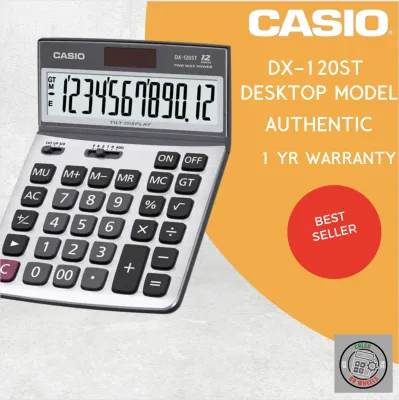
Prices are valid at publication and may change. Please refer to the product page for the latest price.
Core Profile of the Casio AX-120ST
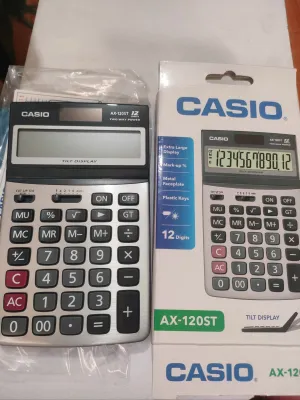
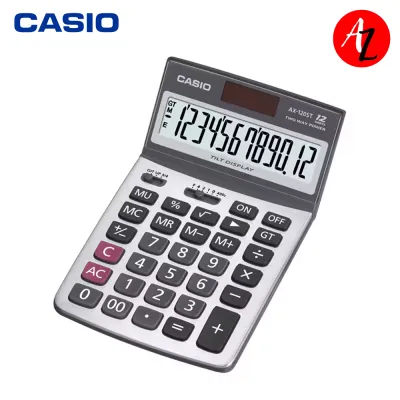
To understand how the Casio AX-120ST compares to other models, it is essential to first establish its baseline specifications and intended use cases. This model is built as a standard 12-digit desktop calculator, which means its display can handle numbers up to hundreds of billions. This capacity is highly suitable for standard business transactions, payroll processing, and local tax computations without the risk of display overflow.
The physical form factor of the AX-120ST is optimized for stationary desk use. It features a sturdy, wide body that helps prevent the unit from sliding or tipping over when keys are pressed rapidly. The display is set at a fixed, upward angle, which enhances readability when you are seated at a standard office desk, reducing neck strain and glare from overhead lighting.
One of the defining characteristics of the ST-series, including the AX-120ST, is the inclusion of dedicated tax calculation keys. These keys, typically labeled TAX+ and TAX-, allow users to store a specific local tax rate, such as the standard value-added tax (VAT) in the Philippines. Once programmed, adding or subtracting the tax from a subtotal requires only a single keystroke, significantly speeding up invoicing and billing workflows.
Reliability is further supported by a dual power source configuration. The calculator utilizes a solar panel as its primary power source under ambient office lighting, while a small backup button battery takes over in dimmer environments or during late-night shifts. This hybrid system ensures that the screen remains active and clear, preventing sudden shutdowns in the middle of a complex calculation.
The target user profile for the AX-120ST includes general office workers, retail cashiers, administrative assistants, and small business owners. If your daily tasks involve calculating totals, applying discounts, determining markups, and processing standard invoices, this model provides a robust, straightforward toolset without the complexity of specialized financial or scientific programming.
Key Comparison Dimensions for Casio Desktop Calculators
When evaluating the AX-120ST against other Casio desktop lines, breaking down your comparison into specific physical and functional dimensions will help you identify which features are non-negotiable for your daily tasks.

Display and Readability
The display is your primary interface with the calculator, making readability a critical factor. While the AX-120ST offers a standard 12-digit flat display with a fixed angle, other Casio models provide different configurations. For instance, some heavy-duty models feature adjustable tilt screens, allowing you to manually pivot the display to block glare from windows or overhead lights. Additionally, if you manage large-scale corporate accounts or international trade figures, you might need to look at 14-digit models, which accommodate much larger numerical values without scientific notation.
Key Layout and Tactile Feedback
The design of the keyboard directly influences your typing speed and accuracy. The AX-120ST features durable, hard plastic keys with generous spacing to prevent accidental double-presses. However, if your job requires hours of continuous data entry, you may want to compare this with Casio’s heavy-duty line, which often utilizes silent, cushioned keys or double-injection molded keys where the markings never wear off. Conversely, smaller, budget-friendly Casio models might use rubberized keys, which are quieter but offer a softer, less distinct tactile response that can slow down rapid touch-typing.
Specialized Function Keys
Different workflows require different mathematical shortcuts. The AX-120ST excels at basic business math with its tax keys and a markup (MU) key, which simplifies profit margin calculations. If your work involves currency conversion, you should verify if alternative models offer dedicated currency exchange keys. For auditing and bookkeeping, check-and-correct models are highly valuable, as they feature navigation keys that let you scroll back through your input history to locate and correct errors without starting over.
Build and Power Constraints
The physical environment of your office should dictate the build quality you choose. In tropical climates with high humidity, dust and moisture can gradually degrade electronic contacts. The AX-120ST features a robust plastic casing, but heavy-duty models often incorporate metal faceplates for added durability. Power configurations also vary; while dual-power (solar and battery) is standard for the AX-120ST, some ultra-compact or specialized models rely solely on battery power, which requires more frequent maintenance and battery replacements over time.
Decision Framework: Which Model Matches Your Workflow?
To translate these technical specifications into a practical choice, you can use a conditional decision framework based on your specific daily tasks and office environment.
Choose the Casio AX-120ST if your primary responsibilities involve standard retail transactions, daily invoicing, general office administration, or basic bookkeeping. Its 12-digit display, dedicated tax keys, and stable desktop footprint provide the ideal balance of functionality and ease of use for these tasks. It is a reliable workhorse that fits seamlessly into a standard office setup without requiring a steep learning curve or a significant budget allocation.
Consider a larger or heavy-duty Casio model if you are a professional accountant, auditor, or financial analyst who spends several hours a day performing high-volume data entry. In these roles, features like an adjustable tilt display, double-injection keys for long-term durability, and a check-and-correct function are highly beneficial. These advanced models allow you to review up to 150 or 300 steps of your calculations, making it much easier to spot errors in long columns of figures without having to clear the memory and re-key the entire sequence.
Consider a compact or basic Casio model if your desk space is highly restricted, such as a small retail kiosk, a shared hot-desk, or a mobile workstation. If your daily calculations rarely exceed basic addition, subtraction, and simple memory recall, a smaller model with a narrower footprint and fewer specialized keys will keep your workspace organized while still providing the reliable performance Casio is known for.
Verify first if your specific accounting software, regional tax compliance guidelines, or company policy requires specialized programmable keys or specific display formats. For example, if your business operations require complex amortization schedules, depreciation calculations, or multi-currency conversions, a standard desktop calculator like the AX-120ST may not suffice. In such cases, you should verify whether a dedicated financial calculator or a software-based solution is mandatory for your compliance and reporting workflows.
Pre-Purchase Verification Checklist
Before finalizing your purchase of the Casio AX-120ST or any alternative model, completing a practical verification checklist will help you avoid compatibility issues and ensure a smooth integration into your daily routine.
First, measure your available desk space and compare it against the physical dimensions listed in the product specifications. Ensure that the calculator can sit flat on your desk alongside your computer keyboard, mouse, and document holders without forcing you into an awkward, unergonomic posture.
Second, check the product label or the official user manual to confirm the exact power source and the specific battery type required for backup. Knowing whether the unit uses a standard button cell (such as an LR44 or CR2032) allows you to keep spare batteries on hand, ensuring uninterrupted operation even during extended periods of low ambient light.
Third, verify the presence and labeling of specific regional tax keys if they are mandatory for your local compliance and billing workflows. Ensure that the tax programming steps outlined in the manual are straightforward and compatible with the specific tax rates you need to apply to your daily transactions.
Finally, review the warranty terms and confirm the availability of authorized service or replacement options in the Philippines. Purchasing your calculator from an authorized local distributor ensures that you have access to genuine customer support and replacement services should you encounter any manufacturing defects or operational issues.
Frequently Asked Questions (FAQ)
Can I use the Casio AX-120ST for scientific or engineering calculations?
No, the Casio AX-120ST is not designed for scientific or engineering applications. Desktop models like the AX-120ST are built specifically for arithmetic, financial, and tax calculations, and they lack the advanced functions required for higher mathematics. They do not feature trigonometric, logarithmic, exponential, or statistical keys. If your academic or professional work involves engineering, physics, or advanced algebra, you should explore Casio’s dedicated scientific or graphing calculator lines, which are engineered to handle complex formulas and multi-variable equations.
How do I safely clean and maintain the keys on a Casio desktop calculator?
To safely clean and maintain your Casio desktop calculator, start by wiping the keys and display with a soft, dry, lint-free microfiber cloth to remove dust and fingerprints. For stubborn dirt or grime, you can slightly damp the cloth with water, ensuring it is not wet enough to drip. Never use harsh chemical solvents, abrasive cleaning pads, or excessive moisture, as these can dissolve the printed key legends, scratch the display screen, or seep into the casing and permanently damage the internal electronic circuits.
Community discussion
Share your experience or ask a question. Comments are reviewed before publication.