
Choosing the right desktop calculator for your workspace depends on balancing your daily calculation volume, desk space, and specific functional needs. The Casio AX-120ST serves as a highly reliable, standard 12-digit desktop calculator designed for general office tasks, retail transactions, and basic administrative workflows. If your daily routine involves straightforward arithmetic, simple percentages, and basic memory calculations, this model offers a balanced, user-friendly layout that fits neatly on any desk. However, if your work demands specialized accounting functions like dedicated tax calculations, cost-sell-margin analysis, or heavy-duty, high-speed data entry with oversized keys, other specialized Casio models might serve your workflow more effectively.
In busy Philippine offices, retail shops, and home workspaces, a calculator is more than just a tool; it is a daily companion that must withstand high humidity, dust, and constant use. Finding the ideal match requires looking closely at key layout, display readability, and specialized functions. By comparing the Casio AX-120ST with other desktop categories in the Casio lineup, you can make an informed decision that enhances your daily productivity and ensures comfortable, error-free calculations.
Core Differences Between the Casio AX-120ST and Other Desktop Models
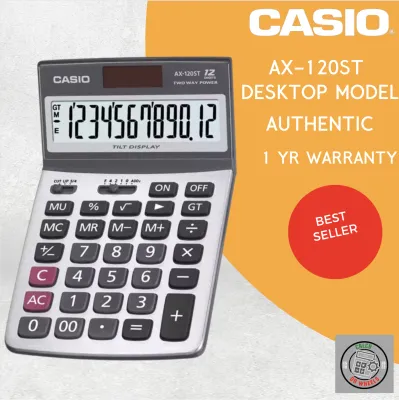
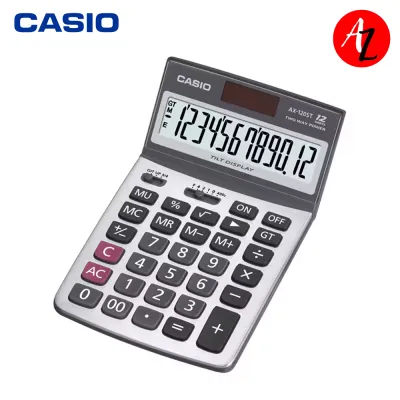
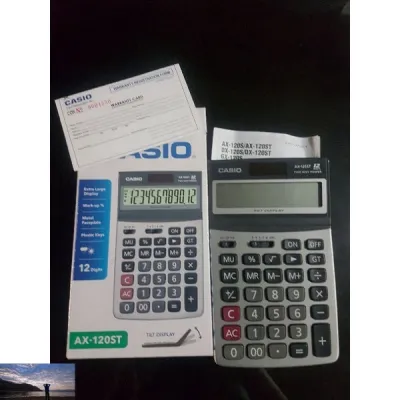
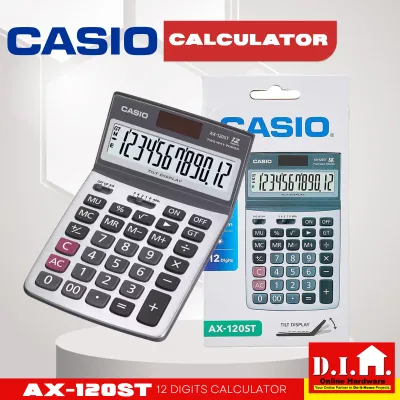
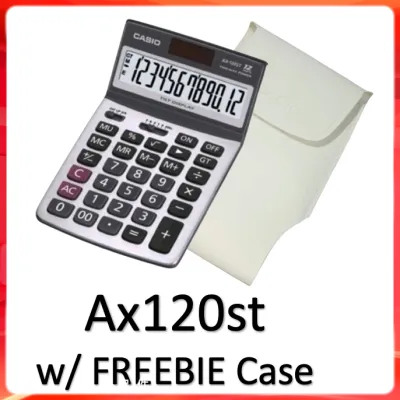
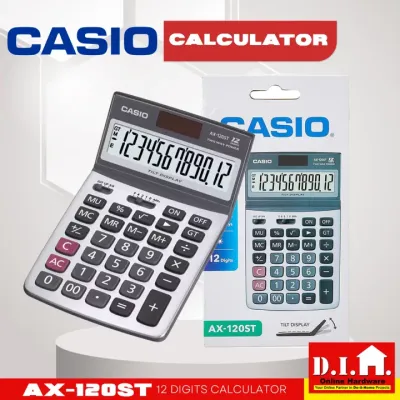
The Casio AX-120ST is positioned as a versatile, mid-sized desktop calculator that bridges the gap between compact portable models and heavy-duty professional machines. Featuring a clear 12-digit display, it easily handles the large numbers commonly encountered in standard business transactions, invoicing, and inventory management. Its physical footprint is designed to save desk space while still providing keys that are large enough to prevent accidental double-presses during rapid data entry.
Products mentioned in this guide
![[COD]CASlO AX120ST TILT DISPLAY DESKTOP CALCULATOR 12 DIGITS](https://img.lazcdn.com/g/p/906b0aae09c23b0ab567c292ef2aaa55.png_400x400q80.png_.webp)
Prices are valid at publication and may change. Please refer to the product page for the latest price.
In contrast, Casio categorizes its broader desktop lineup into several distinct families, each tailored to specific user profiles. Heavy-duty models, often preferred by professional bookkeepers and warehouse managers, feature significantly larger casings, weighted bases to prevent sliding, and extra-large keys with high-durability keycaps. These heavy-duty options are built for continuous, high-speed touch typing where physical stability and key travel are paramount.
Specialized accounting and financial models represent another category, focusing heavily on dedicated functional keys rather than just physical size. While the AX-120ST excels at general-purpose arithmetic, specialized models often include dedicated keys for tax rate calculations, currency conversion, and cost-sell-margin analysis. These built-in functions allow users to perform complex business calculations with a single keystroke, eliminating the need to memorize multi-step formulas.
Power source configuration is another area where desktop models differ, and it is highly relevant for workspaces with varying lighting conditions. The Casio AX-120ST typically utilizes a dual-power system, combining solar power with a backup battery to ensure uninterrupted operation even in dimly lit offices. Other models in the Casio lineup may rely solely on battery power or feature different solar panel sizes. Because power specifications can vary by production batch and specific sub-model, you should always verify the exact power source details on the product packaging or the manufacturer’s official label before purchasing.
Key Features to Evaluate for Your Daily Calculations
When selecting a desktop calculator, the physical design of the keypad plays a critical role in your daily comfort and typing accuracy. Key size, spacing, and contouring determine how easily your fingers can navigate the layout without looking down. For high-volume data entry, keys with a slight concave curve help center your fingertips, reducing fatigue during long hours of auditing or inventory tracking. If you only use a calculator occasionally for quick tallies, a more compact layout with flatter keys may be perfectly adequate and save valuable desk space.

Display design is equally important for reducing eye strain and maintaining accuracy, especially under bright office fluorescent lights or in sunny tropical workspaces. Look for calculators that feature an angled display, which tilts the screen upward toward your natural line of sight. Some advanced Casio models offer adjustable tilt mechanisms, allowing you to customize the angle based on your seating position and desk height. Additionally, check for high-contrast LCD screens and large digit sizes, which make it easier to read numbers quickly from a distance or at an angle.
Beyond physical ergonomics, the presence of specialized keys can dramatically streamline your specific workflow. If you manage retail sales or handle purchasing, a grand total (GT) key is invaluable for accumulating the results of multiple separate calculations. For those working in logistics or basic bookkeeping, a markup (MU) key simplifies pricing calculations. Before choosing a model, review your daily tasks to identify whether you frequently calculate tax rates, margins, or currency conversions, and look for these specific labels on the physical keypad.
The material and build quality of the calculator also deserve careful consideration, particularly in humid environments where dust and moisture can affect electronic contacts. Models with a metal faceplate, such as the aluminum panel on the AX-120ST, offer added durability against daily wear and tear. The rubber feet on the underside of the calculator should also be checked; high-quality, non-slip rubber grips prevent the unit from sliding across your desk as you press the keys, ensuring a stable typing experience.
Casio AX-120ST vs. Alternatives: Feature Comparison Matrix
To help you visualize how the Casio AX-120ST compares to other common categories of Casio desktop calculators, the following matrix outlines the general differences in design, functionality, and target use cases.
| Feature Dimension | Casio AX-120ST (Standard Desktop) | Heavy-Duty / Extra-Large Models | Specialized Accounting Models |
|---|---|---|---|
| Display Capacity | 12 Digits | 12 to 14 Digits | 12 Digits |
| Key Size Profile | Standard medium-large keys | Oversized, high-travel keys | Standard keys with specialized labels |
| Specialized Functions | Basic memory, percentage, square root | Grand total, constant calculations | Dedicated tax, cost-sell-margin, currency |
| Primary Power Source | Dual solar and battery backup | Dual solar and battery backup | Dual solar or battery-only options |
| Best Suited For | General office tasks, retail, home use | High-volume data entry, warehouses | Bookkeeping, tax preparation, finance |
Disclaimer: Because specifications, physical dimensions, and features can vary across specific sub-models and regional releases, please verify the exact product details, power configurations, and current pricing (in ₱) on the manufacturer’s official store or authorized retailer listings before making your final purchase.
How to Choose the Right Casio Calculator for Your Workspace
Selecting the perfect Casio calculator requires matching the tool’s specific strengths to your daily operational needs and physical workspace conditions. If your daily routine consists of standard office administration, basic invoicing, retail sales tallies, and general arithmetic, the Casio AX-120ST is an excellent, well-rounded choice. Its 12-digit display, durable metal faceplate, and balanced key layout provide a reliable and professional tool that handles everyday business tasks with ease.
For professionals who spend hours entering long columns of figures, such as warehouse logicians or high-volume data entry clerks, upgrading to a heavy-duty alternative is highly recommended. These larger models feature robust, oversized keys with deep travel that mimic a computer keyboard, allowing for faster touch-typing with fewer errors. The added weight of a heavy-duty chassis also ensures the calculator remains firmly anchored to your desk during rapid, repetitive use.
If your primary responsibilities revolve around tax preparation, detailed financial reporting, or complex pricing strategies, a specialized accounting model is the most efficient option. Having dedicated keys for tax calculations or cost-sell-margin formulas saves significant time and reduces the risk of manual calculation errors. These models are specifically engineered to streamline multi-step financial workflows into single-button operations.
Finally, take a close look at your physical workspace environment before making a decision. If your desk is located in a corner with limited or inconsistent lighting, ensure the model you choose features a highly efficient dual-power system with a reliable battery backup. A high-contrast LCD screen is also essential in bright, sunlit offices to prevent glare from washing out the digits. By evaluating both your functional requirements and your physical surroundings, you can confidently select the Casio desktop calculator that will keep your daily workflow running smoothly.
Frequently Asked Questions (FAQ)
Is the Casio AX-120ST suitable for complex accounting and tax calculations?
The Casio AX-120ST is highly efficient for standard business arithmetic, basic memory functions, percentage calculations, and general office tasks. However, it does not feature dedicated, single-press keys for advanced tax rate calculations, depreciation, or complex cost-sell-margin formulas. If your professional accounting workflow strictly requires these automated financial functions, you should check the product manual or physical packaging of alternative Casio models to ensure they include the specific dedicated keys you need.
How do I safely clean and maintain the keys on my Casio desktop calculator?
To keep your calculator functioning smoothly and prevent key sticking, use a soft, dry, or slightly damp microfiber cloth to gently wipe the keys and outer casing. Avoid using harsh chemical solvents, abrasive cleaning pads, or excessive moisture, as liquid can easily seep beneath the keycaps and permanently damage the internal electronic circuitry. For dusty environments, a gentle blast of compressed air can safely remove debris from the gaps between the keys without requiring disassembly.
Community discussion
Share your experience or ask a question. Comments are reviewed before publication.