
Choosing between the Casio fx-991 and the Casio fx-570 can feel like a minor decision, but it directly impacts your academic performance, exam comfort, and long-term budget. While both models share the same internal mathematical engine within any given generation, they differ significantly in their power systems, physical dimensions, processing capabilities, and specialized software applications.
You should choose the Casio fx-991 if you are an engineering, science, or advanced mathematics student. This line features a dual-power system combining solar panels with a backup battery, ensuring the calculator will not die during high-stakes examinations. It also boasts faster processing speeds for complex calculus, matrix, and vector operations, alongside exclusive tools like spreadsheet applications and QR-code-based graphing.
You should choose the Casio fx-570 if you are a high school student, a general education major, or a budget-conscious user. It handles standard algebraic, trigonometric, and statistical computations perfectly without the added cost of premium features. It operates on a single battery, making it slightly lighter and more economical for everyday schoolwork.
Products mentioned in this guide
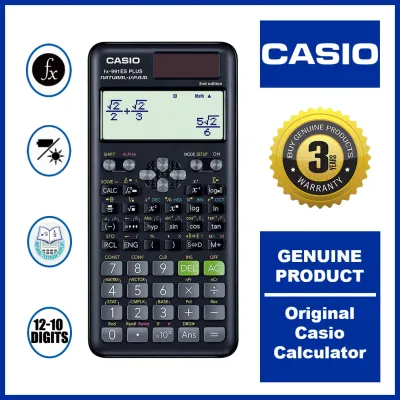
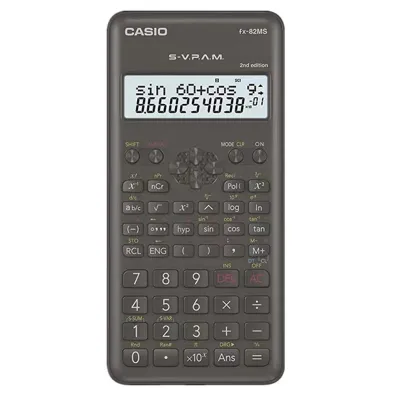
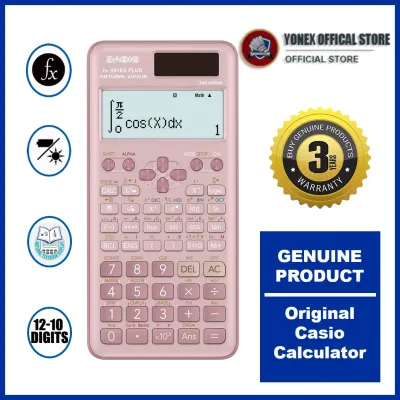
Prices are valid at publication and may change. Please refer to the product page for the latest price.
Before making your purchase, it is vital to check your specific school guidelines or professional board exam rules. In the Philippines, licensing bodies like the Professional Regulation Commission (PRC) enforce strict lists of allowed calculators, and certain advanced features or specific model generations may be restricted.
Why the Generation Matters: CW, EX, and ES PLUS
When comparing the fx-991 and the fx-570, many users make the mistake of comparing models from different eras. Casio regularly updates its calculator lineup, and the letters following the model number indicate the specific generation and user interface design. Comparing an older fx-991 to a newer fx-570 can lead to highly misleading conclusions about performance and features.
The oldest generation still in widespread use is the ES PLUS series (such as the fx-991ES PLUS 2nd Edition). These models feature a classic natural textbook display and traditional menu navigation. While reliable and widely accepted by exam boards, they have slower processing speeds and lower-resolution screens compared to their modern successors.
The ClassWiz EX series (such as the fx-991EX) introduced high-resolution LCD screens, intuitive icon-based menus, and significantly faster processors. Although many EX models have been phased out of production, they remain highly popular in secondary markets and school corridors due to their balance of speed and functionality.
The latest standard is the ClassWiz CW series (including the fx-991CW and fx-570CW). This generation features a completely redesigned, minimalist key layout, simplified menu navigation, and a specialized Math Box app. A newer fx-570CW will easily outperform an older fx-991ES PLUS in processing speed, screen clarity, and ease of use.
To make an accurate decision, always compare models within the same generation. Evaluating the fx-991CW directly against the fx-570CW ensures you are comparing identical mathematical engines, allowing you to focus solely on differences in power, physical build, and specialized features.
Core Differences: Power, Performance, and Features
Understanding the physical and technical differences between these two lines helps you select the tool that matches your study environment and workload.

Power Source and Reliability
The most critical distinction between the two lines is how they are powered. The fx-991 models feature Casio’s Two-Way Power system, which integrates a solar panel on the front face with a small button battery (typically an LR44). The calculator automatically switches to solar power in well-lit environments, preserving the battery for low-light conditions.
This dual-power system is highly advantageous for students in the Philippines. University classrooms and large examination halls can sometimes suffer from uneven lighting or unexpected power fluctuations. With a dual-power model, you have a physical safeguard against a sudden black screen during a crucial exam.
In contrast, the fx-570 models rely entirely on battery power. Depending on the generation, they use either a single button cell or a standard AAA battery. While AAA batteries are incredibly easy to source and replace in local convenience stores, the lack of solar backup means you must monitor battery health closely.
The high humidity of tropical climates also introduces a risk of battery terminal corrosion over time. If a battery-only calculator sits unused in a drawer during semester breaks, a leaking battery can permanently damage the internal contacts. Dual-power models, which draw less continuous strain from the battery, tend to experience fewer issues with rapid battery degradation.
Processing Speed and Memory Capacity
While the mathematical capabilities are nearly identical within the same generation, the hardware configurations of the fx-991 are optimized for heavy computational loads. The processor in the fx-991 is designed to handle iterative calculations with minimal lag.
When solving definite integrals, complex differential equations, or performing regression analysis on large datasets, the processor must run multiple numerical algorithms. On an fx-570, highly complex inputs can occasionally cause a brief calculation delay, whereas the fx-991 handles these tasks with faster processing times.
Memory allocation also varies slightly across older generations. The fx-991 series often provides more dedicated memory registers for storing variables, matrices, and statistical distributions. This extra memory allows you to keep track of multi-step engineering calculations without needing to write down intermediate values on scratch paper.
Advanced Functions and Applications
The software suite of the fx-991 is tailored for advanced academic and professional applications. Depending on the generation, the fx-991 includes specialized tools such as the Spreadsheet app, which allows you to input tabular data, perform basic calculations, and analyze statistical trends directly on the screen.
Another premium feature is the QR code generator. By pressing a specific key combination, the calculator displays a QR code on its high-resolution screen. Scanning this code with a smartphone opens a Casio visualization website, allowing you to view detailed graphs, geometric representations, and interactive charts of your equations.
The fx-570 series generally omits these high-level visualization and spreadsheet tools. It focuses strictly on core scientific computations, including trigonometry, logarithms, base-n calculations, and standard statistical analysis. For many users, this streamlined feature set is more than adequate.
Side-by-Side Specification Comparison
To help you visualize these differences, the table below compares the modern ClassWiz CW versions of both models.
| Feature | Casio fx-991CW | Casio fx-570CW |
|---|---|---|
| Power Source | Two-Way Power (Solar + Button Battery) | Single Battery Power (AAA Battery) |
| Processing Speed | High (Optimized for complex iterations) | Standard |
| Exclusive Apps | Spreadsheet, QR Code Graphing, Math Box | Math Box (Select features) |
| Battery Type | LR44 (Button cell) | AAA (Alkaline) |
| Weight | Lighter, slim profile | Slightly heavier, thicker battery compartment |
| Target User | Engineering, STEM, and College Students | High School and General Education Students |
Note: The exact display resolution, menu layout, and specific app availability will vary if you are comparing older generations like the EX or ES PLUS series. Always verify the suffix on the packaging before purchasing.
Matching the Calculator to Your Academic Needs
Your choice should ultimately depend on your field of study, your career plans, and the rules of your academic institution.
Engineering, Physics, and Advanced Mathematics
If you are pursuing a degree in civil, mechanical, electrical, or chemical engineering, the fx-991 is the superior choice. The demanding curriculum requires constant interaction with complex numbers, vector mathematics, matrix transformations, and calculus.
During long university exams, saving a few seconds on an integration problem can make a noticeable difference in your score. The faster processing speed of the fx-991 ensures that your calculator keeps up with your pace. Additionally, the solar panel provides peace of mind during grueling four-hour exams where a battery failure is not an option.
For those preparing for professional licensure exams in the Philippines, the fx-991 is a staple tool. However, you must always cross-reference the allowed calculator list published by the PRC. Since rules can change, verifying your specific model suffix (such as CW or ES PLUS) against the latest official guidelines is a mandatory step before entering the testing center.
High School Science and General Mathematics
For junior and senior high school students navigating algebra, geometry, basic trigonometry, and introductory chemistry, the fx-570 is an excellent fit. It provides all the necessary mathematical functions required by standard curricula without forcing you to pay for advanced features you may never use.
The interface of the fx-570 is highly approachable. Without the added complexity of spreadsheet apps or QR code generation, students can focus on mastering fundamental mathematical concepts. The use of a standard AAA battery in newer fx-570 models is also highly practical for younger students, as replacements can be found easily in any local store.
If you are a college student majoring in the humanities, business, or social sciences, the fx-570 will easily handle your general education math and statistics requirements. It offers a cost-effective solution that delivers Casio’s legendary reliability without the premium price tag.
Pricing, Value, and Where to Buy Safely
In the local market, pricing reflects the hardware differences between the two models. The Casio fx-991 series typically retails within the ₱1,300 to ₱1,900 range, depending on the generation and the retailer. The fx-570 series is more affordable, generally priced between ₱900 and ₱1,400.
If you are entering a five-year engineering program, investing the extra money in the fx-991 is highly logical. The cost difference spread over several years of intensive study is negligible, and the added security of solar power makes it a highly valuable investment. For shorter courses or general high school use, the fx-570 represents outstanding value.
Because these calculators are highly popular, counterfeit models are common on online marketplaces and informal retail stalls. Fake calculators often look identical to genuine ones at first glance, but they suffer from severe quality issues. Common defects in counterfeits include unresponsive keypads, inaccurate calculation results, poor display contrast, and rapid battery drain.
To ensure you are buying an authentic Casio calculator, always purchase from authorized distributors, official brand stores on major e-commerce platforms, or reputable physical stationery and bookstore chains like National Book Store. Authentic models come with a clear holographic sticker on the packaging, a high-quality printed user manual, and a valid local warranty card. Testing the keys for a crisp, tactile response and checking the display for ghosting when viewed at an angle are simple ways to verify authenticity before you buy.
Frequently Asked Questions (FAQ)
Are Casio fx-991 and fx-570 allowed in board exams?
Permissibility depends entirely on the specific guidelines of the school, university department, or professional licensing board. In the Philippines, the PRC maintains a strict list of approved non-programmable scientific calculators for board exams. While both the fx-991 and fx-570 lines are generally categorized as non-programmable, certain sub-models or newer generations may be subject to specific restrictions. Always consult the most recent official advisory from your licensing board or school administration before bringing your calculator to an exam.
Can I upgrade the firmware on my Casio calculator?
No, standard Casio scientific calculators do not support user-end firmware upgrades, software patches, or external app installations. The operating system and mathematical functions are permanently flashed onto the internal microchip during manufacturing. Because you cannot add features later, it is highly important to select the correct model and generation (such as the ClassWiz CW series) at the time of purchase to ensure you have the interface and tools you need.
How do I spot a fake Casio calculator?
To identify a counterfeit Casio calculator, begin by inspecting the physical build. Genuine Casio calculators have a solid weight, a clean matte finish, and perfectly aligned key labels. Next, perform a diagnostic test: on most models, pressing the Shift, 7, and On keys simultaneously enters a diagnostic screen where you can test the LCD pixels and button responses. Additionally, check the packaging for a genuine holographic security sticker and verify that a valid local warranty card is included. Purchasing only from authorized retailers is the most reliable way to guarantee authenticity.
Community discussion
Share your experience or ask a question. Comments are reviewed before publication.