
Choosing the right scientific calculator is one of the most important decisions a student can make, especially when preparing for rigorous high school and university courses. The Casio fx-991 series has long been a staple in classrooms, with the classic fx-991EX ClassWiz and the newer fx-991CW representing two distinct generations of natural textbook display technology. Both models are designed to help students visualize complex mathematical expressions exactly as they appear in textbooks, but they approach user interaction and physical design in very different ways.
To help you make an informed decision, this comparison breaks down the key differences in interface design, functionality, and overall usability. If you are currently deciding between these two popular models, the choice largely comes down to your personal preference for menu navigation versus direct-key shortcuts.
- Choose the fx-991CW if you prefer a modern, smartphone-like menu system, simplified physical keys, and want a current-generation model that is widely available and actively supported by the manufacturer.
- Choose the fx-991EX if you prefer a traditional layout with dedicated physical keys for quick function access, are already accustomed to the classic ClassWiz interface, and can verify the authenticity of the unit from a trusted seller.
It is also important to clarify a common search query upfront: if you are looking for a calculator with writing pad integration, neither of these models features a physical writing surface or stylus input. They are traditional keypad-operated scientific calculators designed strictly for button-based input and screen-based output.
Products mentioned in this guide
Prices are valid at publication and may change. Please refer to the product page for the latest price.
Screen, Interface, and Button Layout Differences
The most immediate difference you will notice when comparing these two calculators is their physical design and how you interact with their software. The older fx-991EX features a classic keyboard layout where almost every key has multiple functions printed above it in gold or red. To access these secondary functions, you press the Shift or Alpha keys followed by the corresponding button. This design is highly efficient for experienced users who have developed muscle memory, as it allows them to execute complex commands with minimal keystrokes.
In contrast, the fx-991CW introduces a redesigned, minimalist keyboard that reduces visual clutter. Many of the secondary and tertiary functions have been moved off the physical keys and into on-screen menus, which you access via dedicated buttons like “Catalog” and “Tools.” This modern, menu-driven interface is highly intuitive for students who are accustomed to navigating smartphone applications, as it groups related functions together logically. However, this transition means that some operations that required a simple two-key combination on the fx-991EX now require navigating through multiple menu levels on the fx-991CW.
Both models feature high-resolution LCD screens that support natural textbook display, allowing fractions, square roots, integrals, and other mathematical symbols to be formatted correctly. However, the fx-991CW utilizes a slightly updated display font and menu layout designed to improve readability under various lighting conditions. The physical keys on the fx-991CW are also rounded and slightly recessed, which some students find more comfortable for prolonged typing sessions compared to the flat, rectangular keys of the fx-991EX.
Because tactile feedback and screen readability can vary based on personal preference, it is highly recommended to visit a physical stationery store or bookstore to test both models in person. Pay close attention to how easily you can read the screen under bright overhead lights, and test the responsiveness of the keys to ensure they suit your typing style. Additionally, consider the physical dimensions of each unit to ensure it fits comfortably in your standard school pencil case or backpack pocket.
Verifying Math Functions and Processing Speed
When evaluating scientific calculators for advanced coursework, verifying that the device supports all required mathematical functions is essential. Both the fx-991CW and the fx-991EX are equipped to handle a wide range of advanced operations, including matrix calculations, vector analysis, complex numbers, probability distributions, and calculus operations such as numerical integration and differentiation.

To verify the exact capabilities of either model, always inspect the official product packaging or consult the manufacturer’s official website. The packaging typically lists the total number of functions and highlights key mathematical categories supported by the device. This is particularly important for college students majoring in engineering, mathematics, or the sciences, where specific matrix dimensions or equation-solving capabilities are required for daily coursework.
Processing speed is another factor that can influence your experience, especially during timed exams where every second counts. While both calculators are highly efficient, the internal hardware of the newer fx-991CW has been optimized to handle complex calculations, such as solving high-degree polynomial equations or performing iterative calculations, with consistent performance. You can perform an observable trial in-store by inputting a complex definite integral on both models simultaneously and comparing the time it takes for each screen to display the final result.
Before making a purchase, it is also critical to verify the compatibility of these calculators with your school’s academic guidelines or national exam boards. Some institutions and professional regulatory bodies maintain strict lists of approved calculator models for board exams. Since regulations can change, always cross-reference the model numbers with the latest official guidelines provided by your examining board to ensure your chosen calculator is permitted in the exam room.
Clarifying the "Calculator with Writing Pad" Misconception
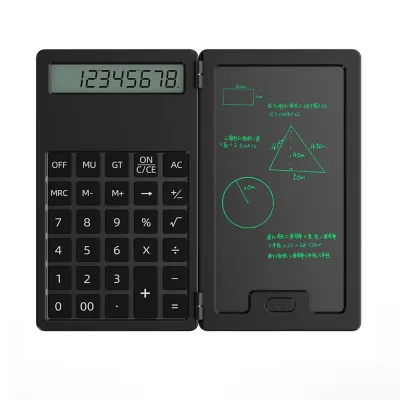
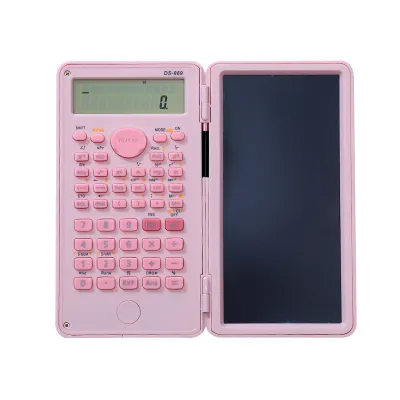
A growing trend among students is the search for a calculator with writing pad capabilities. This search intent often stems from seeing hybrid devices on online marketplaces that feature a standard scientific calculator on one side and a pressure-sensitive LCD writing tablet with a stylus on the other. These hybrid tools allow students to scribble quick formulas, draw diagrams, or perform scratch work without wasting paper.
However, it is vital to clarify that neither the Casio fx-991CW nor the fx-991EX belongs to this hybrid category. The term “natural display” or “natural textbook display” used in their descriptions refers solely to the screen’s ability to render mathematical notation naturally—such as showing fractions with a horizontal bar rather than a slash. It does not mean the screen is touch-sensitive or supports handwriting input.
If your academic workflow strictly requires a device that combines calculation with a digital writing surface, you will need to explore alternative options. These include specialized touchscreen graphing calculators, digital note-taking tablets, or separate standalone LCD writing pads that you can place next to your traditional scientific calculator.
For most standardized exams and professional board tests, hybrid calculators with built-in writing pads or memory-storing digital screens are strictly prohibited due to security and cheating concerns. The fx-991CW and fx-991EX rely entirely on standard, physical keypad input, making them far more likely to be approved by exam proctors and academic institutions.
Evaluating Price, Value, and Authenticity in the Philippines
Navigating the local market for scientific calculators requires careful attention to pricing, availability, and product authenticity. The newer fx-991CW is widely distributed across major stationery chains and official retail outlets in the Philippines, making it easy to find at standard retail prices. The older fx-991EX, having been phased out in many production runs, is increasingly difficult to find in physical stores, which can sometimes lead to inflated prices from third-party sellers online.
Because of the high demand for these specific models among Filipino students, counterfeit calculators are highly prevalent on unauthorized online marketplaces. To protect your investment, always purchase your calculator from authorized stationery retailers, official brand stores, or verified online mall merchants. Genuine units are essential not only for reliable performance but also for ensuring that the mathematical outputs are accurate during critical exams.
When comparing prices in ₱, look for authorized packages that include official warranty cards and user manuals. Avoid purchasing from sellers offering unusually low prices, as these are often indicators of counterfeit goods. A genuine calculator is a long-term investment that should last throughout your high school and college years, making the initial cost of an authentic unit well worth the peace of mind.
Additionally, the tropical climate of the Philippines introduces environmental factors that can affect electronic devices. High humidity can accelerate battery corrosion and damage internal LCD screens over time. To protect your calculator, store it in a dry, well-ventilated pencil case, avoid leaving it in direct sunlight or hot vehicles, and check the battery compartment periodically for any signs of leakage.
Final Decision Framework: How to Choose
To select the best calculator for your academic journey, use the following structured checklist to guide your decision:
- Curriculum Requirements: Review your course syllabi and consult your teachers or university department to confirm which specific models are permitted for your classes and exams.
- User Interface Preference: Determine whether you prefer the modern, menu-based navigation of the fx-991CW or the classic, direct-key shortcut layout of the fx-991EX.
- Availability and Authenticity: Assess whether you can source a guaranteed genuine fx-991EX, or if purchasing the readily available fx-991CW from an authorized local retailer is the safer option.
- Budget and Warranty: Compare current prices in ₱ at authorized stores, and ensure your purchase includes a valid warranty card for after-sales support.
Once you have made your choice, be sure to keep your official receipt and warranty documentation in a safe place. Familiarize yourself with the user manual to understand the specific button combinations or menu paths required for your coursework. Taking the time to master your calculator’s interface early in the semester will save you valuable time and reduce stress during exams.
Frequently Asked Questions (FAQ)
Are the fx-991CW and fx-991EX allowed in board exams?
Permitted calculator models for professional board exams in the Philippines are determined by the relevant regulatory commissions and can change periodically. While both models have historically been widely accepted due to their non-programmable nature, you must always consult the most recent official resolutions and guidelines published by the examining board before your test date. Never rely solely on historical approval lists, as regulations are updated regularly to maintain exam integrity.
What type of battery do these calculators use?
Both the fx-991CW and fx-991EX typically utilize a Two-Way Power system, which combines a primary battery with a solar cell panel to ensure continuous operation even in low-light classroom environments. The primary battery is usually a standard button cell or a single AAA battery, depending on the exact model variation. To verify the precise battery type and access safe replacement instructions, always refer to the back panel of the calculator or the official user manual.
How can I spot a fake Casio calculator?
To identify a genuine calculator, perform several physical and functional checks. First, inspect the packaging for official hologram stickers, QR codes that link to the manufacturer’s verification portal, and a valid warranty card. Second, examine the build quality of the device; genuine models feature crisp screen contrast, high-resolution text, and responsive, high-quality plastic keys. Finally, you can perform a built-in diagnostic test or scan the on-screen QR code generated by the calculator to verify its authenticity on the official website.
Community discussion
Share your experience or ask a question. Comments are reviewed before publication.