
Customizing your Maribank debit card with a dedicated card skin is an excellent way to merge personal expression with everyday utility. The best card skin designs for a Maribank card balance aesthetic appeal with functional preservation, ensuring that your card remains fully operational at automated teller machines (ATMs) and point-of-sale (POS) terminals. Because these cards rely on precise physical dimensions and electronic components, the ideal skin must feature exact cutouts for the EMV chip and contactless payment indicators while utilizing high-grade, residue-free adhesives. Whether you prefer a sleek, minimalist texture that slides smoothly into a slim wallet or a vibrant, hand-drawn illustration inspired by classic journaling aesthetics, understanding the intersection of material durability and design layout is key to a successful customization.
In tropical climates where humidity and heat are constant factors, choosing the right skin becomes even more critical. Standard adhesive stickers often degrade quickly under local weather conditions, leading to sticky edges that can trap dirt or, worse, jam inside card readers. By focusing on premium vinyl materials, verifying precise physical dimensions, and selecting designs that do not interfere with the card’s magnetic stripe or chip, you can enjoy a personalized look that stands up to daily transactions. This comprehensive guide breaks down the essential design styles, material differences, and fit requirements to help you build a reliable shortlist for your next purchase.
Verifying Card Dimensions and Skin Compatibility
Before purchasing any decorative skin, you must verify that its physical dimensions align perfectly with the standard specifications of your Maribank debit card. Most modern payment cards follow the standard CR80 size, which measures exactly 85.60 mm in width by 53.98 mm in height. Additionally, these cards feature a specific corner radius that must be matched precisely by the skin to prevent the corners from peeling back during daily use. A skin that is even a fraction of a millimeter too large will overhang the card’s edges, creating a lip that easily catches on wallet slots, pockets, or terminal entry gates.
Products mentioned in this guide
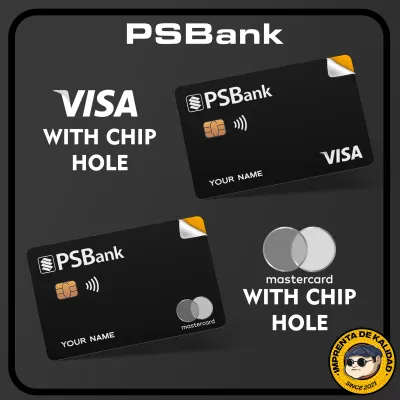
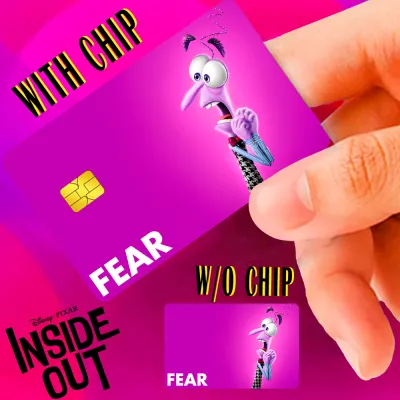
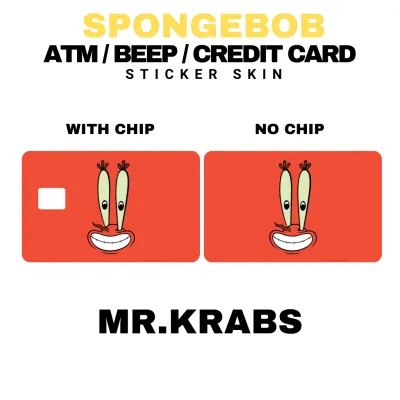
Prices are valid at publication and may change. Please refer to the product page for the latest price.
Functional compatibility requires that the skin design incorporates precise cutouts for the card’s essential features. The EMV chip, located on the front of the card, must remain completely uncovered to allow physical contact with chip-reading terminals. Similarly, if your card displays the contactless payment symbol or your name on the front, the skin should feature accurate windows or transparent zones to keep this information visible. Some skins offer a “half-cover” design that leaves the entire top or bottom half of the card exposed, which is an excellent option for maintaining maximum functional visibility while still adding a personalized touch.
Thickness is another critical specification that directly impacts usability. Standard payment cards are typically around 0.76 mm thick, and ATM card slots are engineered with very tight tolerances to prevent foreign objects from entering. A card skin should ideally add no more than 0.15 mm to the card’s overall thickness. If a skin is too thick—such as those made from heavy-duty laminated plastics or padded materials—the card may become stuck inside an ATM or fail to slide smoothly through manual swipe readers. Always check the manufacturer’s specifications for thickness before committing to a purchase.
Exploring Design Styles for Debit Card Customization
Selecting a design style for your debit card is a highly personal decision, but it also carries practical implications for how your card is perceived and how well it wears over time. The visual design you choose can range from a subtle, professional statement to a bold, artistic expression that matches your favorite stationery collection. Because your debit card is frequently handled and exposed to various environments, the style you select should align with your daily usage patterns and aesthetic preferences.

Minimalist, Textured, and Solid Color Skins
Minimalist and solid color skins are ideal for users who want to refresh their card’s appearance without drawing excessive attention during transactions. These designs often feature muted earth tones, deep jewel colors, or classic monochrome palettes that provide a clean, sophisticated look. When choosing a solid color skin, the finish plays a significant role in both appearance and maintenance. Matte finishes are highly effective at resisting fingerprints and reducing glare under bright store lighting, making the card look consistently clean. Glossy finishes, while vibrant, tend to show micro-scratches and oil from fingers more readily over time.
Textured options introduce a tactile dimension to your card, mimicking premium materials like leather grain, brushed metal, or carbon fiber. These textured skins not only feel unique in hand but also provide a slightly better grip when pulling the card out of a tight wallet compartment. However, it is important to ensure that the texture is not so pronounced that it significantly increases the card’s thickness or creates uneven surfaces that could interfere with the rollers inside an ATM. A subtle, low-profile texture offers the best balance of tactile appeal and mechanical safety.
Patterned, Illustrative, and Washi Tape Styles
For those who enjoy creative expression, patterned and illustrative skins offer endless possibilities. These designs often feature intricate floral patterns, abstract geometric shapes, or whimsical illustrations reminiscent of hand-drawn journal pages. If you are a fan of paper crafts, you might be drawn to skins that mimic the look of traditional Japanese washi tape, complete with faux-fiber textures and delicate pastel overlays. These creative styles can turn a standard plastic card into a miniature piece of art that coordinates beautifully with your planner, notebook, or phone case.
When opting for highly detailed or brightly colored designs, colorfastness and UV resistance are crucial factors to consider. Because debit cards are frequently exposed to light when left on tables or pulled out in sunny outdoor environments, low-quality prints can fade rapidly, losing their visual appeal within a few months. Additionally, constant friction against the inside of your wallet can rub off unprotected ink. Look for designs that feature a clear protective top layer, which seals the print and shields it from both physical abrasion and sun damage, ensuring the colors remain vibrant over the long term.
Comparing Materials: Vinyl, PVC, and Paper-Based Skins
The material composition of a card skin determines its durability, flexibility, and overall lifespan. When shopping on online marketplaces or at specialty stationery shops, you will primarily encounter three material categories: vinyl, PVC, and paper. Understanding the strengths and limitations of each material will help you choose a skin that survives the rigors of daily transactions without peeling or damaging your card.
Vinyl is widely considered the gold standard for card customization due to its exceptional flexibility and water resistance. High-quality vinyl skins can stretch slightly during application, allowing for a perfect, bubble-free fit over the card’s flat surface and rounded corners. This flexibility also prevents edge-lifting, a common issue where the corners of the skin begin to curl upward after repeated insertions into card readers. Vinyl is naturally resistant to water, oils, and mild cleaning agents, making it highly suitable for the humid conditions often experienced in tropical climates like the Philippines.
Polyvinyl chloride (PVC) skins are another durable option, often offering a slightly stiffer and more rigid feel than vinyl. While PVC provides excellent protection against scratches and physical impacts, its rigidity can make it more prone to cracking or lifting at the corners if the card is bent inside a tight pocket. PVC skins are highly water-resistant, but they must be manufactured to precise tolerances to ensure they do not add excessive stiffness to the card, which could prevent it from flexing naturally during use in certain payment terminals.
Paper-based skins and standard paper stickers should generally be avoided for debit card customization. While they are often inexpensive and feature beautiful matte textures, paper is highly susceptible to moisture, sweat, and tearing. Exposure to a sudden rain shower or even the natural humidity of a pocket can cause paper skins to disintegrate, leaving a soggy, unsightly mess on your card. Furthermore, paper fibers can easily tear and shed inside ATM mechanisms, potentially causing mechanical failures in the machine or permanently damaging your card’s magnetic stripe.
The type of adhesive used on the skin is just as important as the face material. Premium card skins utilize removable, pressure-activated adhesives that allow you to reposition the skin during application and peel it off cleanly when you want to change designs. These adhesives are formulated to bond securely to plastic card surfaces without curing into a permanent weld. In contrast, cheap stickers often use permanent adhesives that leave a thick, sticky residue upon removal. This residue can be incredibly difficult to clean off without using harsh solvents that might dissolve the card’s original printed details or damage the EMV chip.
Applying and Removing Card Skins Safely
Achieving a flawless, bubble-free application requires patience and proper preparation. Before you begin, gather your materials in a clean, well-lit workspace free from dust and drafts. You will need your Maribank card, the new skin, a bottle of isopropyl alcohol, a lint-free microfiber cloth, and a flat plastic card (like a ruler or membership card) to act as a squeegee.
First, prepare the surface of your debit card by wiping it thoroughly with a small amount of isopropyl alcohol on the microfiber cloth. This step is essential to remove skin oils, dirt, and pocket lint that could prevent the adhesive from bonding correctly. Allow the card to air dry completely for a minute; do not use paper towels, as they can leave behind tiny fibers. Avoid touching the clean surface of the card with your bare fingers once it is dry.
Next, partially peel the backing paper away from the skin, exposing only the edge containing the EMV chip cutout. Align this cutout precisely with the physical chip on your card. Using the chip as your primary anchor point ensures that the rest of the skin will line up correctly with the card’s outer edges. Once the chip cutout is perfectly aligned, gently press that section down. Slowly peel away the remaining backing paper with one hand while using your other hand—or the plastic squeegee—to smooth the skin onto the card from the center outward. This outward motion pushes any trapped air bubbles to the edges, ensuring a flat, seamless finish.
If you notice an alignment error or a large bubble during the process, do not panic. Gently lift the skin from the nearest corner, reposition it, and try again. High-quality vinyl adhesives are designed to tolerate minor adjustments during application. Once the skin is fully applied, run your thumb firmly along all four edges to seal the adhesive and prevent future lifting.
When it comes time to remove or replace the skin, doing so safely prevents damage to the card’s delicate electronic components. Never use sharp metal blades or fingernails to scrape the skin off, as this can scratch the magnetic stripe or lift the EMV chip. Instead, apply gentle heat to the card using a hair dryer on its lowest setting for about ten seconds. The warmth softens the adhesive, making the skin much easier to peel. Start peeling from one corner, pulling the skin back slowly at a sharp angle. If you encounter resistance, stop immediately, apply a bit more gentle heat, and resume. Any minor adhesive residue left behind can be easily wiped away with a microfiber cloth dampened with isopropyl alcohol.
Building Your Shortlist: What to Check Before Buying
When browsing online marketplaces or local stationery shops for a Maribank card skin, it is easy to get distracted by appealing designs. To ensure you purchase a product that is both beautiful and functional, use this practical checklist to evaluate your options before checking out.
First, verify the seller’s technical specifications. Look for listings that explicitly state compliance with standard CR80 dimensions (85.60 × 53.98 mm) and mention pre-cut holes for the EMV chip. Avoid listings that use generic descriptions like “fits all credit cards” without providing exact measurements, as these often require manual trimming with scissors, which rarely results in a clean, flush edge. If you prefer to keep your cardholder name or the contactless symbol visible, confirm that the seller offers design variations with those specific windows pre-cut.
Second, carefully read through user reviews and look for uploaded customer photos. Pay close attention to feedback regarding edge-lifting, adhesive residue, and ATM compatibility. If multiple reviews mention that the skin peeled off within a week or caused the card to get stuck in a local bank’s ATM, it is a clear sign that the material is either too thick or uses poor-quality adhesive. Look for reviews from buyers who have used the skin for several months to gauge its long-term durability and colorfastness.
Finally, confirm the seller’s return policies and shipping conditions. Because card skins are thin and flexible, they can easily be bent or creased during transit if they are not packaged correctly. Ensure the seller ships the skins inside a rigid cardboard envelope or with protective backing board to prevent damage. A flexible return policy is also valuable in case you receive a skin with misaligned cutouts or a printing defect, allowing you to secure a replacement without hassle.
Frequently Asked Questions (FAQ)
Will a card skin block the NFC or chip reader on my Maribank card?
No, a high-quality, ultra-thin vinyl card skin will not block the NFC (contactless) or chip reader functions of your Maribank card, provided it is applied correctly. The physical EMV chip must remain completely uncovered, which is why choosing a skin with a precise, pre-cut chip window is essential for chip-insertion transactions. For contactless payments, the radio frequency signals used by NFC technology easily pass through thin layers of plastic and vinyl. However, you should avoid skins that incorporate metallic foils, heavy glitter, or thick metal-infused materials, as these metallic elements can shield the signal and cause contactless readers to fail.
Can I use regular washi tape instead of a pre-cut card skin?
While using regular washi tape is a popular DIY method among stationery enthusiasts, it is not recommended for debit cards that are frequently inserted into ATMs or POS terminals. Washi tape is made of paper and uses a very light, low-tack adhesive designed for journals, meaning its edges will easily lift and peel when subjected to the friction of a wallet slot. If these loose edges catch inside an ATM’s motorized card reader, the tape can rip off, jamming the machine and potentially trapping your card inside. If you absolutely want to use washi tape for a unique look, you must apply a single, continuous strip, ensure it does not cover the chip or magnetic stripe, and seal it with a thin, clear, water-resistant protective overlay to keep the edges completely flat and secure.
Community discussion
Share your experience or ask a question. Comments are reviewed before publication.