
Selecting the right wall document holder is more than a matter of clearing off desk clutter; it is a fundamental step in designing an efficient, physical workflow. The ideal choice depends on your document processing volume, the physical thickness of your files, and how quickly you need to retrieve them. By shifting your documents from horizontal piles to vertical wall space, you can streamline daily tasks, improve visibility, and protect important paperwork from damage.
In tropical environments like the Philippines, where indoor humidity levels can fluctuate significantly, paper management presents unique challenges. High humidity causes loose sheets to absorb moisture, making them limp, prone to curling, and difficult to handle. A well-chosen wall holder not only organizes your documents but also keeps them physically supported, flat, and protected from environmental wear.
Quick Guide: Matching Holder Styles to Your Workflow
To select the most effective wall document holder, you must first analyze how paper moves through your workspace. Different holder designs serve distinct operational purposes, and choosing the wrong style can lead to bottlenecks, damaged documents, or underutilized wall space.
Products mentioned in this guide
Prices are valid at publication and may change. Please refer to the product page for the latest price.
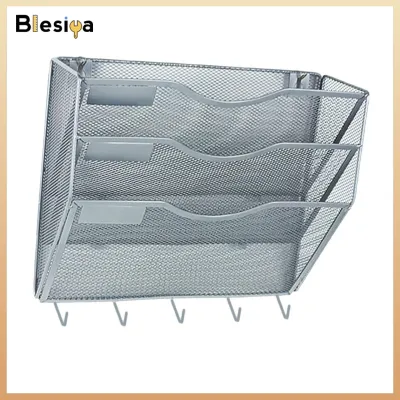
Tiered Racks These vertical assemblies of overlapping slots are designed for active, multi-stage routing. If your workflow involves moving papers through sequential approval steps or sorting incoming mail, tiered racks are the most efficient choice.
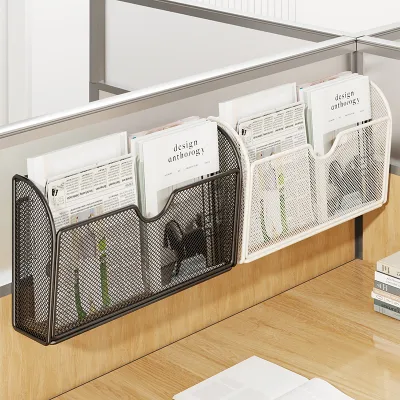
Pocket Holders Consisting of individual, wide compartments, these offer high visibility for passive storage. They work best for displaying blank forms, sign-in sheets, or daily schedules in high-traffic areas.
Wall-Mounted Magazine Files These deep, box-like containers hold bulky, heavy, or bound materials. If your workspace relies on thick catalogs, equipment manuals, or ring binders, magazine files provide the structural depth required to keep them upright.
Ultimately, your decision should be guided by document volume, physical thickness, and retrieval frequency. Evaluating these three dimensions ensures that your wall-mounted system supports your daily physical tasks rather than becoming a passive storage bin for forgotten paperwork.
Tiered Racks: Best for High-Volume Sorting and Routing
Tiered wall racks function as physical databases on your wall, making them indispensable for environments with continuous paper movement. In shared administrative offices, logistics hubs, and busy reception areas, documents must be sorted rapidly and routed to the correct processing stage. A tiered system allows you to assign specific meanings to each level, creating a visual pipeline. For example, you can label the top tier for incoming invoices, the middle tier for pending verifications, and the bottom tier for completed files ready for archiving.

When selecting a tiered rack, pay close attention to the slot depth and the lip height of each compartment. The lip is the front barrier that keeps papers from sliding forward. In humid climates, paper loses its stiffness as it absorbs airborne moisture. If the lip height is too low, damp paper will sag forward, spill over the edge, or block the view of the tier below. Look for racks with a lip height of at least 2 to 3 inches (50 to 75 mm) to keep soft sheets securely upright.
Paper compatibility is another critical factor. In the Philippines, offices regularly handle a mix of standard paper sizes, including A4 (210 mm x 297 mm), Letter (8.5 x 11 inches), and Legal (8.5 x 13 inches). Many imported document holders are designed strictly for A4 or Letter sizes. If you frequently process longer legal-sized documents, ensure the slots are wide enough (at least 230 mm) and have open sides or sufficient height clearance so the tops of the sheets do not fold over or block the compartments above.
To optimize your tiered rack workflow, establish clear visual labels. Use bold, color-coded tags on the front of each tier to indicate ownership or action status. Train your team to check their designated tiers at specific intervals throughout the day. This physical routing system reduces verbal interruptions, minimizes the risk of lost paperwork, and ensures that high-priority documents are processed in a timely, systematic manner.
Pocket Holders: Best for Quick Access and Visibility
Pocket holders are designed for high-traffic zones where visibility and rapid retrieval are paramount. Unlike tiered racks, which are optimized for sorting and processing, pocket holders act as display stations. They are commonly installed in reception areas, medical clinics, school offices, and near shared equipment like printers or copiers. If your goal is to make blank forms, sign-in sheets, safety protocols, or promotional brochures easily accessible to visitors and staff, pocket holders are the ideal solution.
The choice of material for your pocket holder significantly affects both its durability and its performance in different environments. Clear acrylic pockets provide excellent visibility, allowing users to read the document’s header or cover page without removing it. However, in hot and humid conditions, clear plastic can present a physical challenge known as toner blocking. When laser-printed sheets—which use heat-fused plastic toner—are pressed tightly against smooth acrylic or PVC surfaces in non-airconditioned rooms, the toner can stick to the plastic. Over time, this transfers ink to the pocket, ruining the document and leaving permanent stains on the holder. To prevent this, consider using wire mesh or powder-coated steel pockets, which allow air circulation and prevent ink transfer, or ensure that documents are placed inside textured polypropylene sleeves before being inserted.
When evaluating pocket designs, consider the balance between pocket depth and front panel height. If the front panel is too high, it will obscure the identifying text at the top of your forms, forcing users to pull out every document to find what they need. Conversely, if the panel is too low, thin or damp sheets will fold forward and fall out. A front panel that covers approximately 60% to 70% of the document height offers the best balance of structural support and visibility.
For an enhanced workflow, use color-coded folders inside clear pocket holders. Instead of placing loose sheets directly into the pockets, organize them into bright plastic folders. This extra layer protects the paper from dust and humidity while allowing you to establish a color-based filing system that staff can recognize from a distance.
Magazine Files: Best for Bulky or Bound Documents
Standard wall pockets and tiered racks are designed for flat, loose sheets, making them unsuitable for thick, bound, or heavy reference materials. For items like product catalogs, equipment manuals, bound training modules, thick financial reports, or small ring binders, wall-mounted magazine files are the most effective option. These deep, box-like holders provide the structural support necessary to keep heavy, irregular items upright, preventing them from warping or falling onto desks.
When choosing wall-mounted magazine files, structural rigidity and material quality are critical. Avoid paperboard or cardboard files in areas subject to high humidity. Cardboard readily absorbs moisture from the air, causing the walls of the file to soften, buckle, and sag under the weight of heavy documents. Instead, opt for heavy-duty molded plastic, metal wire mesh, or solid steel files. These materials resist environmental moisture and maintain their structural integrity even when packed to capacity with heavy catalogs.
Pay attention to the spine width and the design of the file. Open-front designs allow you to slide documents in and out easily, making them ideal for frequently accessed manuals. Closed-back designs provide a cleaner aesthetic but require more clearance to retrieve items. Ensure the spine width (typically 3 to 4 inches or 75 to 100 mm) is sufficient to accommodate your thickest binders or catalogs without forcing them into the slot, which can damage the bindings.
To integrate magazine files into your daily workflow, group your reference materials by frequency of use. Mount files containing daily operational manuals or active project catalogs at eye level, directly above your primary desk space. Occasional reference materials, such as annual reports or archived catalogs, can be mounted in files positioned higher up or lower down on the wall. Label the spines of the files with large, clear text to ensure quick identification without the need to pull down heavy folders repeatedly.
Mounting Safely and Optimizing Desk Ergonomics
Installing your wall document holders securely is essential to prevent damage to your walls and protect your office equipment. In the Philippines, office walls are commonly constructed from painted concrete, hollow concrete blocks, or glass partitions, rather than drywall. Consequently, mounting methods must be carefully matched to the wall material. For concrete or masonry walls, screw mounting with plastic wall plugs (commonly referred to as tox) is highly recommended. Standard adhesive strips often fail on concrete because moisture can seep through the wall, causing the paint to peel and the adhesive bond to degrade over time.
Always verify the manufacturer’s maximum weight capacity before loading your holders. A single ream of standard A4 copier paper (500 sheets) weighs approximately 2.3 kilograms. When multiple pockets or tiered racks are filled to capacity, the total weight can easily reach 5 to 10 kilograms. Overloading a poorly mounted holder can cause it to pull away from the wall, damaging the plaster and potentially injuring staff or damaging items below. If you must use adhesive mounts on smooth, non-porous surfaces like glass or metal, select industrial-grade, moisture-resistant acrylic foam tapes and strictly adhere to the weight limits specified by the manufacturer.
Ergonomic placement is key to maintaining a comfortable and productive workspace. Position your most frequently accessed document holders within your secondary reach zone—the area you can easily reach with an outstretched arm without bending your back or straining your shoulders. Avoid mounting active files so high that you must stand up to reach them, or so low that you have to bend down. Keeping your active workflow at eye level reduces physical fatigue during long working hours.
Finally, establish a monthly maintenance routine to manage paper accumulation. Paper has a habit of multiplying quickly, and unnecessary documents add dead weight to your wall mounts. Spend ten minutes at the end of each month reviewing the contents of your wall holders. Archive completed files, recycle outdated forms, and ensure that only active, relevant paperwork remains on your wall. This practice keeps your physical organization system running smoothly and prevents structural strain on your mounting hardware.
Frequently Asked Questions (FAQ)
Can I mount a wall document holder on a glass door or partition?
Yes, you can mount document holders on glass surfaces, but you must use non-penetrating mounting methods. Screws are not an option, so you must rely on high-strength, double-sided acrylic foam tape or heavy-duty suction cups designed for commercial use. Before installation, clean the glass surface thoroughly with isopropyl alcohol to remove oil, dust, and condensation, which can weaken the adhesive bond. Keep the weight load strictly limited; glass-mounted holders should only be used for single sheets, light brochures, or a few thin forms to prevent the holder from falling and cracking the glass or damaging the floor.
How do I prevent papers from falling out of a tiered wall rack?
Papers falling or sagging forward is usually caused by low lip heights, lack of slot tilt, or paper softening due to high humidity. To prevent this, select tiered racks designed with a slight backward angle (typically 5 to 10 degrees), which uses gravity to keep the sheets resting securely against the back support. If your current rack is completely vertical, you can insert a rigid plastic backing sheet, a stiff piece of cardboard, or a lightweight clipboard behind your loose papers. This acts as an artificial spine, keeping flexible sheets upright and preventing them from curling or spilling forward.
Community discussion
Share your experience or ask a question. Comments are reviewed before publication.