
Managing physical documents remains a critical operational task for businesses of all sizes. Even in highly digitized workspaces, physical invoices, signed contracts, tax records, and daily reference sheets require a systematic filing structure to prevent desk clutter and administrative delays. Establishing an efficient system relies on choosing the right combination of heavy-duty binders, active-use folders, and specialty organizers to keep documents secure, accessible, and intact.
Selecting these office essentials requires understanding how different filing tools serve distinct stages of a document’s lifecycle. Active files that are handled daily need quick-access folders that do not require hole-punching, while long-term archives require rigid, high-capacity binders that protect pages from environmental wear. By matching your filing tools to your specific document volume, handling frequency, and workspace constraints, you can build a reliable organization system that streamlines daily operations.
How to Choose the Right Folders and Binders for Your Office
Paper Size and Format Compatibility
Before purchasing any filing supplies, verify the exact paper standards used in your daily office operations. In the Philippines, the most common paper formats are A4 (210 mm x 297 mm) and Letter size (8.5 inches x 11 inches), alongside Legal size (8.5 inches x 13 inches, commonly referred to locally as “long bond paper”) which is widely used in legal and government transactions.
Products mentioned in this guide
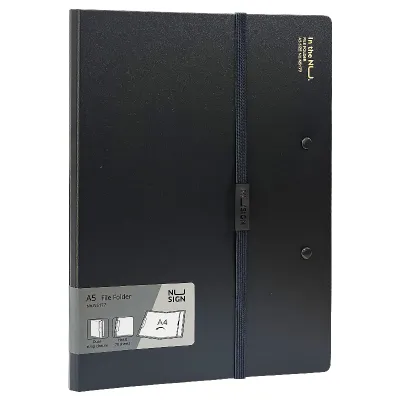

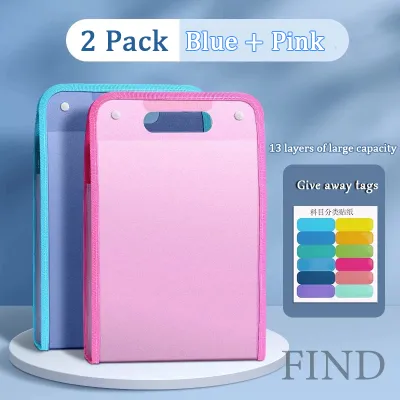
Prices are valid at publication and may change. Please refer to the product page for the latest price.
Always check the internal dimensions of a folder or binder rather than relying solely on its external cover size. If you frequently use plastic sheet protectors or index tab dividers, the binder or folder must be wide enough to fully cover these accessories. If the cover is too narrow, the plastic tabs or sheet edges will protrude past the binder boundary, leading to bent edges, accumulated dust, and premature wear.
Capacity and Spine Width
Matching document volume to the correct spine width is essential for maintaining the structural integrity of both the files and the binder. A binder with a 25 mm (1-inch) spine typically accommodates up to 175 sheets of standard 80 GSM paper, while a 50 mm (2-inch) spine holds around 375 sheets, and a heavy-duty 75 mm (3-inch) spine can manage up to 500 sheets or more.
Overstuffing a binder or folder puts excessive strain on the binding mechanisms, causing rings to gap or folder seams to split. Conversely, underfilling a high-capacity binder allows pages to sag and slump, which can warp the paper over time. For active daily files, select narrow, lightweight folders that are easy to carry; for archival storage, invest in wide-spined binders designed to support heavy, static paper loads.
Material Durability
The tropical climate of the Philippines introduces environmental challenges like high relative humidity, which can severely affect paper-based storage. Traditional cardboard or pressboard binders absorb moisture from the air, making them prone to warping, structural softening, musty odors, and mold growth if stored in non-air-conditioned rooms.
For areas with high humidity or minimal climate control, polypropylene (plastic) covers are highly recommended. Polypropylene is moisture-resistant, easy to wipe clean, and does not support mold growth, making it ideal for long-term durability. If your office prefers the professional, rigid look of traditional cardboard binders, ensure they are fully wrapped in a protective vinyl or plastic laminate layer to seal out environmental moisture.
Binding and Punching Mechanisms
Ensure that the binding mechanism of your chosen binders matches the hole-punching standards used in your office. The standard configurations are 2-hole, 3-hole, and 4-hole mechanisms, with 2-hole systems being highly prevalent for archival lever arch files and 3-hole or 4-hole systems favored for standard ring binders.
Using mismatched equipment—such as trying to force a 2-hole punched document into a 3-ring binder—wastes time and damages the paper. Verify that your office’s heavy-duty paper punches are adjustable or perfectly aligned with the ring spacing of your binder inventory before making a bulk purchase.
Essential Binder Types for Heavy-Duty and Archival Storage
Heavy-duty binders serve as the backbone of an office’s archival and long-term storage system. These binders are designed to secure large volumes of punched documents, protecting them from physical damage, dust, and light exposure over years of storage.

When document volumes exceed the practical limits of standard folders, transitioning to rigid-cover binders is necessary. These tools keep thick stacks of paper upright on shelves, maximizing vertical storage space and keeping archives neat and professional.
Lever Arch Files
Mechanism and Capacity Lever arch files utilize a heavy-duty metal arch mechanism operated by a mechanical lever. When the lever is pressed down, the high-capacity metal arches open wide, allowing you to insert large blocks of paper easily. A metal compressor bar is then clamped down over the rings to press the pages flat, securing up to 500 to 600 sheets of paper within a single binder.
Ideal Scenarios These files are the standard choice for high-volume, static archiving. They are highly suited for storing end-of-year financial records, Bureau of Internal Revenue (BIR) tax compliance documents, completed project blueprints, and historical human resource files where pages are rarely added or removed once filed.
Limitations Due to their heavy construction and wide spines, lever arch files are bulky and heavy when fully loaded. Opening the rings requires a two-handed operation, making them less convenient for quick, daily page updates. They also require deep shelving to accommodate their wide footprint.
Purchasing Checklist
- Metal Compressor Bar: Ensure the bar has a sturdy locking mechanism that holds paper firmly without slipping.
- Rado Slots: Check for metal-reinforced slits on the front cover that allow the binder rings to lock through the cover when closed, keeping the binder stable and upright on shelves.
- Metal Shoe: Look for a metal trim along the bottom edges of the binder covers to prevent the cardboard from fraying when slid across rough steel or wooden shelving.
- Spine Label Pocket: Verify there is a clear plastic pocket on the spine to slide in printed labels, allowing the binder to be easily repurposed for future projects.
D-Ring and O-Ring Binders
D-Ring Advantages D-ring binders feature rings shaped like the letter “D,” which are mounted directly onto the back cover of the binder rather than the spine. This design allows the entire stack of punched pages to lie completely flat when the binder is open, reducing stress on the punched holes and preventing the paper from curling. D-ring binders are excellent for active reference manuals, employee handbooks, and training materials that are opened and read frequently.
O-Ring Characteristics O-ring binders are a classic, cost-effective option where circular rings are mounted directly onto the spine. While highly suitable for lighter document loads and temporary project files, O-ring binders cause the paper to ride up the curve of the ring when the binder is closed. This increases the tension on the inner margins of the paper, making the pages more prone to tearing if the binder is filled to capacity.
Locking Mechanisms When selecting ring binders for mobile use or frequent transport, look for models equipped with locking ring triggers. These mechanisms require a deliberate press of a lever to open the rings, preventing them from accidentally bursting open and spilling pages if the binder is dropped or packed tightly into a travel bag.
Limitations Never exceed the manufacturer’s stated sheet capacity for any ring binder. Overfilling causes the interlocking teeth of the rings to misalign, creating sharp gaps that snag and tear the paper when you attempt to turn the pages.
Essential Folder Types for Daily Access and Active Files
Active office environments require agile filing solutions that do not depend on hole-punching. Quick-access folders allow team members to sort, review, and transport documents rapidly throughout the workday.
These unpunched options are designed for high-frequency handling and ease of use. They facilitate quick visual identification, helping employees locate active project files directly from their desks or sorting trays.
Manila and Pocket Folders
Standard Manila Folders Manila folders are the foundational tool for basic document categorization and desk drawer organization. They are available with tabbed edges—such as 1/3-cut or 1/5-cut tabs—which allow you to write clear category names that remain visible when the folders are filed in a drawer. Untabbed variations are also available, which are better suited for lateral shelf filing where color-coded adhesive labels are applied to the side edges.
Pocket Folders Pocket folders feature interior pockets on one or both sides of the inner covers, designed to hold loose, unpunched documents securely. Many models include dedicated die-cut slots on the inner pockets to hold business cards, making them excellent for client presentations, contract signings, or onboarding packets.
Material Verification When purchasing paper-based folders, check the paper weight, which is typically measured in GSM (grams per square meter) or point thickness (such as 11-point or 14-point stock). For folders handled daily, select a heavier stock of at least 230 GSM to prevent the tabs and corners from folding, tearing, or fraying under constant use.
Limitations Standard paper folders provide minimal protection against liquid spills, grease, or heavy impacts. They are not suitable for long-term archival storage unless they are placed inside secondary protective containers, like plastic storage boxes or filing cabinets.
Expanding Files and Accordions
Multi-Pocket Organization Expanding files, often called accordion files, feature multiple internal pockets divided by plastic or heavy paper dividers. This design allows you to sort multi-stage documents, such as monthly utility bills, supplier invoices, or progressive project receipts, into distinct, labeled categories within a single portable unit.
Closure Mechanisms
- Elastic Band Closures: These utilize a flexible cord that loops over the front cover, allowing the folder to expand naturally and accommodate overfilling while keeping the contents bound.
- Snap or Buckle Closures: These feature rigid plastic latches that offer a secure lock, making them excellent for transport, though they limit the maximum expansion of the folder.
Spine Expansion Look for expanding files equipped with reinforced gussets along the sides and bottom. These gussets allow the spine of the folder to expand outward evenly as more documents are added, preventing the bottom corners from splitting under the weight of heavy paper stacks.
Purchasing Checklist
- Pocket Count: Determine the number of sections required (e.g., 12 pockets for monthly sorting, or 24 pockets for alphabetical filing).
- Divider Material: Select durable polypropylene dividers over thin paper dividers to prevent tearing at the tabs.
- Customizable Tabs: Verify that the file includes removable, write-on tab inserts or pre-printed alphabetical/monthly labels for quick setup.
Specialty Organizers for Presentation and Reference Materials
Standard binders and folders can sometimes compromise the presentation quality or physical safety of specialized documents. When dealing with high-value reference sheets, marketing materials, or cabinet-based filing systems, specialty organizers are required.
These specialized tools are engineered to protect documents from frequent physical contact, ensure high readability under office lighting, and integrate seamlessly with dedicated office furniture.
Clear Books and Display Books
Fixed vs. Refillable Sleeves Display books feature clear plastic sleeves bound into a cover to protect documents from fingerprints, dust, and moisture. Fixed-sleeve display books have a set number of pockets (typically 20 or 40) welded directly to the spine, offering a slim profile ideal for finalized sales portfolios, restaurant menus, or standard operating procedures. Refillable display books feature a ring or clip mechanism that allows you to add, remove, or rearrange clear sleeves as your reference materials evolve.
Finish Options
- Glossy Sleeves: These offer high transparency and enhance color contrast, making them excellent for displaying photographs, design portfolios, and vibrant marketing materials.
- Anti-Glare/Matte Sleeves: These feature a textured surface that diffuses light, reducing reflections from harsh overhead office fluorescent lights, which makes text-heavy reports and reference manuals much easier to read.
Limitations Fixed-sleeve display books cannot be expanded beyond their original pocket count. Additionally, forcing thick cardstock or multiple sheets of paper into a single tight plastic sleeve can stretch the seams, causing the plastic to cloud or tear.
Suspension and Hanging Files
Cabinet Integration Suspension files, or hanging folders, feature built-in metal or plastic rods with hooks on both ends. These hooks rest on parallel rails inside deep filing cabinet drawers, allowing the folders to slide smoothly back and forth. This setup keeps documents perfectly vertical and prevents them from slumping, sliding, or getting lost at the bottom of the drawer.
Rail Compatibility Before purchasing hanging folders, measure the internal width of your filing cabinet drawers. Standard filing cabinets in the Philippines are typically sized for either Letter (short) or Legal (long) hanging folders. Ensure the suspension folders you buy match the cabinet’s rail spacing, as mismatched folders will either fall off the rails or fail to fit inside the drawer.
Pairing with Inner Folders For an efficient filing system, avoid dropping loose papers directly into a hanging folder. Instead, place standard manila folders inside the hanging folder to group related sub-categories. This allows you to pull out a specific, lightweight manila folder to work at your desk while leaving the primary hanging folder structure intact within the cabinet.
Limitations Hanging files are completely dependent on cabinet or desk drawer rail infrastructure. They lack closed sides and protective covers, making them unsuitable for transporting documents outside the office.
Quick Comparison: Matching Filing Types to Office Tasks
| Product Type | Best Use Case | Typical Capacity | Key Limitation |
|---|---|---|---|
| Lever Arch File | Archival and heavy-duty storage of tax, legal, and financial records | High (Up to 500+ sheets) | Bulky; requires two hands to operate safely |
| D-Ring Binder | Active reference manuals, training guides, and daily project files | Medium to High (175–400 sheets) | Heavier and more expensive than standard O-ring binders |
| O-Ring Binder | Temporary project files, light document loads, and low-frequency storage | Low to Medium (100–250 sheets) | Pages do not lie flat; prone to tearing if overfilled |
| Manila/Pocket Folder | Quick desk sorting, active client files, and meeting presentations | Low (Up to 50 sheets) | Minimal physical protection against moisture and spills |
| Expanding File | Sorting monthly utility bills, receipts, and multi-stage projects | Medium (150–300 sheets) | Can become heavy and difficult to carry when filled to capacity |
| Clear Book | Client presentations, portfolios, and frequently read reference sheets | Low to Medium (20–80 pages) | Fixed-sleeve models cannot be expanded or reorganized |
| Suspension File | High-volume cabinet drawer filing and upright categorization | High (Up to 150 sheets per folder) | Requires compatible cabinet rails; not portable for travel |
Frequently Asked Questions (FAQ)
How do I prevent my ring binder pages from tearing at the holes?
To prevent punched pages from tearing under frequent use, apply self-adhesive hole reinforcements (ring reinforcers) to the punched margins of highly active sheets. Avoid overfilling the binder beyond its recommended sheet capacity, as excessive paper volume increases friction against the rings. Finally, choose D-ring binders or lever arch files for heavy document loads, as their flat-laying design distributes physical stress much more evenly across the paper margins than standard O-rings.
What is the best way to store thermal receipts in office folders?
Thermal paper is highly sensitive to heat, light, and friction, which causes the printed text to fade over time. Do not store thermal receipts loose in standard paper folders where they can rub against other documents. Instead, place them inside archival-quality, acid-free polypropylene pockets or clear sleeves to protect them from environmental exposure. For critical financial records and tax compliance, photocopy or digitally scan the thermal receipts before filing them, as the original thermal print will eventually fade even under optimal storage conditions.
How should I label my office folders and binders for easy retrieval?
Establish a standardized labeling system using printed spine inserts for binders and clear, typed adhesive labels for folder tabs. Color-code your labels by department (e.g., blue for finance, green for HR) or by calendar year to enable quick visual sorting. Avoid writing directly on reusable plastic binders or folders with permanent markers; instead, utilize slide-in spine pockets or removable adhesive labels so the filing supplies can be easily repurposed for future projects.
Community discussion
Share your experience or ask a question. Comments are reviewed before publication.