
The Short Answer: Choosing Your Clipboard Orientation
When organizing your workspace or preparing for field tasks, choosing between a clipboard horizontal layout and a traditional vertical one depends entirely on the structure of your documents and your physical working environment. Neither option is universally superior; instead, each serves a distinct operational purpose. Selecting the wrong orientation can lead to crumpled paper edges, awkward writing angles, and inefficient data entry.
A horizontal clipboard is the ideal choice for wide documents, landscape-oriented forms, spreadsheets, and design sketches. It provides a broad, stable base that supports lateral writing movements and keeps wide pages from sagging over the sides. Conversely, a vertical clipboard remains the industry standard for portrait-oriented forms, standard letters, and sequential reading tasks. It is highly optimized for single-handed holding while standing or walking.
To make the right choice, evaluate your primary daily tasks. If your workflow involves data-heavy tables, horizontal charts, or landscape logs, a horizontal board will prevent document damage and ease your writing posture. If you primarily handle standard applications, medical charts, or legal documents, a vertical board will align seamlessly with your existing filing systems and carrying bags.
Products mentioned in this guide
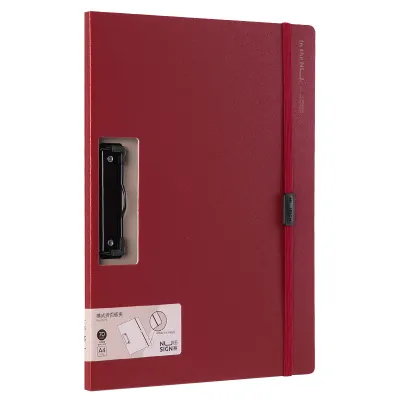
Prices are valid at publication and may change. Please refer to the product page for the latest price.
Analyzing the Clipboard Horizontal and Vertical Layouts
To understand why orientation matters, one must look at the structural differences between these two tools. The physical distinction lies in where the clip is mounted relative to the board’s dimensions. On a traditional vertical clipboard, the clamping mechanism is attached to the shorter top edge, keeping the board in portrait orientation. On a clipboard horizontal design, the clip is mounted along the longer edge, turning the writing surface into a landscape platform.

This structural shift fundamentally alters the board’s center of gravity. When you hold a vertical clipboard from the bottom or side, the weight is distributed along a narrow, vertical axis, making it easy to balance against your forearm. A horizontal board spreads its weight across a wider lateral plane. While this provides a more spacious surface for resting your hand, it requires a different grip to maintain stability, especially when writing without a desk.
Paper size standards also play a critical role in how these boards perform. In the Philippines, offices and schools frequently alternate between three major paper formats: Letter (8.5 x 11 inches), A4 (210 x 297 mm), and Folio (8.5 x 13 inches, commonly referred to locally as long bond paper). A vertical board accommodates these sizes naturally in their native portrait layouts. However, when these same sheets are printed in landscape format for spreadsheets or schedules, placing them on a vertical board leaves the side margins completely unsupported, causing the paper to floppy, crease, or tear.
Key Factors When Comparing Clipboard Orientations
Selecting the right clipboard orientation requires analyzing several practical dimensions of your daily work. Beyond mere aesthetics, the choice impacts document protection, physical comfort, and how easily you can store your tools at the end of the day.
Document Type and Paper Size Compatibility
The layout of your printed forms is the most critical factor in this decision. Standard vertical papers, such as contracts, application forms, and letters, are designed to be read from top to bottom. Placing these on a vertical board ensures that the entire sheet is supported from the top clip down to the bottom margin. If you attempt to clip a portrait document onto a horizontal board, the bottom half of the paper will hang off the edge, making it impossible to write on the lower sections without placing the board on a flat table.
However, many specialized industries rely on landscape documents. For instance, engineering schematics, architectural sketches, financial ledgers, and logistics shift logs are almost always formatted horizontally to accommodate wide columns of data. A horizontal clipboard is necessary for these tasks because it supports the entire width of the paper. Without this lateral support, the left and right edges of your landscape documents will fold backward under the pressure of your pen, leading to illegible entries and damaged records.
Furthermore, using the wrong board orientation can obscure critical information. If you clamp a landscape sheet into a vertical board, the clip often covers essential headers, column titles, or page numbers along the side margin. A horizontal board keeps the clip positioned at the true top of your landscape document, ensuring all data fields remain visible and accessible.
Workspace Ergonomics and Desk Space
The physical environment where you write dictates how comfortable your clipboard will be during extended use. If you work at a cramped desk, a shared counter, or a narrow cubicle, desk depth is often limited. A vertical clipboard requires more vertical clearance, which can cause it to bump into computer monitors, desk shelves, or keyboard trays. A horizontal clipboard, with its lower profile, fits more easily into shallow workspaces, allowing you to write comfortably without rearranging your desk setup.
For professionals who write while standing or walking—such as warehouse inventory checkers, construction supervisors, or medical staff on ward rounds—ergonomics are even more critical. When holding a vertical clipboard, you can rest the bottom of the board against your hip or cradle it along your forearm, using your non-writing hand to support the base. This position is highly stable and minimizes wrist fatigue over long shifts.
Writing on a horizontal clipboard while standing presents different physical challenges. Because the board is wider, holding it by the side can create an uneven lever arm, putting extra strain on your wrist. To write comfortably on a horizontal board while mobile, you must support it from underneath near the center of gravity. This requires a wider arm posture, which may feel less secure if you are navigating crowded corridors or busy outdoor environments.
Writing Comfort and Field of Vision
The mechanics of writing and reading differ significantly between portrait and landscape orientations. When writing on a vertical board, your hand moves in relatively short horizontal strokes, moving downward as you complete each line. This matches the natural visual tracking pattern of reading standard text blocks. However, if you are filling out dense, multi-column forms, your eyes must constantly jump across narrow rows, which can lead to alignment errors.
A horizontal board encourages a wider lateral arm movement. This layout matches our natural binocular field of vision, which is wider than it is tall. When tracking data across a wide spreadsheet, a horizontal board allows your eyes to follow rows smoothly from left to right without the interruption of page breaks or cramped columns. This makes horizontal clipboards highly efficient for data entry, auditing, and graphing tasks where spatial relationships across a wide plane are important.
Additionally, the horizontal layout provides a larger physical area to rest your palm while writing near the margins. On a vertical board, writing near the left or right edge often forces your hand to hover unsupported in the air, resulting in shaky handwriting. The extra width of a horizontal board ensures your wrist remains fully supported even when writing at the outer limits of the page.
Storage, Filing, and Portability
Your workflow does not end when the writing is finished; you must also consider how the clipboard and its documents fit into your broader storage and filing systems. Vertical clipboards are highly standardized and align perfectly with standard office infrastructure. They slide easily into vertical filing cabinets, desk organizers, and standard backpacks or briefcases. They also match the dimensions of standard plastic sleeves and folder dividers.
Horizontal clipboards present unique storage challenges. Because of their extra width, they may not fit into standard vertical backpack compartments or laptop sleeves without sticking out of the top. In filing cabinets, a horizontal board must be stored sideways, which can make index tabs difficult to read and may require wider drawer configurations. If your office relies heavily on vertical filing systems, using horizontal boards will require dedicated storage bins or shelves designed for landscape media.
For field workers who travel between sites, portability is a key concern. A vertical board is generally easier to pack into a compact bag. If you choose a horizontal board for its writing benefits, you must ensure your carrying bags are wide enough to accommodate the board without bending its corners or damaging the clip mechanism.
The Decision Framework: Which One Do You Need?
To help you choose the correct tool for your specific needs, use this practical decision framework based on your document types, workspace, and storage preferences.
- Choose a horizontal clipboard if:
- You primarily work with landscape-oriented documents, wide financial ledgers, or multi-column data sheets.
- Your tasks involve drawing, sketching, or plotting graphs that require a wide, continuous horizontal surface.
- You work at a shallow desk or counter where vertical clearance is restricted by monitors or shelving.
- You need maximum palm support when writing near the left and right margins of your pages.
- Choose a vertical clipboard if:
- Your daily paperwork consists of standard portrait A4, Letter, or Folio (long bond) forms, such as contracts, checklists, or patient records.
- You frequently write while standing, walking, or moving through active work zones where cradling the board against your forearm is necessary.
- You rely on standard backpacks, briefcases, or vertical filing cabinets for daily transport and storage.
- You need a highly portable, compact writing surface that is easy to pack and carry.
- Verify first if:
- Your workplace uses proprietary forms with pre-punched holes or unique margins. Ensure the clip placement of your chosen board will not obstruct barcodes, signature blocks, or essential headers.
- Your storage solutions can accommodate the wider dimensions of a horizontal board without causing damage to the board or surrounding files.
Maximizing Your Clipboard Setup
Once you have selected the ideal orientation, maximizing its utility requires paying close attention to the board’s construction and mechanical components. The clip itself is the most critical moving part. For general office use, a low-profile flat spring clip is highly recommended because it allows boards to be stacked easily and fits into tight bag compartments without catching. For heavy-duty environments or thick document stacks, a high-capacity butterfly clamp provides stronger holding power, though it adds significant bulk to the board’s profile.
Material selection is equally important, especially when operating in tropical climates. In the Philippines, high relative humidity can severely impact certain materials over time:
- Hardboard / MDF: While highly economical, basic compressed wood fibers are susceptible to moisture absorption. In humid conditions, untreated hardboard can warp, swell, or soften, losing the rigid surface required for smooth writing.
- Plastic / Acrylic: These materials are completely impervious to humidity and water, making them excellent for outdoor or industrial use. They are lightweight and easy to clean, though low-grade plastics can crack if dropped on hard surfaces.
- Aluminum: This is the most durable option for demanding environments. Aluminum clipboards are rigid, rust-resistant, and provide an exceptionally smooth writing surface. They are ideal for construction sites, warehouses, and field research, though they carry a higher price point.
Finally, always verify the exact physical dimensions of the board before purchasing. A quality clipboard should extend at least 10 to 15 millimeters beyond the edges of your target paper size on all sides. This extra border acts as a protective bumper, preventing the edges of your documents from fraying, tearing, or collecting dirt during daily handling.
Frequently Asked Questions (FAQ)
Can I use standard vertical paper on a horizontal clipboard?
While you can physically clamp a vertical sheet onto a horizontal clipboard, it is highly inefficient for writing. If you clip the paper along its short top edge, the bottom half of the sheet will extend past the bottom of the board, leaving it completely unsupported. If you clip the paper along its long side edge, the document will be rotated 90 degrees, forcing you to write sideways or read rotated text. For standard vertical documents, a dedicated vertical clipboard is always recommended to ensure proper paper support and legibility.
Are horizontal clipboards more expensive than vertical ones?
Horizontal clipboards are not inherently more expensive to manufacture, as they use similar amounts of raw materials. However, because vertical clipboards are produced in massive quantities for standard school and office markets, they benefit from economies of scale and are highly commoditized. In the Philippines, standard vertical plastic or wooden clipboards typically range from ₱50 to ₱150. Horizontal clipboards, being specialty items, are less common in local retail shops and may carry a slight price premium, often ranging from ₱120 to ₱300 depending on material quality and brand availability.
Community discussion
Share your experience or ask a question. Comments are reviewed before publication.