
Selecting the right resin-coated (RC) photo paper for your Epson or Canon inkjet printer is essential for achieving high-quality prints at home or in the office. RC photo paper features a specialized plastic barrier that prevents ink from saturating the paper base, resulting in sharp details, vibrant colors, and excellent durability. However, achieving these results requires matching the paper’s physical characteristics and surface finish to your printer’s specific ink system and paper handling capabilities.
To make an informed purchase, you must evaluate the compatibility between your printer’s ink (dye-based or pigment-based) and the paper’s microporous coating. Additionally, selecting the appropriate surface finish—whether glossy, luster, or matte—and verifying physical specifications like weight (GSM) and sheet size will prevent common issues such as paper jams, ink smudging, and color distortion. This guide outlines the essential steps to verify compatibility and select a suitable RC photo paper for your printing setup.
Understanding RC Photo Paper and Inkjet Compatibility
Resin-coated (RC) photo paper is engineered with a high-quality paper core encased between two thin layers of polyethylene plastic. The top layer is treated with a highly sensitive microporous coating designed to receive and lock in inkjet inks. This unique multi-layered structure prevents moisture from penetrating the paper fibers, which allows the paper to dry almost instantly, resist water droplets, and remain flat without curling even under heavy ink coverage.
Products mentioned in this guide
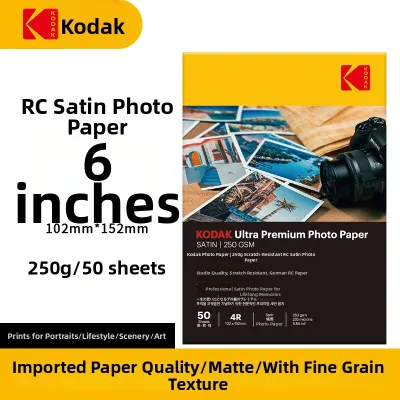
18 Lazada user ratings
The print quality is great. It is very well-made. It's also quite easy to use.
The print quality is great. It works very smoothly.
The paper quality is good and worth getting.
The texture is actually quite nice.
I have repurchased this many times.
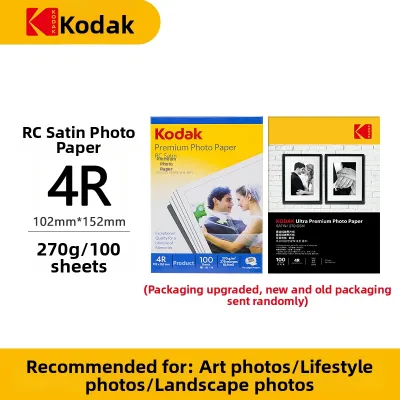
15 Lazada user ratings
Was a bit hesitant at first but this proved me right. The quality exceeded my expectations for the price. Very impressed!
Bought this as a gift and the recipient loved it. Great quality and reliable. Highly recommend!
Couldn't resist this deal and I'm thrilled with my purchase. Everything was top-tier.
The item arrived in perfect condition and is very well-presented.
The item is in great condition and looks very neat.
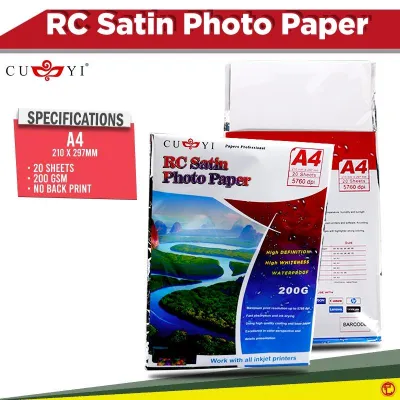
940 Lazada user ratings
all goods po. salamat kay seller, lazada at delivery team. handling is great, walang yupi ang items ko. sa uulitin po. ubusin ko mun mga 'to…Read full reviewShow less
all goods po. salamat kay seller, lazada at delivery team. handling is great, walang yupi ang items ko. sa uulitin po. ubusin ko mun mga 'to, bili ulit ako after.
I love the quality of the photopaper. Tagal ko na naghahanap ng ganito. And thank you also seller for the freebie. 🥰 Will order again ng iba…Read full reviewShow less
I love the quality of the photopaper. Tagal ko na naghahanap ng ganito. And thank you also seller for the freebie. 🥰 Will order again ng ibang sizes.
Good condition at sobrang safe ang photopaper" job well done sa seller. oorder ulit ako sa shop na to. Thank you seller and kuya rider. Godb…Read full reviewShow less
Good condition at sobrang safe ang photopaper" job well done sa seller. oorder ulit ako sa shop na to. Thank you seller and kuya rider. Godbless!
item is as expected. thank you seller for free items,so generous. Nice photo paper. Packed well. thank you so very much.
mas mura tong photopaper compare mo sa mga nabebenta sa bookstore. quality sya at hindi lukot nung dumating
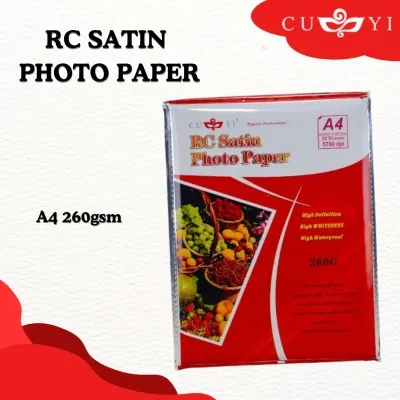
5,655 Lazada user ratings
This product exceeded my expectations in both quality and performance. It's well-designed, user-friendly, and does exactly what it promises.…Read full reviewShow less
This product exceeded my expectations in both quality and performance. It's well-designed, user-friendly, and does exactly what it promises. I’ve been using it regularly and have had no issues so far. The materials feel durable, and the functionality is impressive for the price. It arrived on time and was packaged securely. Overall, I’m very satisfied with this purchase and would definitely recommend it to others looking for a reliable and affordable option. Great value for money!
this is perfect to preserved a memory☺️ Perfect size for my needs, High-quality photo paper, if i were you u would definitely use this satin …Read full reviewShow less
this is perfect to preserved a memory☺️ Perfect size for my needs, High-quality photo paper, if i were you u would definitely use this satin photo paper
Professional-grade printing at home, The recycled paper feature is a plus, Excellent print results, Highly recommended for photo enthusiasts…Read full reviewShow less
Professional-grade printing at home, The recycled paper feature is a plus, Excellent print results, Highly recommended for photo enthusiasts,
Very satisfied with the paper's texture, Great for printing photos, Excellent print results, Impressive thickness and weight,
Durable and long-lasting, Impressive thickness and weight, Very satisfied with the paper's texture,
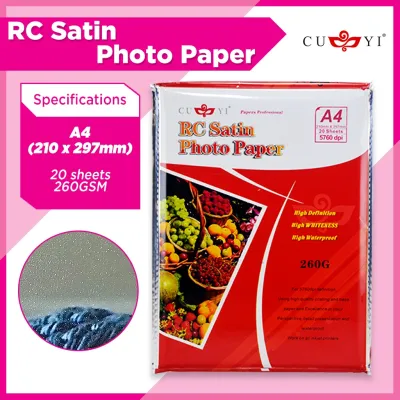
17 Lazada user ratings
Quality:maganda, makapal, sulit Ease of Use:maganda sya gamitin sa cake Appearance: good quality, recomended mura na maganda pa ang kalidad.
Great value for money, Excellent packaging, UV dye ink compatible, Perfect for photo prints, Water resistant surface, Fast shipping service,
High quality photo paper, Fast shipping service, Excellent packaging, Genuine product, Perfect for photo prints, Satin finish texture,
ayos po maganda packaging kaya siguradong mauulit ang pagbili ko
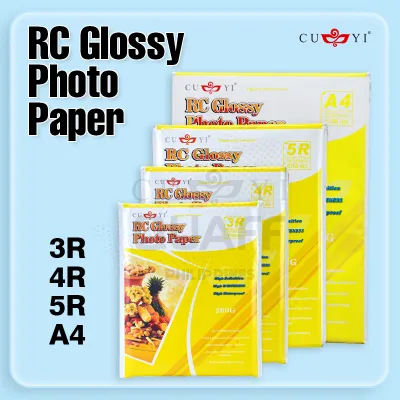
305 Lazada user ratings
High-quality glossy finish, Great value for money, Prints look professional, Excellent ink absorption, Durable and long-lasting, Vibrant col…Read full reviewShow less
High-quality glossy finish, Great value for money, Prints look professional, Excellent ink absorption, Durable and long-lasting, Vibrant colors on the prints,
High-quality glossy finish, Prints look professional, Resin coated for smudge-free prints, Vibrant colors on the prints,
Professional-grade photo paper, Excellent ink absorption, Durable and long-lasting, Durable and long-lasting,
Professional-grade photo paper, Great value for money, High-quality glossy finish, Perfect for framing,
Prices are valid at publication and may change. Please refer to the product page for the latest price.
Inkjet printers primarily use either dye-based or pigment-based inks, and understanding which type your Epson or Canon printer utilizes is critical. Dye-based inks, common in standard home models and continuous ink supply system (CISS) printers like the Epson EcoTank or Canon PIXMA G-series, consist of fully dissolved colorants. These inks flow smoothly into the microporous structure of RC paper, yielding highly vibrant colors, smooth gradients, and a highly reflective finish.
Pigment-based inks, typically found in professional-grade photo printers, consist of solid color particles suspended in a liquid carrier. These particles sit on top of the paper’s surface rather than soaking deep into the coating. While pigment inks offer excellent longevity and resistance to fading, they require high-quality RC paper with compatible microporous structures to prevent “bronzing,” a phenomenon where light reflects unevenly off the printed surface.
Before purchasing any RC photo paper, consult your specific Epson or Canon printer manual to verify the supported ink types and media pathways. The manual will specify whether your device is optimized for dye or pigment inks and outline the maximum paper thickness the internal rollers can safely pull. Adjusting your printer driver settings to match the paper type is equally important, as this calibration controls the exact volume of ink deposited onto the sheet.
Matching RC Photo Paper Finishes to Your Printing Needs
The surface finish of your RC photo paper significantly influences the visual impact and physical durability of your printed images. Glossy RC paper features a highly reflective, smooth surface that maximizes color saturation, contrast, and image sharpness. This finish is suitable for vibrant commercial prints, family snapshots, and high-contrast colorful graphics where maximum visual pop is desired. However, glossy surfaces are highly susceptible to glare under direct lighting, easily show fingerprints, and can stick to the glass of a picture frame if mounted without a mat board.

Luster, often referred to as semi-gloss, satin, or pearl, is a popular choice for professional portraiture, wedding albums, and fine art photography. This finish features a subtle, pebbled texture that effectively diffuses light, reducing distracting reflections while maintaining deep black tones and rich color saturation. Luster paper offers excellent resistance to fingerprints and handling marks, making it highly practical for portfolios and prints that will be handled frequently.
Matte and silk finishes provide a completely non-reflective, textured surface that is well-suited for black-and-white photography, artistic portfolios, and text-heavy layouts. Because matte paper lacks a shiny topcoat, it eliminates glare entirely, allowing prints to be viewed clearly from any angle under bright gallery lighting. The trade-off is a slight reduction in color vibrancy and maximum black density compared to glossy or luster papers, but it offers a classic, tactile quality that enhances fine details and artistic textures.
Key Specifications to Check Before Purchasing
Physical compatibility with your printer’s hardware is just as important as ink compatibility. You must verify the paper size and the printer’s feed path before making a purchase. Standard consumer inkjet printers often feature front-loading paper cassettes with tight, curved roller paths that can easily bend or jam stiff, heavy photo papers. For thicker RC media, utilize the rear paper feed slot or manual bypass tray if your Epson or Canon printer is equipped with one, as these paths provide a straighter line of travel.
Paper weight is measured in grams per square meter (GSM), which directly indicates the thickness and stiffness of the sheet. RC photo papers generally range from 200 gsm to 300 gsm or more. While heavier papers feel more substantial and professional, you must cross-reference your printer’s maximum GSM capacity in the user manual. Standard home printers typically handle up to 260 gsm through their rear trays, whereas professional photo printers can easily feed media up to 300 gsm and beyond. Attempting to feed unsupported heavy paper can lead to roller slippage, misfeeds, or physical damage to the internal mechanism.
Given the tropical climate and high relative humidity in the Philippines, proper packaging and storage specifications are vital. When browsing online listings, look for RC photo paper that is shipped in moisture-resistant, resealable plastic sleeves inside rigid cardboard packaging. This protection prevents the paper from absorbing atmospheric moisture before printing, which can cause the edges to warp or negatively affect ink absorption and drying times. Store your unused paper flat in a cool, dry environment away from direct sunlight.
Evaluating Online Listings and Verifying Quality
When shopping on e-commerce platforms or online marketplaces, it is important to look past vague marketing terms like “ultra-premium” or “studio-grade.” Instead, focus on verifying concrete technical specifications in the product description. Ensure the listing explicitly states the exact GSM, precise dimensions (such as 4R, A4, or A3), and clearly identifies the coating type as “Resin Coated” or “microporous.” If a listing fails to specify these details, the paper may be a basic cast-coated paper, which lacks the water resistance and rapid drying properties of true RC media.
Because smoothness, bleed resistance, drying speed, and water resistance depend on the exact combination of your printer’s ink formulation and the paper’s coating, you should always perform a trial run. Avoid purchasing bulk packs of 100 or 500 sheets initially. Instead, purchase a small trial pack of 20 sheets to test compatibility with your specific printer model.
To conduct a proper trial, print a high-resolution test image containing a mix of vibrant colors, deep blacks, and fine text using your printer’s high-quality photo settings. Immediately after printing, observe the drying speed; high-quality RC paper should dry almost instantly to the touch. Inspect the print under a bright light to check for ink pooling, bleeding along sharp edges, or uneven color patches. If the ink smudges easily or pools on the surface, the paper’s coating may be incompatible with your ink type, or your printer driver settings may need adjustment. If issues persist after adjusting settings, stop using the paper and consult your printer manufacturer’s support channels.
Frequently Asked Questions (FAQ)
Can I use third-party RC photo paper in my Epson or Canon printer?
Yes, third-party RC photo papers are generally compatible with both Epson and Canon inkjet printers, provided the paper’s weight, size, and coating type align with your printer’s hardware specifications. Using third-party paper does not automatically void your printer’s warranty; however, printer manufacturers typically do not cover print-head damage or feed issues caused directly by incompatible or low-quality media. When switching to a new third-party brand, always perform a nozzle check and print a small test pattern first to verify that the ink absorption and feed alignment are correct before proceeding with large print jobs.
Why do my printed photos look different from my screen?
This discrepancy occurs because computer and mobile screens display colors using the RGB (Red, Green, Blue) light model, whereas inkjet printers produce colors using the CMYK (Cyan, Magenta, Yellow, Black) ink model, which has a naturally narrower color gamut. Furthermore, digital screens are backlit and often uncalibrated, making images appear brighter and more vibrant than they will look on physical paper. To minimize this difference, ensure you select the correct paper type preset in your printer driver settings, which calibrates the ink density for that specific surface. For highly accurate color reproduction, you can download and apply specific ICC profiles provided by the paper manufacturer for your exact printer model.
Community discussion
Share your experience or ask a question. Comments are reviewed before publication.