
Choosing the right security paper requires balancing the level of fraud protection your document needs with the physical capabilities of your printing equipment. Whether you are issuing academic diplomas, printing corporate checks, or producing official administrative forms, the ideal paper must deter unauthorized duplication while remaining compatible with your office or commercial printers. By matching specific security features—such as watermarks, chemical sensitivities, and ultraviolet fibers—to your document’s risk profile, you can secure your organization’s credentials without overspending.
Understanding Security Paper Features and Specifications
Security paper serves as a physical barrier against counterfeiting, tampering, and unauthorized duplication. Unlike standard office paper, it incorporates specialized manufacturing techniques that make alterations immediately visible, allowing you to select a stock that aligns with your security requirements and budget.
Visual and covert security elements are the primary indicators of authenticity. Watermarks pressed into the paper pulp during manufacturing are visible when held to the light and cannot be photocopied. Security threads are embedded directly into the paper fibers, while microprinting consists of tiny text that appears as a solid line to the naked eye. Ultraviolet (UV) reactive fibers remain invisible under normal lighting but glow brightly under blacklight, providing an excellent covert verification method.
Products mentioned in this guide
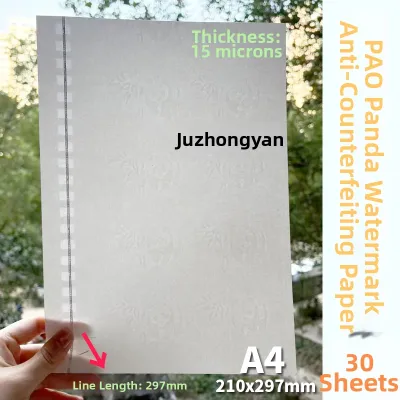
Prices are valid at publication and may change. Please refer to the product page for the latest price.
Physical properties dictate the paper’s durability and tactile quality. Paper weight, measured in grams per square meter (GSM), determines thickness and stiffness. Higher weights feel more premium and resist tearing, making them ideal for long-lasting documents. Additionally, cotton fiber composition enhances the paper’s texture and archival lifespan, while brightness levels affect text contrast.
Print compatibility is another critical factor to verify before purchasing. Some security papers are optimized for laser printers, which use heat to fuse dry toner, while others work best with inkjet printers that rely on liquid ink absorption. Using the wrong paper type can lead to smudging, poor ink adhesion, or printer jams, so always check the manufacturer’s specifications.
Matching Security Paper to Document Scenarios
Selecting the right security paper requires analyzing the specific environment in which the document will be used, handled, and verified. Over-specifying security features for low-risk documents inflates your printing budget, while under-specifying leaves high-value documents vulnerable to fraud. Aligning features with the document’s purpose ensures both cost-efficiency and robust protection.

Academic and Professional Certificates
Academic diplomas, professional licenses, and training certificates require a balance of elegant aesthetics and reliable security. Prioritize tactile and visual features like parchment finishes, pre-printed borders, and elegant watermarks that convey prestige. These elements deter color copier reproduction and enhance the perceived value of the achievement.
The weight of the paper is a key factor in establishing this premium feel. Selecting a heavier stock, typically between 120 GSM and 180 GSM, ensures the certificate remains crisp and does not easily crease during presentation, handling, or framing. This thickness also supports embossed foil seals or heavy ink applications without warping.
Finally, verify that the certificate paper is fully compatible with standard office laser or inkjet printers. Because you will likely print individual names, dates, and serial numbers on pre-designed templates, the paper surface must allow for sharp text definition and rapid ink drying. Conducting a quick trial run helps ensure that the toner or ink adheres permanently without flaking.
Financial Instruments and Checks
Negotiable financial instruments, such as corporate checks and gift certificates, demand the highest level of anti-fraud protection. The primary threat is unauthorized alteration, where fraudsters attempt to change names or monetary amounts. To combat this, select paper treated with chemical-sensitive properties that produce visible stains or reveal hidden warning words when exposed to common solvents, erasers, or ink eradicators.
Ensure that the paper dimensions and layout conform strictly to local banking standards in the Philippines. Check clearing systems often utilize automated optical character recognition (OCR) and magnetic ink character recognition (MICR) technologies, which require precise paper alignment and thickness to prevent processing errors. Using non-compliant paper can result in rejected transactions and administrative delays.
For added security, look for paper that incorporates advanced physical elements such as embedded security threads or holographic foils. These features are incredibly difficult to replicate without industrial-grade manufacturing equipment, providing immediate visual proof of authenticity for bank tellers and cashiers during manual verification.
Government-Style and Official Forms
High-volume administrative documents, such as official permits, licenses, and registration forms, require a cost-effective security solution. Because these forms are printed in large quantities, the cost per sheet is a primary consideration. You can achieve a high level of security without exceeding your budget by choosing paper that features covert elements, such as invisible UV-reactive fibers, which do not interfere with the document’s clean layout.
These forms must also feed smoothly through high-speed commercial or office printers. Security paper with uneven surfaces or excessive chemical coatings can cause frequent paper jams, misfeeds, and printer wear. Opt for a smooth, medium-weight paper (around 80 GSM to 100 GSM) that is specifically rated for high-speed printing to maintain operational efficiency.
Because official forms often serve as permanent records, review the manufacturer’s label to confirm the paper’s archival properties. Acid-free paper made from purified wood pulp or cotton blends resists yellowing and degradation over time. This ensures that the documents remain legible and intact for decades when stored in filing cabinets or archives.
Evaluating Print Compatibility and Handling Requirements
Before committing to a specific security paper, you must evaluate how it performs with your existing printing hardware. Laser printers rely on intense heat and pressure to fuse dry toner to the paper fibers, whereas inkjet printers deposit liquid ink that must dry through absorption. Review your printer’s user manual to confirm its maximum paper weight capacity, and perform a test print with a sample sheet to observe ink drying speed, bleed resistance, and toner adhesion.
Adjusting your printer’s driver settings can significantly improve print quality on specialized security stocks. For example, selecting “Heavy Paper,” “Cardstock,” or “Labels” in your print menu instructs the machine to slow down the feeding speed and increase the fuser temperature. This adjustment ensures that the toner bonds permanently to thick or textured sheets, preventing the text from scratching off during handling.
Proper storage is critical to maintaining the physical and chemical integrity of your security paper, particularly in tropical climates like the Philippines. High humidity can cause paper fibers to absorb moisture, leading to curling, wavy edges, and frequent printer jams. Keep your unused paper stored flat in its original, moisture-resistant packaging inside a temperature-controlled room, and protect light-sensitive or UV-reactive papers from prolonged exposure to direct sunlight to prevent premature fading of the security features.
Building a Purchasing and Verification Checklist
Establishing a structured verification process helps ensure that the security paper you receive matches your exact specifications and quality standards. When your shipment arrives, cross-reference the product label and supplier invoice to confirm key details such as sheet size, paper weight, and the specific list of security features. This initial check prevents costly printing errors caused by using the wrong paper stock.
Next, conduct a physical and visual inspection of several random sheets from the batch. Hold the paper up to a light source to verify the clarity and positioning of the watermarks, and run your hand over the surface to check for consistent texture and thickness. If your paper features UV-reactive fibers, use a handheld blacklight in a darkened room to confirm that the fibers glow brightly and are evenly distributed across the sheet.
For large-scale or high-security orders, always request a physical sample pack from the supplier before placing a bulk order. Testing a few sample sheets on your own office equipment allows you to evaluate print compatibility, ink absorption, and feeding reliability under real-world conditions. This step is the most effective way to protect your budget from ₱1,000s in wasted materials and printing downtime.
Frequently Asked Questions (FAQ)
Can standard office printers handle heavyweight security paper?
Many standard office printers can handle moderately heavy security paper, but you must verify the maximum paper weight capacity in your printer’s user manual. To prevent paper jams and feeding issues with thicker stocks, always use the printer’s manual feed tray or bypass slot rather than the standard paper cassette. If your security paper exceeds your printer’s weight capacity or features complex elements like thick holographic foils, it is best to outsource the printing to a professional commercial service.
How should unused security paper be stored to maintain its integrity?
To preserve the physical and chemical properties of security paper, store it in a cool, dry room away from fluctuating temperatures and high humidity, which are common in tropical climates. Keep the sheets flat inside their original, sealed packaging to protect them from airborne moisture and dust. Additionally, ensure that papers containing UV-reactive fibers or light-sensitive chemical coatings are stored in dark cabinets or opaque containers to prevent premature degradation from prolonged exposure to ambient light and direct sunlight.
Community discussion
Share your experience or ask a question. Comments are reviewed before publication.