
Choosing the right light board requires balancing your specific creative medium with the physical specifications of the device. Whether you are transferring a detailed graphite sketch, aligning animation frames, or practicing delicate calligraphy strokes, the ideal tool must provide consistent illumination without causing eye strain or physical discomfort. By focusing on key factors such as active workspace dimensions, brightness control, and power delivery, you can select a reliable companion for your creative projects.
A dedicated tracing pad replaces inconsistent methods like taping paper to a sunny window or using awkward overhead lamps. It offers a flat, stable, and evenly lit surface that allows you to see through heavy paper stocks with clarity. Understanding how these devices operate and how their features align with your workflow ensures you invest in a tool that enhances your productivity and protects your physical well-being.
Key Factors to Consider When Buying a Light Board
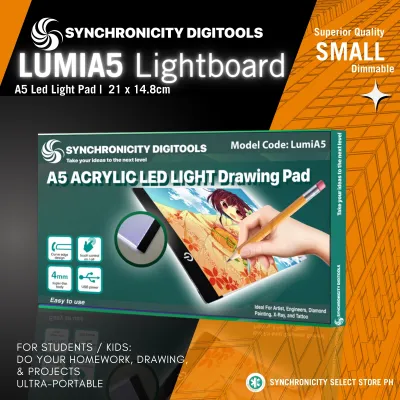
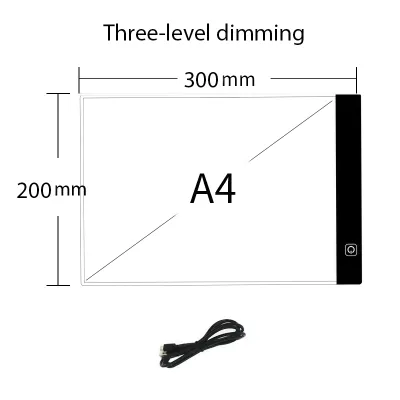
When shopping for a light board, the active illumination area is one of the first specifications you should examine. This is the actual lit portion of the screen, which is often smaller than the overall physical dimensions of the device due to the surrounding bezel. If you primarily work with standard A4 paper, an A4-sized light board is highly portable and fits easily on compact desks. However, if you plan to work on larger illustrations or need extra space for reference sheets, upgrading to an A3 or A2 format prevents your paper from hanging over the edges and creasing.
Products mentioned in this guide
Prices are valid at publication and may change. Please refer to the product page for the latest price.
Brightness adjustability is another critical feature that directly impacts the versatility of your workspace. Look for boards that offer stepless dimming, which allows you to fine-tune the light output by holding down the power button, rather than being limited to three fixed brightness levels. This flexibility is essential when transitioning between thin tracing paper and heavier cardstock, as it lets you increase the illumination to penetrate dense fibers or lower it to prevent glare on lighter sheets.
The power source of your light board determines where and how long you can work comfortably. Many modern light boards utilize a USB connection, allowing you to power them using a laptop, a portable power bank, or a standard wall adapter. This makes them highly portable and convenient for artists who move between studios or work in different environments. For permanent studio setups, a dedicated wall adapter is often preferred because it provides a stable, uninterrupted power supply that is less prone to flickering during long drawing sessions.
Finally, pay close attention to the surface material and the design of the edge bezel. A high-quality acrylic surface is durable, lightweight, and resistant to minor impacts, making it the standard choice for most consumer light boards. The bezel should ideally be flush with the illuminated surface, creating a completely flat plane. A flush design allows you to slide your hands and paper smoothly across the edges without catching, and it makes taping your workpieces down much easier.
Matching Light Board Features to Your Art Style
Different artistic disciplines require unique combinations of board thickness, light diffusion, and surface texture to achieve optimal results. A calligrapher working with delicate ink requires a different setup than an animator flipping through multiple sheets of paper. By matching the technical specifications of a light board to your specific creative tasks, you can avoid paying for unnecessary features while ensuring your primary needs are fully met.

Tracing Reference Images and Sketching
For general sketching and transferring reference images, your primary concern is achieving sufficient light penetration through standard drawing papers. If you typically use sketching paper weights ranging from 70 gsm to 120 gsm, a standard-brightness light board will easily project your reference lines through the top sheet. The light must be strong enough to reveal fine graphite details without washing out the contrast of your original image.
Surface texture also plays a subtle but important role when transferring line art. A completely slick, glossy acrylic surface can cause some papers to slide around too easily, making it difficult to maintain alignment. Look for a surface that offers a microscopic texture or a slight matte finish, which provides just enough grip for your paper while protecting your delicate reference materials from scratches.
Animating Frames and Flipbooks
Animation requires a high degree of precision and the ability to work with multiple layers of paper simultaneously. When choosing a light board for traditional 2D animation, verify whether the device features built-in peg bars or is compatible with attachable registration pegs. These pegs keep your animation paper perfectly aligned as you flip back and forth between frames to check the fluid movement of your drawings.
Additionally, animators should prioritize an ultra-thin profile and consistent edge-to-edge illumination. A thin board, often measuring less than 8 millimeters, allows you to rest your wrists comfortably on the desk surface without experiencing a sharp height transition. Consistent, shadow-free lighting across the entire surface is crucial when stacking three or four sheets of paper, as any dark spots or uneven diffusion can obscure the subtle changes between sequential frames.
Practicing Lettering and Calligraphy
Lettering and calligraphy demand extreme precision, steady hand movements, and comfortable working angles over extended periods. To maintain an ergonomic wrist position and prevent fatigue, look for light boards that feature built-in kickstands or are compatible with adjustable desktop stands. Tilting the board slightly upward mimics the angle of a traditional drafting table, reducing strain on your neck, shoulders, and wrists.
For precise stroke work, a light board that allows you to easily slide custom guideline sheets beneath your working paper is invaluable. Some boards come with printed grids or ruler markings along the edges, which help you align your guidelines perfectly. Ensure the surface is highly transparent and free of internal patterns, such as heavy dot matrices, which can distort the fine lines of your calligraphy guides and interfere with your visual accuracy.
How to Evaluate and Test a Light Board Before Purchase
Whether you are browsing options in a physical art supply store or evaluating listings on an online marketplace, a systematic inspection helps you identify a high-quality light board. Begin by checking the uniformity of the illuminated surface. Turn the board on to its maximum brightness setting and look closely for any dark corners, flickering, or visible LED hotspots. The light should be perfectly even across the entire active area; visible dots or bright patches indicate poor light diffusion, which can distort your tracing lines and cause eye strain.
Heat generation is another critical factor to assess, especially in warm and humid tropical climates. If you are testing a display model in a store, leave the board turned on for several minutes and feel the surface with your hand. It should remain cool or only slightly warm to the touch. Excessive heat generation not only causes physical discomfort during long drawing sessions but can also cause your paper to warp, buckle, or absorb moisture from your hands, ruining your artwork.
Next, verify the glare reduction properties of the acrylic surface. A good light board uses advanced light-diffusion technology to scatter the light evenly, preventing harsh reflections from bouncing off the screen and into your eyes. If possible, view the board from different angles under normal room lighting to ensure the surface does not act like a mirror, which would force you to squint or adjust your posture constantly.
Finally, establish a realistic budget in Philippine Pesos (₱) based on your actual workspace requirements rather than chasing unnecessary digital features. Basic, highly portable A4 light boards are widely available and offer excellent value for students and hobbyists. Larger A3 or professional-grade A2 boards with advanced features like magnetic surfaces or built-in rechargeable batteries represent a larger investment. Focus your budget on optical clarity, build sturdiness, and reliable power connections rather than paying extra for complex digital integrations that do not improve your drawing experience.
Setup, Maintenance, and Safe Usage Practices
Creating an ergonomic and safe working environment is essential for protecting your eyesight and extending the lifespan of your light board. When setting up your workspace, always adjust the ambient room lighting to balance the brightness of your board. Working with a highly illuminated tracing pad in a pitch-black room creates extreme contrast, which rapidly fatigues your eyes. Instead, keep your room moderately lit so that your eyes do not have to constantly adjust between the bright screen and the dark surroundings.
Proper maintenance of the acrylic surface is crucial for preserving its optical clarity over time. Dust, graphite particles, and oils from your skin can accumulate on the screen, scattering the light and obscuring your view. Always follow the manufacturer’s instructions for cleaning, which typically involve gently wiping the surface with a dry or slightly damp microfiber cloth. Avoid using harsh chemical solvents, glass cleaners, or alcohol-based solutions, as these can react with the acrylic, causing permanent clouding, micro-cracking, or yellowing.
Safe storage practices protect your investment from physical damage when the board is not in use. Because acrylic is susceptible to scratching, store your light board in a protective padded sleeve or its original packaging. Avoid stacking heavy books, drawing pads, or sharp tools on top of the board, as concentrated pressure can crack the internal LED panels or create deep scratches that disrupt the even flow of light. Always store the board flat or vertically in a secure slot where it cannot fall.
Electrical safety and heat management are equally important, particularly when operating electronic devices in humid environments. Always use the power cable and adapter specified by the manufacturer to prevent voltage fluctuations or overheating. When you finish your drawing session, make it a habit to unplug the device from the power source rather than relying solely on the board’s power button. This simple practice prevents unnecessary heat buildup, protects the internal circuitry from power surges, and ensures the long-term reliability of your light board.
Frequently Asked Questions (FAQ)
Can I use a light board with thick watercolor paper?
Yes, you can use a light board with thick watercolor paper, but it requires a device with high maximum brightness levels. Standard watercolor paper, which typically weighs around 300 gsm, is dense and highly opaque, meaning it blocks a significant amount of light compared to sketching or tracing paper. To trace onto watercolor paper successfully, you will need a light board capable of producing high illumination levels, often measured in lux. Before purchasing, check the manufacturer’s specifications for maximum paper weight compatibility, or test your specific watercolor paper on a display model to ensure the light can penetrate the thick, textured fibers clearly enough for you to follow your reference lines.
Is it safe to leave a light board plugged in for long periods?
While modern LED light boards are designed to be highly energy-efficient and generate minimal heat, it is not recommended to leave them plugged in and powered on indefinitely. Always check the product label or user manual for continuous use ratings and to see if the device features an automatic shutoff timer. Over time, continuous operation can cause heat to build up within the compact frame, potentially shortening the lifespan of the LEDs or degrading the acrylic panel. To ensure safety and preserve the device, monitor the surface temperature during use, and always unplug the power adapter when you step away from your workspace or when the board is not actively in use.
Community discussion
Share your experience or ask a question. Comments are reviewed before publication.