
To tell if a SEVENTEEN lightstick is authentic, you must examine its physical build quality, verify packaging security features like holographic seals, and test its Bluetooth connectivity with the official mobile app. Counterfeiters often replicate the basic look of the iconic “Caratbong,” but they struggle to match the precise manufacturing tolerances, high-quality plastics, and digital integration of official merchandise.
K-Pop concerts in the Philippines are high-energy events where a functioning, authentic lightstick is central to the fan experience. With the high demand for these devices, unauthorized replicas have flooded online marketplaces. Knowing how to spot these fakes before and after your purchase ensures you do not waste your hard-earned ₱ on a device that fails to sync during the show.
Physical and Build Quality Checks
Evaluating the physical build quality is one of the most immediate ways to identify a counterfeit lightstick. Authentic lightsticks use high-grade, durable polycarbonate and ABS plastics that feel solid and balanced in your hand. Counterfeits often feel noticeably lighter, hollow, or utilize cheap, thin plastics that flex under moderate pressure. In tropical climates with high humidity, low-quality plastics may also develop a sticky residue or warp more easily over time.
Products mentioned in this guide
![SEVENTEEN - CARAT BONG ver. 3 [OFFICIAL LIGHTSTICK]](https://img.lazcdn.com/g/p/c95c3a0e6b890200544f0c684469e295.png_400x400q80.png_.webp)
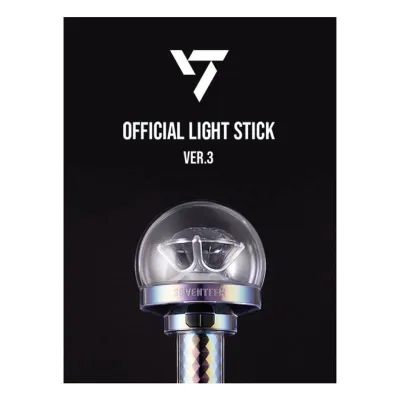
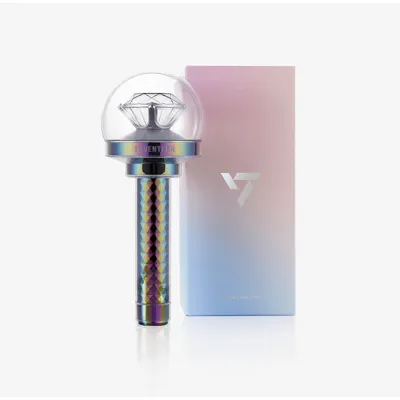
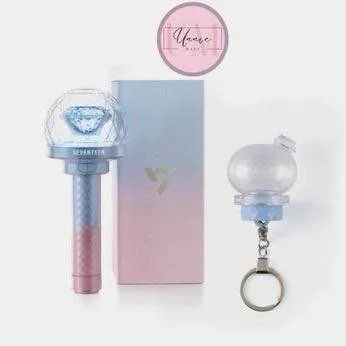
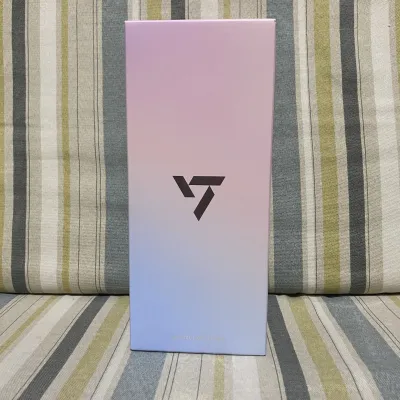
Prices are valid at publication and may change. Please refer to the product page for the latest price.
Inspect the seams where the plastic parts join. Genuine manufacturing processes leave clean, almost invisible seam lines. Fakes frequently exhibit rough, raised, or sharp edges along the handle and globe, indicating a lack of quality control during molding.
Look closely at the SEVENTEEN logo and the iconic central diamond inside the globe. The engraving on an authentic unit is sharp, deep, and perfectly aligned. The paint or coating on the gem should be uniform, without bubbles, scratches, or overspray. On counterfeit versions, the logo font might look slightly thicker, blurry, or misaligned, and the gem’s color may appear dull or unevenly coated.
Press the power button several times to test its tactile feedback. A genuine lightstick features a button with a distinct, satisfying click and immediate spring-back. Counterfeit buttons often feel mushy, require uneven force to register, or sink too deep into the housing.
Unscrew the battery cap and inspect the internal contacts. Authentic units use clean, well-soldered, corrosion-resistant metal springs and plates that hold standard AAA batteries securely. Fakes often have flimsy, crooked, or poorly soldered contacts that can cause flickering or fail to power the device entirely when shaken. Additionally, check the battery carrier itself; genuine carriers fit snugly inside the handle without rattling, and the polarity markings are clearly molded into the plastic.
Packaging and Documentation Inspection
The retail packaging and included documentation offer critical clues regarding authenticity. The retail box of an official Caratbong is printed on sturdy, high-quality cardboard with crisp, high-resolution graphics. Check the text alignment, font sharpness, and barcode clarity. Counterfeit boxes often display blurry text, washed-out colors, or slight color shifts, such as a purple tint instead of the signature Rose Quartz and Serenity hues.

Official merchandise features a specialized holographic sticker from the entertainment agency on the packaging. This sticker should reflect light with a clear, sharp pattern and contain micro-text or specific serial numbers. Fake stickers are often flat, lack the multi-layered holographic depth, or are entirely missing.
Open the box and inspect the included accessories. The user manual should be printed on high-quality paper with clear, legible text in multiple languages, free of spelling errors. The hand strap should feel sturdy, with the printed logo sharp and resistant to peeling. Fakes often include poorly printed manuals on thin paper and flimsy straps with blurry, iron-on lettering that degrades quickly.
Digital Verification and App Connectivity
The most reliable way to verify a modern SEVENTEEN lightstick is through its Bluetooth functionality. Turn on the lightstick’s Bluetooth mode according to the official instructions and open the official SEVENTEEN Lightstick app on your smartphone. An authentic lightstick will pair quickly and reliably, allowing you to control the color wheel and light modes.
Once connected, the app will often check for firmware updates. Genuine lightsticks can receive these digital updates seamlessly. Counterfeit lightsticks, which typically use cheap, generic Bluetooth microchips, will fail to connect to the official app, show connection errors, or fail to register during firmware checks.
Some versions include a unique QR code or a digital verification card inside the box. Scanning this code should direct you to an official verification portal or register the product within the official fan platform app. If the QR code is invalid, leads to a suspicious URL, or has already been registered multiple times, the product is likely counterfeit.
Safe Purchasing Channels for K-Pop Merchandise
To guarantee authenticity, always purchase your lightstick from official sources, such as the official global fan community shop, authorized physical pop-up stores, or established local K-Pop specialty shops with a proven track record.
When shopping on general e-commerce platforms or online marketplaces, exercise extreme caution. Be wary of listings that use stock photos instead of actual product photos, or those with vague descriptions like “OEM,” “high-quality replica,” or “concert-ready.” Unrealistic discounts—such as a lightstick priced at a fraction of its standard retail value—are a primary indicator of a counterfeit.
Carefully read the customer feedback section. Look for detailed reviews that include unboxing photos and videos. Pay close attention to reviews mentioning successful Bluetooth pairing and app connectivity. Avoid sellers with low ratings, high numbers of negative reviews, or those who delete and recreate listings to hide poor feedback.
Steps to Take If You Receive a Fake Lightstick
If you suspect you have received a counterfeit lightstick, document the discrepancies immediately. Take clear, high-resolution photos of the packaging flaws, rough plastic seams, and misaligned logos. Record a continuous video showing the unboxing, the battery installation, and the failed attempts to connect the device to the official mobile app.
Open a return and refund request on the e-commerce platform where you made the purchase. Use the platform’s built-in buyer protection tools to submit your photo and video evidence. Clearly state that the item received is a counterfeit, which violates the platform’s terms of service. Do not click “Order Received” or confirm the transaction until the dispute is fully resolved.
Report the specific listing and the seller’s store to the platform’s customer support team. Providing detailed evidence helps the platform take down counterfeit listings, protecting other fans from falling victim to the same seller.
Frequently Asked Questions (FAQ)
Can a fake SEVENTEEN lightstick connect to the official app?
No, counterfeit SEVENTEEN lightsticks generally cannot connect to the official synchronization app. Genuine lightsticks contain proprietary Bluetooth hardware and firmware designed to communicate securely with the official software. Because counterfeiters use cheap, generic Bluetooth modules to save on manufacturing costs, these fake devices cannot pass the app’s authentication protocols or sync with the concert lighting systems.
Are there different versions of the SEVENTEEN lightstick I should know about?
Yes, SEVENTEEN has released multiple official versions of their lightstick, commonly referred to as the Caratbong. Each version features distinct design changes, material finishes, and updated technology, such as the transition from standard LED modes to advanced Bluetooth synchronization. Because the physical details and packaging vary significantly between versions, you should always consult the official release guides and specifications for the specific version you are trying to authenticate.
Community discussion
Share your experience or ask a question. Comments are reviewed before publication.