
Quick Answer: Which Calculator Should You Choose?
Choosing between a Karson calculator with an integrated writing pad and a classic CASIO scientific calculator depends entirely on your academic level, your specific course requirements, and how you prefer to organize your workspace.
Select a Karson calculator with a writing pad if your daily tasks consist of basic arithmetic, general business calculations, or introductory algebra, and you want to eliminate paper clutter by using a built-in digital scratchpad for quick formulas and intermediate steps. This option is highly practical for general office work, home budgeting, or basic high school classes where extensive scientific functions are not required.
Choose a CASIO scientific calculator if you are enrolled in STEM courses, engineering programs, or advanced mathematics classes that require complex functions, statistical analysis, and trigonometric operations. Furthermore, if you are preparing for standardized national exams or professional board examinations, a dedicated CASIO scientific calculator is often mandatory due to strict institutional regulations that prohibit devices with external writing or recording capabilities. Neither option will suffice if your curriculum strictly demands advanced graphing capabilities or specialized financial modeling software.
Products mentioned in this guide
Prices are valid at publication and may change. Please refer to the product page for the latest price.
Core Differences in Functionality and Design
To make an informed purchase, you must first understand that these two devices are designed for fundamentally different tasks. The Karson calculator with a writing pad is a hybrid productivity tool, whereas a CASIO scientific calculator is a dedicated mathematical engine.

Mathematical Capabilities
A standard Karson calculator with a writing pad typically operates as a basic four-function or standard desktop calculator. It excels at addition, subtraction, multiplication, division, percentages, and simple memory functions. In contrast, a CASIO scientific calculator is engineered to handle hundreds of advanced functions, including logarithms, trigonometry, calculus integration, matrix calculations, and statistical distributions. Attempting to use a basic calculator for advanced engineering or physics coursework will leave you without the necessary mathematical operators.
Display and Interface
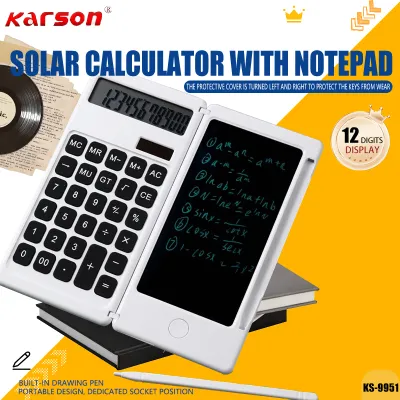
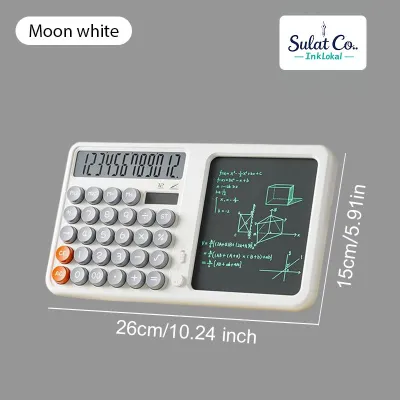
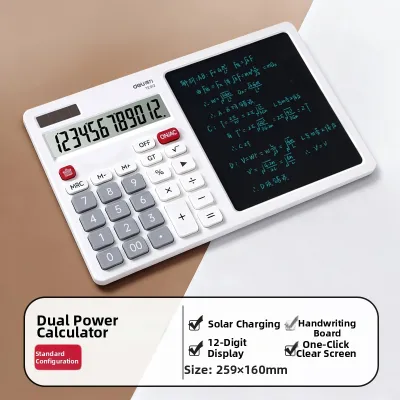
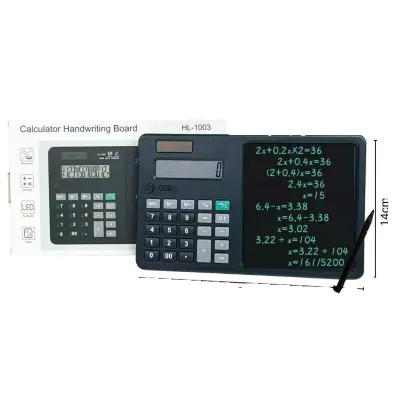
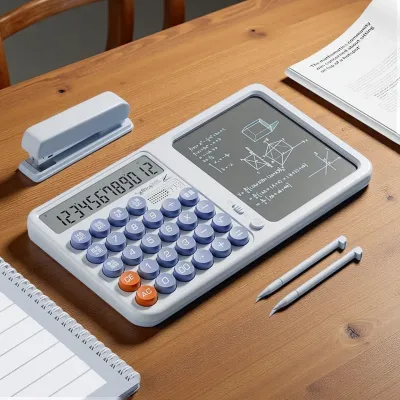
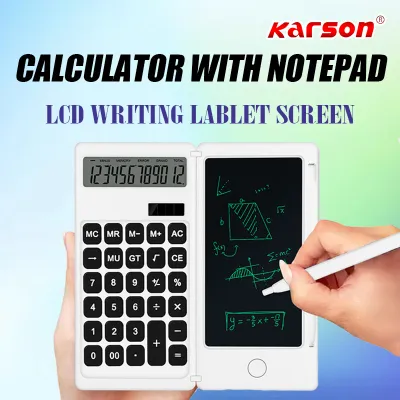
The visual interfaces of these two devices serve different purposes. The Karson model features a split design: one side houses a standard single-line or dual-line digital display for numbers, while the adjacent side features an LCD writing pad. This writing pad allows you to write with an included stylus, acting as a digital sheet of paper. On the other hand, a CASIO scientific calculator utilizes a multi-line dot-matrix display, often featuring natural textbook display technology. This allows fractions, square roots, and other mathematical expressions to appear exactly as they are written in your textbooks, which helps prevent input errors during complex multi-step equations.
Form Factor and Usability
The physical construction of these calculators dictates where and how they are best used. The Karson calculator often utilizes a clamshell or folding design to protect both the keys and the sensitive LCD writing surface when carried in a backpack. The keys are typically spaced widely, resembling a standard office calculator. CASIO scientific calculators generally feature a rigid, non-folding body protected by a slide-on hard cover. The key layout is dense, utilizing secondary and tertiary functions accessed via “Shift” and “Alpha” keys, which requires some practice to navigate efficiently during timed exams.
When the Karson Calculator with Writing Pad Makes Sense
The Karson calculator with a writing pad is an innovative solution for individuals who find themselves constantly reaching for scrap paper to jot down numbers during a calculation. It is particularly well-suited for specific daily routines and environments.
Office and Retail Environments
For general office administration, bookkeeping, retail inventory tracking, or managing household expenses, you rarely need advanced calculus functions. The ability to calculate a series of figures on the left side of the device while simultaneously writing down phone numbers, inventory codes, or temporary sums on the right side is incredibly efficient. It keeps your desk clean and reduces paper waste.
Introductory Education and Homework
Students in middle school or early high school who are learning basic algebra and pre-algebra can benefit from this hybrid design. The writing pad is excellent for sketching out simple geometric shapes, listing variables, or practicing step-by-step equation solving. Because the writing pad can be cleared instantly with the press of a single button, it encourages trial-and-error learning without wasting physical stationery.
Tropical Climate Considerations
In humid tropical environments, such as during the rainy season in the Philippines, traditional paper notebooks can absorb moisture from the air, becoming damp, limp, and difficult to write on with standard ballpoint pens. An LCD writing pad remains completely unaffected by ambient humidity, providing a smooth, consistent writing surface year-round. However, users should verify the responsiveness of the stylus and ensure the screen contrast remains sharp under local classroom lighting conditions.
When a CASIO Scientific Calculator is Required
There are academic and professional milestones where a dedicated scientific calculator is not just preferred, but absolutely mandatory. In these scenarios, the unique features of the Karson model cannot compensate for the lack of specialized mathematical processing.
Advanced STEM Curriculums
If you are studying chemistry, physics, civil engineering, mechanical engineering, or advanced statistics, a scientific calculator is an indispensable tool. You will need to compute trigonometric functions, convert polar and rectangular coordinates, solve quadratic equations, and perform regression analysis. CASIO calculators are built with dedicated internal processors designed to handle these complex algorithms instantly and accurately.
Classroom and Exam Standardization
In many high schools and universities, mathematics departments standardize their instruction around specific calculator brands, most notably CASIO. Professors often write lesson plans and demonstrate key sequences on the board using standard CASIO layouts. If you are using a non-standard calculator, you may struggle to follow along with the step-by-step instructions during lectures.
Durability and Longevity
CASIO scientific calculators have a long-standing reputation for physical durability. Their hard plastic keys are designed to withstand years of rapid, heavy tapping during long study sessions and high-pressure exams. The slide-on hard case protects the screen and keys from being crushed or scratched inside a crowded school bag, making it a highly reliable investment for your entire academic journey.
Feature Comparison and Specification Checklist
Before making your final purchase, it is helpful to compare the physical and functional attributes of these two options. Use this checklist to evaluate specific models in retail stores or on local e-commerce platforms.
- Display Capabilities: Verify if the calculator offers a multi-line display. A multi-line screen is essential for reviewing previous calculation steps, whereas a single-line screen only shows the current active number.
- Writing Pad Erasability and Lock Function: For calculators with an integrated writing pad, check if there is a physical lock switch on the back or side. This switch prevents your notes from being accidentally erased if you bump the clear button mid-calculation. Test the smoothness of the stylus tip on the screen to ensure it does not scratch the surface.
- Power Source and Battery Type: Check the product packaging to see if the device features dual-power capabilities (solar panels combined with a backup battery) or if it relies solely on button-cell batteries (such as CR2025 or LR44). Solar-powered models offer peace of mind during long exam sessions.
- Key Tactility and Spacing: Press the keys to evaluate their responsiveness. Scientific calculators should have firm, tactile keys that click slightly to confirm input, preventing missed keystrokes during rapid calculations.
- Local Price Verification: Because prices fluctuate based on import costs and retail promotions, always check current local retail prices in ₱ on reputable local online marketplaces or at physical stationery stores in your area to ensure you are getting a fair deal.
How to Verify Your Course and Exam Requirements
To avoid purchasing a calculator that you cannot use when it matters most, you must verify your institutional guidelines before spending your money.
Review Your Course Syllabus
At the start of every semester, carefully read the syllabus provided by your instructor. Most math and science teachers explicitly state which calculator models are permitted, which are recommended, and which are strictly banned. If the syllabus only permits “non-programmable scientific calculators,” a basic calculator with a writing pad might be technically allowed for basic classes, but it will not have the functions you need for advanced coursework.
Check Board Exam and Standardized Test Allowed Lists
If you are preparing for professional licensure exams in the Philippines, such as those administered by the Professional Regulation Commission (PRC), or college entrance exams, you must consult the official list of approved calculator models. Testing centers have incredibly strict security protocols to prevent cheating. Because the Karson calculator features a digital writing pad that can store temporary handwritten notes, it is highly likely to be prohibited in exam rooms. Proctors generally ban any device with an erasable screen or external writing surface to maintain exam integrity.
Consult Your Instructor
If your school’s guidelines are ambiguous, do not guess. Take a photo of the calculator you are considering, or bring the physical device to your instructor or department head before the first major exam. Ask them directly if the device complies with classroom policies. It is always better to discover a compatibility issue early in the semester rather than at the door of the testing hall.
Frequently Asked Questions (FAQ)
Can I use a Karson calculator with a writing pad for engineering classes?
No, a Karson calculator with a writing pad is generally not suitable for engineering classes. Engineering coursework requires advanced mathematical capabilities, including vector calculations, matrix algebra, complex numbers, calculus integration, and trigonometric functions, which basic four-function calculators do not possess. Additionally, the integrated writing pad may violate department policies regarding unauthorized writing surfaces during exams. You should invest in a dedicated scientific or graphing calculator approved by your engineering department.
Do CASIO scientific calculators have a note-taking feature?
Standard CASIO scientific calculators do not include a digital writing pad or a free-form note-taking feature. They are designed strictly for mathematical computations to comply with global educational and examination standards. If you need to take notes or write down intermediate steps while using a CASIO calculator, you must use traditional stationery, such as a paper notebook, or a separate digital writing tablet. Some advanced models allow you to store variables in the calculator’s internal memory, but this is limited to numerical values rather than handwritten text or diagrams.
Community discussion
Share your experience or ask a question. Comments are reviewed before publication.