
The Short Answer: Which Notebook Type Fits Your Needs?
Choosing between an AI notebook and a traditional paper notebook depends on how you want to manage your information. There is no single superior option. Instead, the right choice depends on your daily workflow, your need for digital organization, and your personal writing preferences.
If you are a student, researcher, or busy professional who needs searchable digital archives, automated meeting summaries, instant cross-device syncing, and cloud backups, an AI notebook is highly recommended. It bridges the gap between physical writing and digital productivity, turning your handwritten notes into actionable digital files instantly.
Conversely, if you prioritize a completely distraction-free environment, zero screen fatigue, unrestricted pen and paper compatibility, and want to avoid ongoing subscription fees, a traditional paper notebook remains the ideal choice. It offers unmatched tactile freedom and requires no battery power or technical setup.
Products mentioned in this guide


Prices are valid at publication and may change. Please refer to the product page for the latest price.
While hybrid workflows exist—such as using a standard notebook and scanning pages with your phone’s camera—they generally lack the automated optical character recognition (OCR), smart tagging, and instant cloud integration that dedicated AI smart systems provide.
Defining the Contenders: AI Smart Notebooks vs Traditional Paper
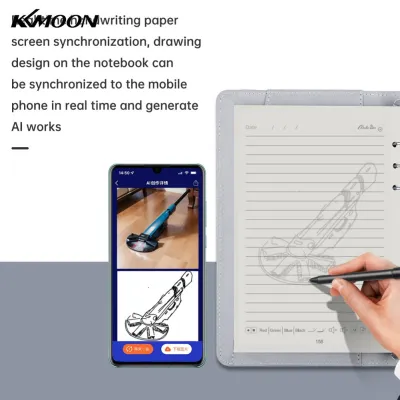
To make an informed decision, it is essential to understand what qualifies as an AI notebook versus a traditional one. The term “AI notebook” spans a few distinct product categories. First, there are smart paper notebooks that use specialized physical paper paired with a companion mobile app; these apps leverage advanced OCR and artificial intelligence to scan, digitize, tag, and summarize your handwritten text. Second, reusable smart notebooks feature synthetic, erasable pages that can be wiped clean with water or heat after you scan your notes to the cloud. Third, e-ink or LCD smart tablets simulate the look of paper while offering digital writing surfaces and built-in AI organization tools.

Traditional notebooks, on the other hand, are standard physical notebooks—whether spiral-bound, thread-sewn, or glued. They rely entirely on physical paper and manual ink. There are no companion apps, digital sensors, or automated organization features. Your notes remain exactly where you write them unless you manually copy or photograph them.
This comparison focuses on the practical workflow, long-term usability, and financial value of AI-assisted digitization versus pure analog note-taking. Rather than focusing on a single brand, we will examine how these two distinct approaches fit into your daily life.
Head-to-Head Comparison: How They Perform in Daily Workflows
Evaluating these two options requires looking closely at how they perform during real-world tasks. From the physical sensation of writing to the ease of retrieving a note months later, each system offers distinct advantages and trade-offs.
Writing Feel and Pen Compatibility
Traditional paper notebooks offer an incredibly diverse range of tactile experiences. You can choose from various paper weights, typically measured in grams per square meter (GSM), ranging from lightweight 60 GSM sheets to thick, luxury 160 GSM paper that resists ink bleeding. The texture, or “tooth,” of the paper can vary from ultra-smooth to slightly textured, allowing you to customize the resistance against your pen. Furthermore, traditional paper is universally compatible with almost any writing instrument, including fountain pens, gel pens, ballpoints, highlighters, and markers, without any risk of damaging a digital sensor or rendering the page unscannable.
AI smart notebooks present a different set of physical characteristics. Smart paper systems often use synthetic or highly coated pages designed to allow easy erasing or high-contrast scanning. Consequently, they usually require specific pen types, such as erasable gel pens or proprietary smart pens that contain built-in cameras or transmitters. If you use a standard ballpoint or fountain pen on a reusable smart notebook, you may permanently ruin the synthetic coating or prevent the page from being erased. For digital e-ink smart tablets, the writing experience relies on a stylus interacting with a textured screen. While manufacturers design these screens to simulate the friction of real paper, the feel is distinct, and you are limited to proprietary or highly specific stylus nibs.
If a natural, unrestricted writing feel is your absolute priority, you should verify the paper’s tooth and pen damping before committing to a smart system. Many users find that the slick surface of reusable smart paper or the glass-like feel of some digital screens cannot fully replicate the satisfying feedback of high-quality traditional paper.
Digitization, Search, and AI Organization
The core value of an AI notebook lies in its ability to streamline information management through automation. When you write in a smart notebook, the companion app uses your smartphone camera or a built-in sensor to detect the page boundaries, correct perspective distortion, and crop the image automatically. Once digitized, the app’s OCR engine analyzes your handwriting, converting it into searchable digital text. Advanced AI features then take this a step further by automatically generating summaries, extracting action items, creating tags, and syncing the files directly to cloud platforms like Google Drive or Dropbox. This means you can search for a single keyword written weeks ago and find the exact page instantly.
In contrast, traditional notebooks require a completely manual approach to organization. If you need to find a specific note from a meeting three months ago, you must physically flip through pages or maintain a meticulous hand-written index at the front of your book. Digitizing your notes requires you to manually take photos, crop them yourself, and organize them into folders on your phone or computer. There is no automatic text search, meaning your handwritten words remain locked in a static image format unless you take the time to type them out.
However, AI organization is not without its limitations. The accuracy of handwriting-to-text conversion depends heavily on how neatly you write. If your handwriting is highly cursive or messy, the AI may produce inaccurate transcriptions. Additionally, you must verify whether the smart notebook’s app supports your primary language or mixed-language notes, as many AI models struggle with multilingual text or regional dialects.
Durability and Humidity Resistance
Environmental factors play a significant role in the longevity of your notes, particularly in tropical climates like the Philippines. High humidity levels, sudden downpours, and ambient moisture can severely affect physical paper. Traditional paper notebooks are highly susceptible to absorbing moisture from the air, which leads to page warping, yellowing, ink bleeding, and even mold growth over time if stored in non-air-conditioned spaces. If a traditional notebook is caught in a heavy rainstorm or suffers a liquid spill, the physical notes can be permanently ruined or rendered illegible.
Smart notebooks offer a significant advantage when it comes to data preservation. Because the workflow encourages immediate digitization, your notes are safely backed up to the cloud almost as soon as they are written. Even if the physical smart notebook is damaged, lost, or worn out, your digitized files remain perfectly preserved and accessible from any device. Furthermore, reusable smart notebooks often utilize synthetic, water-resistant pages that are highly durable and immune to the warping or mold that plagues standard paper in humid environments.
Nonetheless, digital storage introduces its own set of long-term risks. Your access to digitized notes depends entirely on the app developer’s commitment to maintaining their cloud servers and software updates. If the company goes out of business or discontinues the companion app, your smart notebook may lose its digital features. Additionally, accessing your notes on the go requires a stable internet connection, which can be a limitation in areas with spotty mobile data coverage.
Upfront Costs and Long-Term Consumables
The financial commitment of each notebook type reveals a contrasting cost structure. Traditional notebooks generally feature a low upfront cost. You can easily purchase a standard notebook for under ₱100 to ₱500, depending on the brand and paper quality. While you must continuously buy new notebooks once the pages are filled, the ongoing cost is predictable and spread out over time. There are no hidden fees, software updates, or subscription paywalls required to keep using your notebook.
AI smart notebooks require a much higher initial investment. A reusable smart paper notebook can cost anywhere from ₱1,500 to ₱4,000, while premium e-ink smart tablets often range from ₱15,000 to over ₱30,000. While reusable options promise to save money by reducing physical paper consumption, you must factor in the cost of long-term consumables. These include proprietary erasable pens, specialized ink refills, replacement stylus nibs, and microfiber cleaning cloths.
Furthermore, many smart notebook companion apps utilize a freemium model. While basic scanning and cloud syncing might be free, advanced AI features—such as automated meeting summaries, unlimited OCR transcriptions, and expanded cloud storage—are frequently locked behind monthly or annual premium subscription plans. Over several years, these subscription fees can far exceed the cost of buying multiple high-quality traditional notebooks.
The Decision Framework: Choose Based on Your Workflow
To determine which option is the best investment for your daily routine, evaluate your specific tasks, environment, and personal preferences against the following criteria.
Choose an AI Smart Notebook if:
- You need to quickly search through months of handwritten notes using keywords.
- You frequently share meeting minutes, sketches, or lecture notes with colleagues or classmates in digital formats.
- You want to leverage AI to automatically summarize long lectures, extract action items, or format your notes.
- You live or work in highly humid environments and want to ensure your notes are safely backed up to the cloud to prevent physical degradation.
- You prefer a minimalist lifestyle and want a single, reusable notebook instead of stacking dozens of filled paper notebooks on your shelf.
Choose a Traditional Notebook if:
- You use note-taking as a way to disconnect from digital screens, reduce eye strain, and focus without notifications or digital distractions.
- You enjoy the artistic freedom of using fountain pens, calligraphy markers, watercolors, or heavy sketching pencils.
- You want a reliable, zero-maintenance writing tool that never needs a battery charge, software update, or internet connection.
- You prefer to avoid recurring software subscription fees and want complete, offline data privacy for your thoughts and sketches.
Neither option may fit your needs if:
- You require the full processing power, multitasking capabilities, and color display of a standard tablet. In this scenario, investing in a standard tablet paired with a high-quality stylus and a dedicated note-taking application is a more practical choice.
- You only take notes occasionally or use a notebook once a month. The premium cost of a smart notebook system is difficult to justify if the device sits idle most of the time.
Verify first if:
- You are planning to buy a reusable smart notebook. Make sure you are comfortable with the specific pen models required and the physical erasing process. Some reusable notebooks require wiping pages with a damp cloth, while others use heat (such as a hairdryer or microwave) to clear the pages. Ensure this maintenance routine fits naturally into your daily schedule before buying.
Essential Specs to Verify Before Purchasing
Before making your final purchase, check these critical specifications to ensure your chosen notebook fits your existing tools and setup.
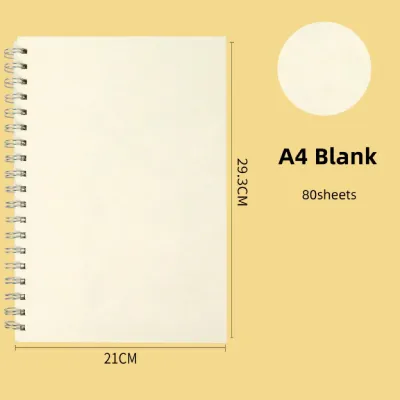
- Paper and Size Standards: Notebooks come in various standard sizes, such as A4 (large desk size), A5 (medium portable size), and B5 (a comfortable middle ground). Verify that the dimensions fit comfortably in your bag and on your workspace. For both traditional and smart notebooks, check if the binding allows the notebook to lay completely flat (180 degrees). A flat-laying notebook is crucial not only for comfortable writing but also for preventing shadows and distortion when scanning pages with a smartphone camera.
- Ink and Pen Compatibility: If you are choosing a smart paper notebook, read the manufacturer's packaging carefully to identify the required ink types. Many smart systems are only compatible with specific water-based gel inks or erasable pens. Using an incompatible pen can permanently stain the synthetic pages or damage the scanning contrast. For traditional notebooks, check the paper weight (GSM) to ensure it can handle your preferred ink without feathering or bleeding through to the back of the page.
- App Ecosystem and Privacy: For any AI notebook, download the companion app before purchasing the physical product. Check if the app requires a mandatory online account to function and read their privacy policy to understand where your digitized notes and voice recordings are stored. Verify whether the advanced AI features, such as OCR translation or automated summaries, require a paid subscription or if they are included with the initial purchase.
- Device Compatibility: Ensure the smart notebook's companion app is fully compatible with your smartphone or tablet's operating system (iOS or Android). Check the available export formats to confirm you can easily save your notes as PDFs, JPEGs, or plain text files, and verify that the app integrates seamlessly with your preferred productivity tools, such as cloud storage services or digital planners.
Frequently Asked Questions (FAQ)
Can I use any pen with an AI smart paper notebook?
No, most AI smart paper notebooks require specific pens to function correctly. Reusable smart notebooks typically require specialized erasable friction pens or specific water-based gel inks to ensure the pages can be wiped clean without leaving permanent stains. Additionally, smart pens with built-in cameras require proprietary ink refills that fit the pen’s physical housing. Using a standard ballpoint or permanent marker can permanently ruin the specialized coating on smart pages.
Do traditional notebooks have any digital advantages?
While traditional notebooks are physical, they offer several indirect digital advantages. They have zero battery dependency, require no software updates, and provide absolute data privacy since your notes are never uploaded to a cloud server. If you want to digitize them, you can still use free third-party document scanning apps to save pages as PDFs, though you will lack the automated AI tagging and instant keyword search of dedicated smart systems.
Are e-ink smart tablets considered AI notebooks?
Yes, e-ink smart tablets are often classified as a premium category of AI notebooks. While they are fully digital devices rather than paper, many modern models are designed specifically to mimic the tactile feel of writing on paper. They include advanced AI features such as real-time handwriting-to-text conversion, smart layout formatting, and automated cloud synchronization, offering a powerful middle ground between analog writing and digital convenience at a higher price point.
Community discussion
Share your experience or ask a question. Comments are reviewed before publication.