
Selecting the right financial calculator can determine your success in university finance courses and professional licensing exams. If your career path points toward global credentials like the Chartered Financial Analyst (CFA) or Financial Risk Manager (FRM) designations, the Texas Instruments BA II Plus is the standard choice. However, if you prefer a familiar interface that mirrors standard scientific calculators, CASIO financial models offer intuitive menu-driven navigation and multi-line displays. The ideal decision depends on your long-term career goals, your university’s specific syllabus, and the strict regulations of local licensing boards.
Key Differences and Core Functions
To understand how these tools operate, you must first look at their input logic. The Texas Instruments BA II Plus features two calculation modes: Chain (Chn) and Algebraic Operating System (AOS). In Chain mode, the calculator processes operations in the exact order you enter them. For example, typing 2 + 3 * 4 yields 20 because it adds two and three before multiplying by four. Switching to AOS mode ensures the calculator respects standard mathematical order of operations, yielding 14.
In contrast, CASIO financial calculators, such as the FC-200V or FC-100V, utilize Visually Perfect Algebraic Method (V.P.A.M.) logic. This system naturally follows the mathematical order of operations and displays the entire formula on the screen. You can see your parentheses, fractions, and exponents exactly as they appear in a textbook, which significantly reduces input errors during complex multi-step equations.
Products mentioned in this guide

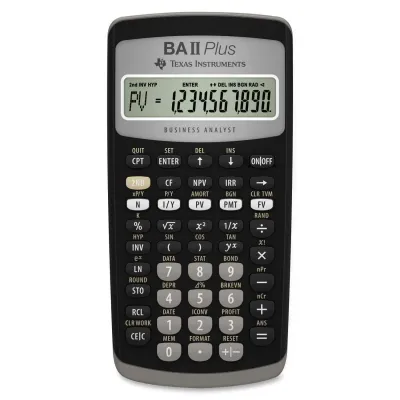

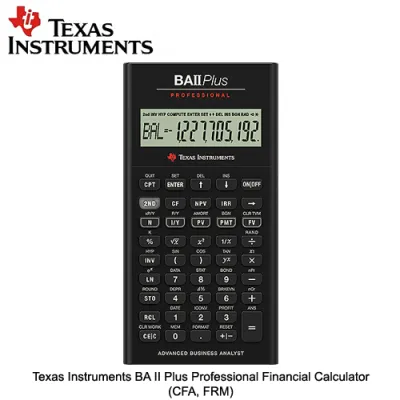
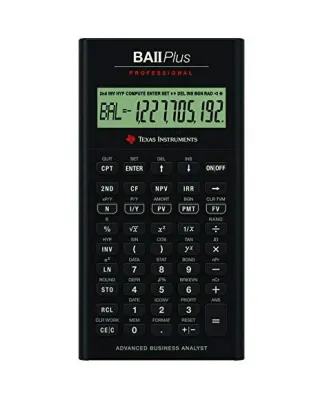

Prices are valid at publication and may change. Please refer to the product page for the latest price.
The display layouts represent another major point of divergence. The standard Texas Instruments BA II Plus utilizes a single-line, ten-character LCD. This layout requires you to recall previous inputs from memory or press specific recall keys to verify your numbers. CASIO models feature a high-resolution, multi-line dot-matrix display. This screen allows you to view multiple variables simultaneously, making it easier to compare different financial scenarios without clearing your work.
When it comes to built-in financial functions, both brands cover the essential curriculum requirements. They easily handle Time Value of Money (TVM) calculations, including present value, future value, payments, and interest rates. They also compute uneven cash flows for Net Present Value (NPV) and Internal Rate of Return (IRR), alongside amortization schedules and depreciation methods.
However, the method of accessing these functions differs. The Texas Instruments BA II Plus relies on a worksheet-based system. To calculate depreciation or cash flows, you must enter a specific worksheet by pressing the 2nd key followed by the corresponding number key, then scroll through variables using the arrow keys. CASIO simplifies this process by providing dedicated mode keys. Pressing a mode key opens a structured menu on the screen, where you fill in the blanks for each variable and press a solve key to see the result.
Usability and Learning Curve
The physical design of the keys plays a significant role in your daily study sessions. The standard Texas Instruments BA II Plus is known for its firm, rubbery keys that require a deliberate, solid press. Some students find this tactile feedback reassuring, as it helps prevent accidental double-presses. The upgraded Professional version of the TI model features metallic dome keys that offer a clickier, more responsive feel.

CASIO financial calculators feature plastic keys that closely resemble those on standard scientific calculators. These keys generally have a lower travel distance and a lighter touch, which can facilitate faster typing speeds during timed exams. If you have spent years using a CASIO scientific calculator in high school, transitioning to a CASIO financial model will feel almost seamless.
For absolute beginners, the learning curve for the Texas Instruments BA II Plus can be steep. Because the screen only displays one number at a time, you must trust the keystroke sequence completely. Forgetting to clear the TVM worksheets before starting a new calculation is a common mistake that leads to incorrect answers. CASIO’s visual menus make it much easier to spot where an incorrect value was entered, as all active variables remain visible on the screen.
To verify which layout suits your typing style, try visiting a local stationery store to test the physical buttons. Pay attention to how quickly the numbers register on the screen when you type rapidly. Check the screen visibility under bright overhead lights to ensure the display remains legible without excessive glare.
Support resources are another critical factor to consider. Because the Texas Instruments BA II Plus is the dominant calculator in global finance, you will find an endless supply of third-party study guides, online tutorials, and prep-course materials tailored specifically to its keystrokes. CASIO users may need to rely more heavily on the official manufacturer manual or regional university guides, as mainstream prep providers default to the TI layout.
Exam Approval and Course Requirements
Before committing to a purchase, you must verify the calculator policy of your specific academic program and any professional organizations you plan to join. The Texas Instruments BA II Plus is one of the few calculators explicitly approved by the CFA Institute and the Global Association of Risk Professionals (GARP) for the CFA and FRM exams. If you plan to sit for these international exams, buying the TI model early in your college career allows you to build muscle memory long before exam day.
CASIO financial calculators are generally not permitted for the CFA or FRM exams. However, they are widely accepted in local university courses and various regional professional examinations. In the Philippines, the Professional Regulation Commission (PRC) regulates the specific models of calculators allowed in licensure examinations, such as the Certified Public Accountant (CPA) board exam.
The PRC periodically updates its list of allowed calculators to maintain exam integrity. While standard scientific calculators are common, certain financial models may face restrictions or require specific inspection at the testing center. You must consult the latest official PRC resolutions or advisory bulletins to confirm whether your chosen CASIO or TI model is permitted for your specific board exam.
Do not rely solely on advice from older students or online forums, as exam policies can change from year to year. Always check the official syllabus provided by your university professors at the start of the semester. Some instructors design their entire curriculum around the Texas Instruments BA II Plus, meaning classroom demonstrations and slide decks will show TI-specific keystrokes. Using a different brand in such classes can force you to spend valuable study time translating instructions.
Budget and Purchasing Considerations
When planning your budget, you will find that both brands offer options across different price points. In the local market, the standard Texas Instruments BA II Plus typically represents a mid-to-high tier investment, often priced between ₱2,000 and ₱3,500. The Professional version of the TI model, which includes additional cash flow functions and a premium casing, sits at the higher end of this range. CASIO financial models, such as the FC-200V, generally occupy a highly competitive mid-tier price bracket, making them an attractive option for budget-conscious students.
To ensure you are purchasing an authentic device, buy only from authorized stationery retailers, official brand stores, or reputable online marketplaces. Counterfeit calculators are a persistent issue and can fail unexpectedly during an exam. When inspecting a calculator, check the packaging quality for crisp, clear printing and look for official hologram stickers.
Authentic calculators have a solid, balanced weight and buttons that do not wobble excessively. You can also perform a physical diagnostic test on the device. For the Texas Instruments BA II Plus, pressing [2nd] [Format] and navigating the reset options can confirm the internal software version. For CASIO models, pressing a specific combination of keys (usually [Shift] [7] [ON] simultaneously) initiates a diagnostic screen that tests the LCD pixels and internal ROM.
Consider the long-term maintenance costs as well. The standard TI BA II Plus uses a CR2032 lithium coin battery, which can last for several years of regular use but requires a small screwdriver to replace. CASIO models often run on a single AAA battery or feature a dual solar-and-battery power system, making battery replacements simpler and more accessible.
Given the tropical climate and high humidity in the Philippines, proper storage is essential to protect your investment. Keep your calculator in its slide-on hard case when not in use, and consider placing a small packet of silica gel in your pencil case. This simple step helps prevent moisture from damaging the internal circuitry or causing the LCD screen to bleed over time.
Final Decision Framework
To make your final decision, evaluate your academic path against these specific profiles.
Choose the Texas Instruments BA II Plus if you are pursuing global finance certifications like the CFA or FRM, or if your university curriculum explicitly requires TI-specific keystrokes. This model is the undisputed industry standard, ensuring that almost every textbook, online tutorial, and study group will align perfectly with your device.
Choose a CASIO financial calculator if you prefer a multi-line display that shows your entire formula, value the familiar layout of standard scientific calculators, and are primarily focusing on local university courses or exams where CASIO is permitted. The visual menu system and easier battery replacement make it an exceptionally user-friendly tool for daily coursework.
Verify first if your specific university department or the PRC has placed any recent restrictions on financial calculators for your upcoming exams. If you are preparing for the CPA board exam in the Philippines, cross-reference the exact model number with the latest PRC approved calculator list before making your purchase.
Before heading to the counter or finalizing your online order, run through this quick pre-purchase checklist:
- Confirm the exact model name (e.g., BA II Plus Standard vs. Professional, or CASIO FC-200V vs. FC-100V).
- Check the warranty terms provided by the distributor or retailer.
- Ensure the package includes the protective slide-on cover and a printed English user manual.
- Verify the battery type so you can keep a spare in your exam kit.
Community discussion
Share your experience or ask a question. Comments are reviewed before publication.