
A well-stocked workspace is the foundation of daily efficiency, but buying random office supplies often leads to clutter and wasted budget. Identifying the right work essentials requires matching your specific tasks, physical space, and ergonomic needs with functional tools. In a tropical climate like the Philippines, where high humidity and warm temperatures can affect everything from paper quality to adhesive durability, choosing the right supplies requires careful consideration of materials and specifications. By focusing on utility, compatibility, and spatial constraints, you can curate a workspace that minimizes distractions and maximizes daily output.
Assessing Your Workspace Needs Before Buying
Before purchasing any new office supplies, evaluate your physical workspace to avoid clutter. Measure the exact dimensions of your desk surface, including width, depth, and height. If your desk has built-in drawers, measure their internal dimensions to ensure any organizers you buy will fit perfectly inside.
Weight capacity is another critical factor, especially if you plan to add heavy monitor arms, desktop shelves, or large stacks of reference books. Check your desk manufacturer’s specifications to determine how much weight the surface can safely support without bowing or shaking during typing.
Products mentioned in this guide
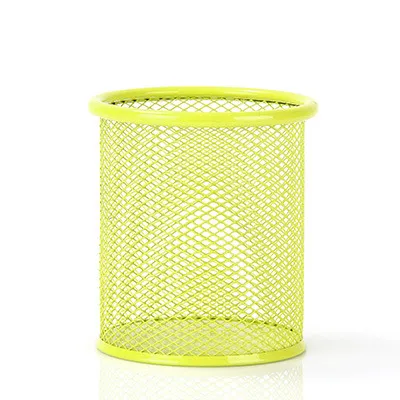
1,294 Lazada user ratings
Elegant and stylish appearance, Enhances productivity and efficiency, Enhances productivity and efficiency, Easy to assemble and use, High-q…Read full reviewShow less
Elegant and stylish appearance, Enhances productivity and efficiency, Enhances productivity and efficiency, Easy to assemble and use, High-quality wire mesh material, Sturdy and durable design, Versatile for various office appliances, Efficiently organizes office supplies,
. item came well packed and intact. thank you to the ever reliable delivery personnel for handling my orders well. reasonable delivery time …Read full reviewShow less
. item came well packed and intact. thank you to the ever reliable delivery personnel for handling my orders well. reasonable delivery time .
it organize my school supplies and its nice to see that everything is in place para si hirap maghagilap kung saan kukunin ang mga gamit.
Efficiently organizes office supplies, Elegant and stylish appearance, Sleek black color adds a professional touch, minsan
Design:excellent 👌 uu Price:excellent 👌👌 uu Durability:excelldentuuuu
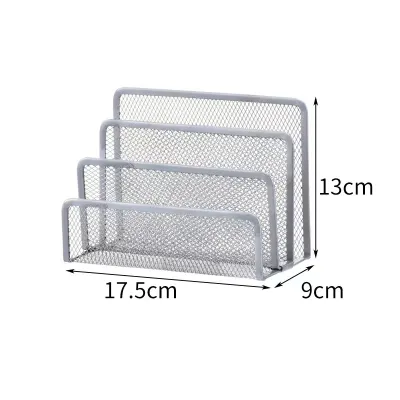
450 Lazada user ratings
Shipping out took too long but understandable because of the holidays. Order placed Dec 21 and they only shipped it out by jan 3. Pretty dec…Read full reviewShow less
Shipping out took too long but understandable because of the holidays. Order placed Dec 21 and they only shipped it out by jan 3. Pretty decent item. Perfect for storing notebooks and envelopes. Kinda wish the dividers were adjustable somehow.
Versatile storage for small items, Sleek black color adds elegance, Convenient mesh shelves, Great addition to my office decor, maliit lang …Read full reviewShow less
Versatile storage for small items, Sleek black color adds elegance, Convenient mesh shelves, Great addition to my office decor, maliit lang pero oks lng. Mabilis nmn ang delivery
Nice product though a bit small than expected. A better alternative for some pricey organizer. Was able to unclutter papers and docs in my w…Read full reviewShow less
Nice product though a bit small than expected. A better alternative for some pricey organizer. Was able to unclutter papers and docs in my working table. Satisfied! ;)
Design:It's okay. Price:Also affordable Durability:Some were dented slightly. Not still sure if it's durable. But by the looks of it, I thin…Read full reviewShow less
Design:It's okay. Price:Also affordable Durability:Some were dented slightly. Not still sure if it's durable. But by the looks of it, I think it is.
super fast delivery and good quality yung product. what you see is what you get at maayos na dumating walang dents. thank you seller and laz…Read full reviewShow less
super fast delivery and good quality yung product. what you see is what you get at maayos na dumating walang dents. thank you seller and lazada!😊
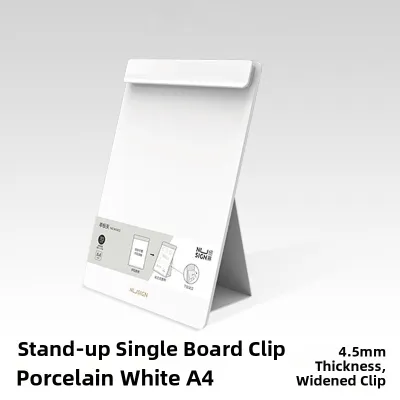
125 Lazada user ratings
The design is simple and elegant, and it's really easy to use and quick to set up. I'm very satisfied with it!
The design is simple and classy, super easy to use, and I'm really happy with it.
Very satisfied, it works great.
Pretty good, no weird smell.
Really great to use!
Prices are valid at publication and may change. Please refer to the product page for the latest price.
Next, analyze your daily task requirements to distinguish between actual necessities and unnecessary novelties. If your workflow is primarily digital, your stationery needs may be limited to a single notebook for quick brainstorming and a reliable pen. Conversely, if you handle heavy physical paperwork, legal documents, or manual sketching, prioritize robust filing systems, high-capacity trays, and specialized writing instruments.
Establishing a realistic budget in Philippine Pesos (₱) before browsing online marketplaces or local stationery stores helps prevent impulse purchases. Allocate a larger portion of your budget to high-impact items that directly affect physical comfort or daily efficiency, such as an ergonomic wrist rest or a sturdy monitor riser. Save smaller portions for easily replaceable consumables like paper clips, sticky notes, and basic writing instruments.
Core Writing and Documentation Supplies
Writing instruments are the most frequently used tools on any desk, making their selection vital to a smooth workflow. When choosing pens, evaluate the ink type—such as gel, ballpoint, or rollerball—alongside the tip size, which typically ranges from ultra-fine 0.38mm to bold 1.0mm. Gel inks offer exceptional smoothness but require longer drying times, which can lead to smudging in humid tropical conditions. Ballpoint pens use oil-based inks that dry almost instantly and resist water, making them highly reliable for signing official documents.

Paper compatibility is crucial to preventing common issues like bleeding, feathering, and ghosting. In the Philippines, standard paper sizes differ from international norms, with “short” (Letter, 8.5 x 11 inches) and “long” (F4/Legal, 8.5 x 13 inches) sizes widely used alongside standard A4 sheets. When selecting notebooks or loose-leaf paper, check the paper weight, measured in grams per square meter (GSM). Standard copy paper is usually 70 to 80 GSM, which is prone to ink bleed-through when using gel pens or fountain pens; opting for 100 GSM or higher ensures a clean, double-sided writing surface even in high-humidity environments where paper naturally absorbs moisture and softens.
To verify ink and paper compatibility without relying on manufacturer claims, perform a simple scratch and bleed test on a spare sheet. Write a few lines with your preferred pen, observing the drying speed, line spread (feathering), and whether the ink shows through on the reverse side (ghosting). This trial helps you determine the exact material combination that works best for your writing style before committing to a specific notebook brand.
The binding style of your notebooks should match your note-taking habits. Spiral-bound notebooks lay completely flat and allow you to fold pages back, making them ideal for cramped desk spaces. Thread-bound or case-bound notebooks offer a professional appearance and durability for long-term archiving, but may require a break-in period to lay flat. Disc-bound and ring-bound systems provide the ultimate flexibility, allowing you to rearrange, remove, or add pages as your projects evolve.
Consumable fasteners and adhesives are essential for keeping documents organized, but they must be chosen based on the thickness of your paperwork. Standard paper clips are suitable for holding two to ten sheets, while binder clips are necessary for thicker bundles. In humid climates, standard metal clips are highly susceptible to rust, which can permanently stain and damage important papers. To prevent this, look for vinyl-coated, plastic, or stainless steel paper clips.
When selecting adhesives like glue sticks, liquid glue, or mounting tapes, check the product labels for solvent content and ventilation requirements, especially if working in enclosed, non-air-conditioned rooms. High tropical temperatures can cause cheap adhesives to melt, dry out, or leave a sticky residue. Store these items in a cool, dry place to prolong their shelf life and maintain bonding strength.
Desk Organization and Space Management
A cluttered desk directly contributes to mental fatigue and decreased focus. To manage incoming and outgoing paperwork efficiently, evaluate desktop trays and document sorters based on their footprint, tier count, and structural stability. Vertical sorters are excellent for saving desk space as they utilize height to organize folders, while horizontal trays are better suited for quick-access documents and active projects. Ensure the trays are wide enough to accommodate standard local paper sizes, including long bond paper, without the edges curling or hanging over.
Pen holders and drawer organizers keep your writing instruments and small tools from rolling around or getting lost. When selecting a drawer organizer, look for modular trays with adjustable dividers that allow you to customize the compartment sizes to fit your specific tools, such as long rulers, scissors, and highlighters. For desktop pen cups, choose weighted bases that prevent tipping when filled with heavy metal pens or scissors, and look for internal compartments or silicone linings that protect delicate pen tips from damage.
Physical document archiving requires a systematic approach using file folders and clear labeling. Standard manila folders, expanding files, and hanging folders should be selected to match your filing cabinet or storage box dimensions. Verify that the tab placements (such as 1/3-cut or 1/5-cut tabs) are easily visible when stored. Labeling your folders clearly with a consistent color-coding or alphabetical system ensures you can retrieve critical documents in seconds, reducing the time spent searching through disorganized stacks of paper.
Ergonomic and Comfort Accessories
Maintaining physical well-being during long hours of desk work is essential for sustaining productivity and preventing chronic strain. Monitor stands and laptop risers are critical tools for achieving proper eye-level alignment, which reduces strain on your neck and shoulders. Before purchasing a riser, verify its maximum weight capacity and footprint to ensure it can safely support your monitor or laptop without wobbling. Look for models with adjustable heights and angles, as well as integrated storage space underneath to keep your keyboard or notebook out of the way when not in use.
Wrist rests for your keyboard and mouse help maintain a neutral wrist position, preventing repetitive strain injuries. When evaluating wrist rests, check the material, thickness, and edge design to ensure they align perfectly with the height of your input devices. Memory foam and gel are popular filling materials, but in warm tropical climates, they can trap heat. Look for wrist rests covered in breathable, moisture-wicking fabrics or those made from natural materials like wood or leather, which remain cool to the touch and are easy to wipe clean.
Desk mats serve multiple purposes, providing a comfortable resting area for your forearms, improving mouse tracking, and protecting your desk finish from scratches, spills, and sweat. When choosing a desk mat, assess the surface texture, thickness, and overall dimensions. Felt mats offer a soft, premium aesthetic but can be difficult to clean and may feel warm in non-air-conditioned rooms. PU leather and textured rubber mats are highly durable, water-resistant, and easy to sanitize, making them highly practical choices for tropical environments where humidity and condensation from cold drinks are common.
For items with prolonged body contact, such as wrist rests and desk mats, check the product labels or manufacturer specifications to ensure they are free from harmful chemical off-gassing and skin irritants. Selecting hypoallergenic and easy-to-clean materials is particularly important if you work in a warm environment where sweat can accumulate on the surfaces.
Tech and Cable Management Essentials
The modern desk setup is heavily reliant on digital devices, which often results in a chaotic tangle of power cords, charging cables, and peripheral wires. Cable management is not just about aesthetics; it also prevents accidental disconnections, reduces dust accumulation, and eliminates tripping hazards. Choose cable clips, silicone organizers, or hook-and-loop ties based on the number and thickness of the cords you need to secure. Hook-and-loop ties are highly recommended over single-use plastic zip ties because they are reusable, adjustable, and do not pinch or damage delicate copper wires inside the cables.
Power strips and surge protectors are the lifelines of your electronic equipment, guarding sensitive devices against sudden voltage spikes. In the Philippines, where power fluctuations and lightning strikes during the rainy season are common, investing in a high-quality surge protector is essential. Verify that the surge protector has a high Joule rating, built-in circuit breakers, and adequate spacing between outlets to accommodate bulky power adapters without blocking adjacent sockets. Ensure the plug type matches your wall outlets (typically Type A or Type B) and that the cord length is sufficient to reach the outlet safely.
For setups with multiple monitors, external drives, and charging docks, routing cables out of sight requires dedicated under-desk management tools. Under-desk cable trays or wire baskets can be screwed or clamped to the underside of your desk to hold heavy power bricks and excess cable slack. If your desk has built-in grommet holes, use plastic or metal grommet inserts to route cables directly through the desktop, keeping the surface clean and maximizing your usable workspace.
Building Your Personalized Work Essentials Checklist
Once you understand the various categories of desk tools, you can build a personalized checklist tailored to your specific workflow and environment. Begin by cross-referencing your selected items against your measured desk space and your established budget in ₱. If your desk is compact, eliminate non-essential items like large desk mats or multi-tier paper trays, and opt for vertical storage solutions instead.
To manage your expenses logically, group your final checklist into immediate daily necessities and future upgrades. Immediate necessities should include core writing instruments, a high-quality notebook, basic cable management ties, and essential power strips. Future upgrades, such as premium ergonomic monitor arms, custom wrist rests, or heavy-duty filing cabinets, can be phased over several months as your budget allows.
Before finalizing any purchase, carefully review product labels, manufacturer specifications, and warranty terms. Pay close attention to material safety certifications, especially for items with prolonged skin contact like desk mats and wrist rests, or products involving solvents and adhesives. Checking the care instructions ensures you select materials that are easy to maintain and durable enough to withstand daily wear and tear in your specific working environment.
Frequently Asked Questions (FAQ)
How often should I replace my daily work essentials?
The replacement frequency of your work essentials depends on whether they are consumable supplies or durable goods. Consumables like ink refills, notebooks, sticky notes, and adhesives require regular restocking based on your usage volume. For example, gel pen refills may need replacement every few weeks of heavy writing, while high-quality notebooks are replaced once all pages are filled.
Durable goods like desk organizers, monitor stands, and cable trays are designed to last for years, but they should still be inspected regularly for signs of wear. Look for physical or functional degradation, such as frayed power cords, cracked plastic trays, flattened wrist rests that no longer provide support, or dull scissor blades. Conduct a quick desk audit every six months to discard broken items, clean out accumulated clutter, and replenish your core supplies before they run out.
What is the best way to clean and maintain desk organizers?
Proper maintenance of your desk organizers prolongs their lifespan and keeps your workspace looking professional. Always check the manufacturer’s care labels or instructions before applying any cleaning agents, as harsh chemicals can strip protective coatings, discolor plastics, or damage natural wood finishes. For routine cleaning, use mild, non-abrasive methods such as a dry microfiber cloth for dusting, or a slightly damp cloth with a drop of mild dish soap to remove fingerprints and smudges from acrylic, metal, or plastic organizers.
To prevent ink stains, dust buildup, and debris accumulation, plan a deep-cleaning session every few months. Empty all pen cups, drawer trays, and document sorters completely. Shake out any loose dirt, dust, or pencil shavings, and wipe down the interior surfaces. If you encounter stubborn ink leaks inside a pen holder, use a cotton swab dipped in rubbing alcohol, testing a small, inconspicuous area first to ensure it does not damage the material’s finish. Allow all organizers to dry completely before restocking them with your supplies.
Community discussion
Share your experience or ask a question. Comments are reviewed before publication.