
Choosing between the Casio fx-350EX and the fx-991EX for senior high school comes down to your academic track and the specific mathematical demands of your subjects. While both calculators belong to the highly regarded ClassWiz family and share a clean, high-resolution display, they serve very different academic paths. If you are enrolled in the Science, Technology, Engineering, and Mathematics (STEM) strand, the advanced capabilities of the fx-991EX are practically essential for handling complex calculus and matrix operations. Conversely, for students in non-STEM strands like Accountancy, Business, and Management (ABM) or Humanities and Social Sciences (HUMSS), the simpler and more budget-friendly fx-350EX provides all the necessary tools without overwhelming you with unused features.
Understanding the Core Differences Between fx-350EX and fx-991EX
Both the Casio fx-350EX and the fx-991EX are part of the ClassWiz series, which revolutionized student calculators with high-resolution screens and intuitive, icon-based menus. This shared design language means that transitioning between the two models is seamless, as they both utilize the Natural Textbook Display. This display format is incredibly helpful for senior high school students because it shows fractions, exponents, and square roots exactly as they appear in your textbooks, reducing input errors during stressful exams.
Despite their physical similarities, the internal capabilities of these two models differ significantly. The fx-350EX is designed as an entry-level scientific calculator, offering standard mathematical functions that cover algebra, trigonometry, and basic statistics. It operates on a single battery, which you can easily replace when it runs low. Because it lacks advanced computing engines, its menu system is streamlined, making it highly accessible for students who do not want to navigate through hundreds of specialized functions.
Products mentioned in this guide
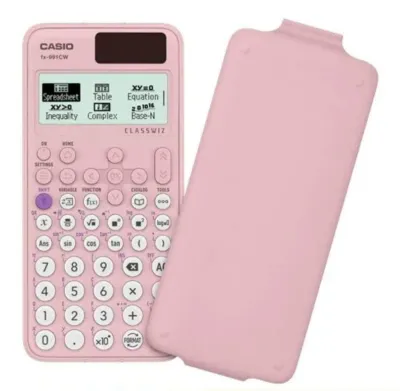
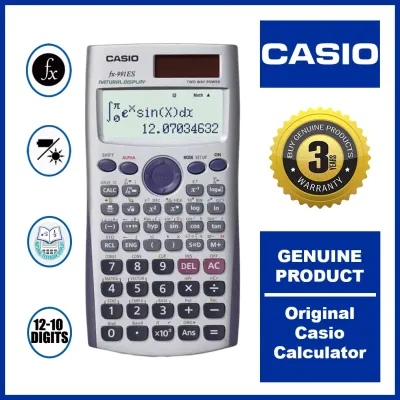
Prices are valid at publication and may change. Please refer to the product page for the latest price.
On the other hand, the fx-991EX is a powerhouse engineered for advanced mathematics and scientific computations. It features a dual-power system, utilizing a solar panel on the front face alongside a backup battery to ensure the device never shuts down during a crucial exam. The operational scope of the fx-991EX extends to advanced equation solvers, matrix calculations, vector calculations, and spreadsheet functions. When unboxing either model, you should verify these power configurations and function lists on the official packaging to ensure you have the exact hardware specifications required for your classes.
Matching Calculator Features to Senior High School Subjects
To make an informed decision, you must look closely at the curriculum of your chosen senior high school strand. The Department of Education structures mathematics courses to prepare students for specific career paths, and your calculator needs to match these academic milestones.

For foundational courses like General Mathematics and Statistics and Probability, which every senior high school student must take, the fx-350EX is more than capable. It easily handles logarithmic functions, permutations, combinations, and basic statistical regressions. If your academic journey does not require you to go beyond these subjects, investing in a more complex calculator might mean paying for features you will never use.
However, if you are in the STEM strand, your curriculum will include Pre-Calculus, Basic Calculus, and General Physics. These subjects introduce concepts that are significantly easier to grasp and verify when you have the right tools. The fx-991EX allows you to perform numerical differentiation and integration directly on the screen, which serves as an excellent way to double-check your manual calculations. It also handles simultaneous equations, polynomial equations, and complex numbers, which are standard fare in advanced physics and pre-calculus modules.
To help you visualize how these models align with your academic workload, consider the following suitability mapping for common senior high school subjects:
| Senior High School Subject | Casio fx-350EX Suitability | Casio fx-991EX Suitability | Key Required Operations |
|---|---|---|---|
| General Mathematics | Fully Suitable | Fully Suitable | Fractions, basic algebra, exponents |
| Statistics and Probability | Fully Suitable | Fully Suitable | Mean, standard deviation, regressions |
| Pre-Calculus | Limited | Fully Suitable | Trigonometric identities, conic sections |
| Basic Calculus | Not Recommended | Fully Suitable | Limits, derivatives, integrals |
| General Physics | Limited | Fully Suitable | Vector analysis, constant conversions |
| General Chemistry | Fully Suitable | Fully Suitable | Scientific notation, stoichiometry |
Before making your final purchase, it is highly recommended to cross-reference your specific subject syllabus with the official Casio user manual. The manual provides a comprehensive list of all supported mathematical operations, allowing you to confirm whether a specific function, such as matrix multiplication or vector dot products, is supported by the model you are eyeing.
Checking Exam Compliance and School Policies
Acquiring a powerful calculator is useless if you are not allowed to bring it into the examination room. Fortunately, both the Casio fx-350EX and the fx-991EX are classified as non-programmable scientific calculators. This classification is crucial because almost all high schools and national testing bodies strictly prohibit programmable calculators to prevent students from storing formulas or notes in the device’s memory.
While both models are generally accepted in standard classroom settings, you must check your specific school handbook or consult your subject teachers. Some teachers prefer that students learn the manual steps of calculus or matrix algebra before relying on a calculator to solve them. In such cases, a teacher might temporarily restrict the use of the fx-991EX during specific quizzes, or require everyone to use a basic scientific calculator like the fx-350EX to ensure a level playing field.
If you are preparing for national examinations or planning ahead for college admission tests, compliance rules can become even stricter. Some specialized exams may ban calculators that have integration or equation-solving capabilities altogether, regardless of whether they are programmable. If you find yourself facing such restrictions, having the simpler fx-350EX as a backup ensures you still have a reliable, compliant tool to speed up your arithmetic without violating any testing protocols.
Evaluating Price and Long-Term Value
Budget is a major deciding factor for many families when purchasing school supplies. In the Philippines, scientific calculators are long-term investments, often lasting from senior high school all the way through college graduation. Therefore, you must weigh the upfront cost in ₱ against the expected lifespan and utility of the device.
When browsing authorized stationery stores, office supply shops, or official brand stores on online marketplaces, you will notice a clear price difference. The fx-350EX is positioned as an affordable, entry-level option, making it highly accessible for families on a strict budget. The fx-991EX commands a premium price due to its dual-power system and advanced computing capabilities. If you are a non-STEM student, paying this premium may not offer a good return on investment, as the extra features will likely remain untouched.
However, for STEM students, the higher price of the fx-991EX represents excellent long-term value. If you plan to pursue engineering, architecture, computer science, or actuarial mathematics in college, the fx-991EX will continue to serve you well into your university years. Buying it now for senior high school saves you from having to upgrade to a more advanced model later, effectively saving you money in the long run.
Because of the popularity of these ClassWiz models, counterfeit devices are common in the market. To protect your investment, use this checklist when purchasing:
- Look for the holographic security sticker on the packaging, which shifts colors when tilted.
- Scan the QR code on the calculator's box or screen to verify its authenticity on the official Casio verification website.
- Purchase only from established, authorized stationery retailers or official online flagship stores.
- Check that the keys have a crisp, responsive tactile feel and that the screen contrast is sharp and legible from different angles.
Final Verdict: Which Model Fits Your SHS Track?
Your final choice should align directly with your academic track, your future college plans, and your current budget. There is no single winner between these two models, as each is designed to serve a distinct group of students effectively.
You should choose the Casio fx-350EX if you are enrolled in the ABM, HUMSS, or GAS (General Academic Strand) tracks. This model provides all the algebraic, trigonometric, and statistical functions required for your curriculum. It is easy to use, highly compliant with almost all exam guidelines, and represents a budget-friendly option that does not compromise on build quality or display clarity.
You should choose the Casio fx-991EX if you are enrolled in the STEM track or plan to take advanced science and mathematics courses. The ability to solve quadratic equations, calculate matrices, perform vector analysis, and compute numerical integrals will save you valuable time during exams. It is an essential preparatory tool for college-level STEM courses and offers outstanding durability and functionality that justifies its higher price point.
If you remain unsure about which model to buy, start by consulting your senior high school mathematics teacher or reviewing your upcoming course syllabi. Understanding the exact mathematical operations you will be tested on is the safest way to ensure you select a calculator that is both powerful enough for your homework and fully compliant with your school’s exam policies.
Frequently Asked Questions (FAQ)
How do I reset my Casio ClassWiz calculator to its default settings?
To reset your Casio ClassWiz calculator, press the SHIFT key followed by the 9 key (which has the RESET label printed above it). This will open a menu asking whether you want to clear the setup data, clear the memory variables, or initialize the entire system. Select the option to initialize all settings by pressing the corresponding number key, and then confirm your choice by pressing the equals key. Keep in mind that performing a full reset will permanently delete all stored variables, statistical data, and custom contrast settings, returning the device to its factory default state.
Are the fx-350EX and fx-991EX allowed in professional board exams?
While both calculators are widely accepted in senior high schools and universities, professional licensure examinations in the Philippines operate under separate, highly strict guidelines. The Professional Regulation Commission (PRC) maintains a specific list of allowed calculator models for board exams, such as those for civil engineering, mechanical engineering, or certified public accountants. This list is updated periodically, and certain advanced models—including some versions of the fx-991 series—have faced restrictions or bans in the past due to their advanced features. Always consult the latest official PRC memorandum for your specific profession before assuming your high school calculator is permitted for a board exam.

Community discussion
Share your experience or ask a question. Comments are reviewed before publication.