
Choosing between the Casio fx-991EX ClassWiz and the Casio fx-991ES Plus comes down to your academic level, calculation complexity, and budget. The fx-991EX ClassWiz represents a modern generation of scientific calculators, offering a high-resolution display, faster processing, and advanced features like spreadsheet functions. The fx-991ES Plus is a classic, reliable workhorse that has served students for years, offering essential scientific functions at a more accessible price point. For senior high school and college students in engineering, science, or mathematics, the ClassWiz is generally a highly recommended investment due to its speed and readability. However, the ES Plus remains a highly capable alternative if your curriculum has strict calculator guidelines or if you prefer a simpler, text-based interface.
Core Differences and Initial Recommendation
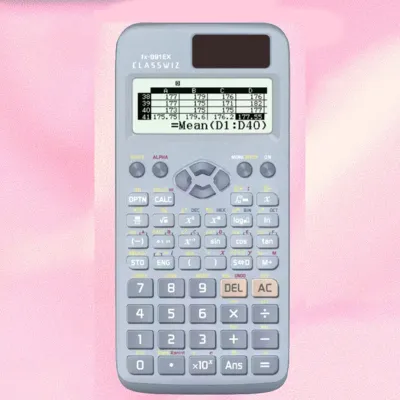
The generational gap between the modern ClassWiz series and the older ES Plus series is evident in both design and capability. The fx-991ES Plus belongs to the Natural-V.P.A.M. generation, which introduced natural textbook display but retained a low-resolution screen. The fx-991EX ClassWiz is part of the newer ClassWiz lineup, featuring a high-resolution LCD that can display more information clearly, including spreadsheets and QR codes. This technological leap changes how formulas are read and how quickly calculations are processed.
For target user profiles, the ClassWiz is ideal for college students in STEM fields, engineering majors, and professionals who require rapid calculations, matrix operations, and statistical distributions. The ES Plus is well-suited for junior and senior high school students, or those in non-engineering courses where advanced matrix calculations or spreadsheets are not required. It provides all the fundamental scientific functions needed for algebra, trigonometry, and basic calculus without the added complexity of advanced menus.
Products mentioned in this guide



Prices are valid at publication and may change. Please refer to the product page for the latest price.
A faster processor and clearer display can save valuable seconds during timed exams, making the ClassWiz a popular choice for competitive environments. However, some local institutions or board exams may have specific restrictions on allowed calculator models, which makes verifying compliance the very first step before purchasing. Understanding these core differences helps you choose a tool that not only fits your academic workload but also complies with your school’s specific regulations.
Display, Interface, and Daily Usability
The most striking difference when placing these two calculators side by side is the screen quality. The fx-991EX ClassWiz features a high-resolution LCD screen that displays crisp formulas, variables, and icons. This allows for an icon-based menu system, making it easier to navigate functions without memorizing abbreviations. The high-resolution display also means that numbers and mathematical symbols are rendered with smooth curves rather than blocky pixels.

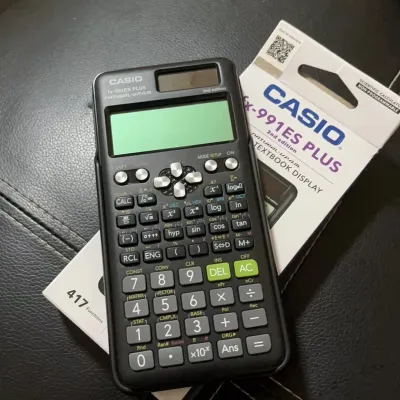
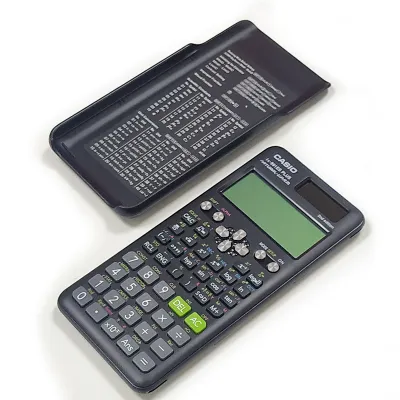
In contrast, the fx-991ES Plus uses a traditional text-based menu and a lower-resolution screen. While it still features the Natural Textbook Display—allowing fractions, square roots, and exponents to appear exactly as they do in textbooks—the characters can look pixelated compared to the ClassWiz. Navigating the menu on the ES Plus requires scrolling through numbered text lists, which can feel slower and less intuitive for users accustomed to modern smartphone interfaces.
The learning curve on the ClassWiz is significantly shorter due to this visual upgrade. During timed exams, finding the right mode quickly is crucial. The icon-based menu of the ClassWiz reduces the time spent searching for specific modes. Instead of scrolling through text lists, you can quickly select the matrix, vector, or equation mode using intuitive icons. This streamlined navigation minimizes stress and helps prevent input errors when working under pressure.
When rendering complex equations, matrices, and calculus operations, the ClassWiz offers a clear advantage. It can display larger matrices (up to 4×4) on a single screen with clear grid lines, whereas the ES Plus is limited to 3×3 matrices and requires more scrolling to view all elements. This visual clarity reduces input errors, which is crucial when solving multi-step engineering problems. The ClassWiz also displays more lines of text, allowing you to view previous calculations and results simultaneously without losing context.
Processing Speed and Advanced Functions
Under the hood, the fx-991EX ClassWiz features a significantly faster processor than the fx-991ES Plus. When performing resource-heavy operations like numerical integration, differentiation, or solving high-degree polynomial equations, the ClassWiz delivers results almost instantaneously. The ES Plus, while reliable, may take several seconds to compute complex calculus problems or solve systems of equations, which can be a disadvantage during fast-paced exams.
The total number of built-in functions also highlights the technological gap. The ClassWiz boasts over 550 functions, compared to the 417 functions on the ES Plus. Exclusive ClassWiz features include a basic spreadsheet function, which allows users to perform simple data entry, formulas, and calculations on a 5-column by 45-row grid. It also features a QR code generator that displays graphs on a smartphone or tablet screen when scanned, bridging the gap between a scientific calculator and a graphing tool.
Advanced equation solvers and statistical tools differ significantly between the two models. The ClassWiz can solve up to fourth-degree polynomial equations and simultaneous linear equations with up to four variables. The ES Plus is limited to third-degree polynomials and three variables. Additionally, the ClassWiz offers advanced statistical distribution calculations (such as normal, binomial, and Poisson distributions) directly from the menu, which is highly beneficial for college-level statistics and probability courses.
For students dealing with vectors and complex numbers, the ClassWiz simplifies the input process. It allows for direct vector calculations up to three dimensions with dedicated keys, and handles complex numbers with greater ease. The ES Plus can perform these calculations as well, but the interface requires more keystrokes and menu navigation, which increases the likelihood of input mistakes during long calculation sequences.
Build Quality, Power, and Exam Compliance
The physical design of the two calculators reflects their respective eras. The fx-991EX ClassWiz features a sleek, textured body with a modern carbon-fiber-like pattern on the casing, making it feel premium and secure in the hand. Its keys are flat, low-profile, and highly responsive, offering a distinct tactile click that confirms a successful press. The fx-991ES Plus has a more traditional, rounded plastic body with raised keys that feel slightly softer to press, which some users may prefer for rapid, blind typing.
Both models utilize a dual-power system, combining a solar panel with a backup button battery. This ensures the calculator remains functional even in low-light conditions, such as dimly lit classrooms or exam halls. Under normal usage, the battery life for both models spans several years. While the high-resolution screen of the ClassWiz may consume slightly more power during intensive operations, the solar panel effectively offsets this, ensuring long-term reliability without frequent battery replacements.
Exam compliance is a critical factor for students in the Philippines. While both models are non-programmable scientific calculators, local licensing bodies, such as the Professional Regulation Commission (PRC) for board exams, and individual universities maintain strict lists of allowed calculator models. The ES Plus has historically been widely accepted, while the ClassWiz’s advanced features, such as the spreadsheet and QR code functions, have led to restrictions in certain specific board exams.
Before making a purchase, always check the latest official guidelines from your school, department, or exam board. Some institutions may ban specific models or require a physical inspection sticker before you can enter the testing room. It is always safer to verify compliance with your specific course syllabus or licensing body rather than assuming a model is permitted based on its non-programmable status.
Price, Value, and Authenticity Checks
The fx-991EX ClassWiz generally commands a higher price than the fx-991ES Plus in the local market. The price premium, typically ranging from a few hundred to several hundred pesos (₱), is justified by the ClassWiz’s faster processing speed, high-resolution display, and expanded function set. For students who will use the calculator throughout a four- or five-year engineering or science program, the extra investment in the ClassWiz offers excellent long-term value.
Due to the popularity of these calculators, counterfeit units are common in online marketplaces and unauthorized physical stores. To verify authenticity, check the packaging for high-quality printing, official holographic stickers, and clear branding. Authentic Casio calculators feature precise key alignment, crisp screen contrast, and a solid build that does not creak when flexed. Counterfeit models often have mushy keys, uneven backlighting, and poor plastic molding.
You can also perform a hardware self-test to verify the internal software authenticity. On both models, pressing the Shift, 7, and On keys simultaneously enters the diagnostic mode. Following the on-screen prompts allows you to test the LCD pixels, key responsiveness, and view the internal ROM version. Authentic units will display the correct model name and official firmware version, whereas fakes may fail to enter this mode or display generic text.
To ensure you receive an authentic product, purchase only from authorized stationery stores, official brand stores on major e-commerce platforms, or reputable local department stores. Avoid suspiciously cheap listings on online marketplaces, as these are often low-quality counterfeits that may malfunction during critical exams. Investing in a genuine calculator ensures reliability when you need it most.
Final Verdict: Which Calculator Fits Your Needs?
Choose the fx-991EX ClassWiz if:
- You are an engineering, science, or mathematics major who needs fast calculation speeds for complex matrices, calculus, and statistical distributions.
- You prefer a modern, high-resolution display with an intuitive icon-based menu that reduces input errors.
- You want advanced features like spreadsheet calculations and QR code graphing to assist in your studies.
Choose the fx-991ES Plus if:
- You are on a strict budget and want a reliable, time-tested scientific calculator for general high school or college math.
- Your curriculum or exam board specifically lists the ES Plus as the maximum allowed model, or bans the ClassWiz.
- You prefer a simpler, traditional text-based interface and do not require advanced matrix sizes or spreadsheet functions.
Verify first if:
- Your specific university, department, or professional licensing board (such as the PRC) permits the model you intend to buy. Never assume a calculator is allowed just because it is non-programmable; always consult the official, up-to-date list of approved calculators before finalizing your purchase.
Frequently Asked Questions (FAQ)
Can I use the fx-991EX ClassWiz for board exams in the Philippines?
The allowance of the fx-991EX ClassWiz for professional board exams in the Philippines depends entirely on the latest guidelines issued by the Professional Regulation Commission (PRC). While it is a non-programmable scientific calculator, the PRC periodically updates its list of allowed calculators for various engineering and professional exams. Some boards may restrict models with advanced features like spreadsheets or QR codes. Always consult the official PRC website or your review center for the most up-to-date list of permitted calculators before your exam date.
Is the fx-991EX ClassWiz worth the upgrade from the fx-991ES Plus?
If you are currently using the fx-991ES Plus and are entering advanced college courses in engineering, physics, or mathematics, upgrading to the fx-991EX ClassWiz is highly beneficial. The faster processing speed, 4×4 matrix capabilities, and high-resolution display will save you time and reduce errors during complex calculations. However, if you are using the calculator for general high school math, basic algebra, or non-STEM college courses, the fx-991ES Plus remains perfectly adequate, and an upgrade is not strictly necessary.
How do I spot a fake Casio scientific calculator?
To spot a fake Casio calculator, start with a physical inspection. Genuine units have crisp, clear key labels, perfectly aligned buttons, and a high-contrast screen that is readable from various angles. Next, perform the diagnostic test by pressing Shift, 7, and On simultaneously. An authentic calculator will guide you through a pixel test and display the official ROM version. Finally, check the packaging for holographic security stickers and purchase only from authorized stationery retailers or official online brand stores to guarantee authenticity.

Community discussion
Share your experience or ask a question. Comments are reviewed before publication.