
Choosing the right Casio scientific calculator for your board exam in the Philippines depends entirely on verifying your specific model against the latest Professional Regulation Commission (PRC) guidelines. While Casio offers a wide range of powerful calculators, the PRC strictly regulates which devices are allowed inside the testing room to ensure a fair examination environment. To secure your peace of mind on exam day, you must select a non-programmable model that matches the exact specifications permitted by your respective professional regulatory board.
Using an unauthorized calculator can lead to immediate confiscation, leaving you to perform complex calculations by hand, or even disqualification from the exam. By understanding the rules, checking your device’s features, and preparing it properly, you can focus entirely on answering your exam questions with confidence.
Understanding Board Exam Calculator Rules
The Professional Regulation Commission (PRC) oversees licensure examinations for various professions in the Philippines, including engineering, accountancy, nursing, and architecture. Each professional board under the PRC has the authority to issue specific resolutions detailing which calculator models are allowed. Because these rules can change, relying on outdated lists or peer recommendations can lead to confiscation at the testing center door.
Products mentioned in this guide

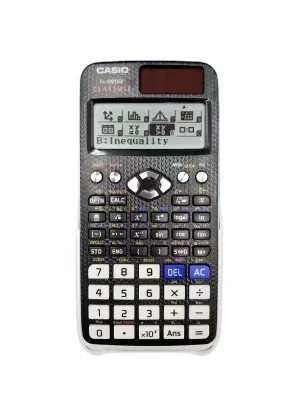
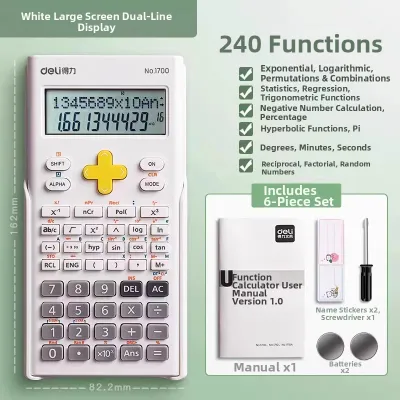
Prices are valid at publication and may change. Please refer to the product page for the latest price.
To verify your device, always visit the official PRC website and search for the most recent memorandum or resolution concerning allowed calculators for your specific board exam. For instance, the Board of Civil Engineering or the Board of Mechanical Engineering may have different technical requirements compared to boards governing non-technical fields. Some boards maintain a strict whitelist of approved models, while others provide a list of prohibited features.
A universal rule across almost all Philippine board exams is the strict prohibition of programmable, graphing, or Computer Algebra System (CAS) calculators. These advanced devices can store text, formulas, and custom scripts, which compromises the integrity of the examination. Standard scientific calculators, which perform basic and advanced mathematical operations without storing user-defined programs, are the baseline standard for permitted devices.
When reading official memoranda, pay close attention to the exact model suffixes. Manufacturers often release multiple versions of a calculator with similar model numbers but different suffix letters, such as “ES,” “ES Plus,” “EX,” or “CW.” A single letter difference can mean the inclusion of a prohibited feature or a model that has not been officially evaluated by the board. Always match the complete model name printed on your calculator’s casing with the official PRC list.
Key Features to Check on Your Casio Calculator
Before purchasing a new calculator or preparing your existing one, conduct a thorough physical and functional inspection. Start by checking the keyboard and screen interface for any indicators of prohibited capabilities. If you see keys labeled “PRGM” (program), “FILE,” or buttons dedicated to plotting graphs, the calculator is highly likely to be classified as programmable or graphing and will be rejected by exam proctors.

The presence of a Computer Algebra System (CAS) is another critical factor. CAS-enabled calculators can perform symbolic algebra, meaning they can solve equations with variables rather than just numerical values. Look at the product specifications or the user manual to confirm that your device is strictly a numerical scientific calculator.
Next, examine the physical casing of the calculator. The model number must be clearly legible and printed directly on the plastic body, usually above the screen or on the back of the device. Avoid using calculators where the model number has been rubbed off, scratched, or covered by stickers, as proctors must be able to verify the model instantly during security checks.
While avoiding prohibited features is essential, you must also ensure your calculator has the necessary permitted features to handle your exam’s specific mathematical demands. For engineering and scientific exams, look for models that support matrix calculations, vector operations, complex numbers, and equation solving (such as quadratic or cubic equations). For general exams, reliable fraction calculations, trigonometric functions, and basic statistical analysis (like standard deviation) are usually sufficient.
Verify the button responsiveness and display clarity under different lighting conditions. A high-resolution natural textbook display is highly beneficial for reading complex fractions and exponents accurately, reducing the risk of transcription errors during high-pressure exam moments.
Preparing Your Calculator for Exam Day
Ensuring your calculator is in peak physical and operational condition before stepping into the testing room prevents unnecessary panic. Power management is your first line of defense. If your Casio calculator uses a dual-power system (solar and battery), ensure the backup battery is fresh. For battery-only models, replace the internal battery with a high-quality, brand-new cell at least a week before the exam to avoid sudden screen fading or power failure.
If the specific rules of your testing center permit it, pack a set of compatible spare batteries in your bag. Keep in mind that some proctors may not allow you to change batteries during the exam, so starting with a fresh battery already installed is the safest approach.
Memory clearing is a mandatory procedure in almost every examination hall. Proctors will often instruct all examinees to perform a hard reset of their calculators before the test begins. Familiarize yourself with the exact key combination required to reset your specific Casio model—typically involving the “Shift” key followed by the “Reset” or “9” key, then confirming the initialization. Practice this sequence beforehand so you can perform it quickly and confidently in front of an invigilator.
Finally, conduct a strict physical audit of your calculator and its slide-on cover. Remove all stickers, decorative decals, and personal labels from both the calculator body and the protective case. Ensure there are no handwritten notes, formulas, or cheat sheets tucked inside the cover or taped to the back of the device. The casing must be entirely clean, unmodified, and free of any markings that could be interpreted as an attempt to smuggle unauthorized information into the exam.
Frequently Asked Questions (FAQ)
Can I bring a Casio graphing calculator to any Philippine board exam?
Graphing calculators are generally prohibited in almost all Philippine professional licensure examinations. The PRC and individual regulatory boards restrict these devices because their advanced plotting screens, programmable memory, and ability to store large amounts of text or custom formulas present a security risk. To avoid having your calculator confiscated at the testing center, you should strictly rely on the latest official resolution issued by your specific professional board rather than making assumptions based on general practice.
What should I do if my calculator model is not explicitly listed in the guidelines?
If your specific Casio model is not explicitly mentioned on either the approved or prohibited lists, you should contact the PRC or your specific professional regulatory board directly for official clarification well in advance of your exam date. To prevent any last-minute complications or the risk of being left without a calculator, it is highly recommended to purchase and practice with a standard, widely accepted non-programmable scientific calculator as a primary or backup device. Having a secondary, indisputably compliant calculator ensures you can proceed with your exam without unnecessary stress.

Community discussion
Share your experience or ask a question. Comments are reviewed before publication.